01What happens in the Laughing Fairy Meme trend
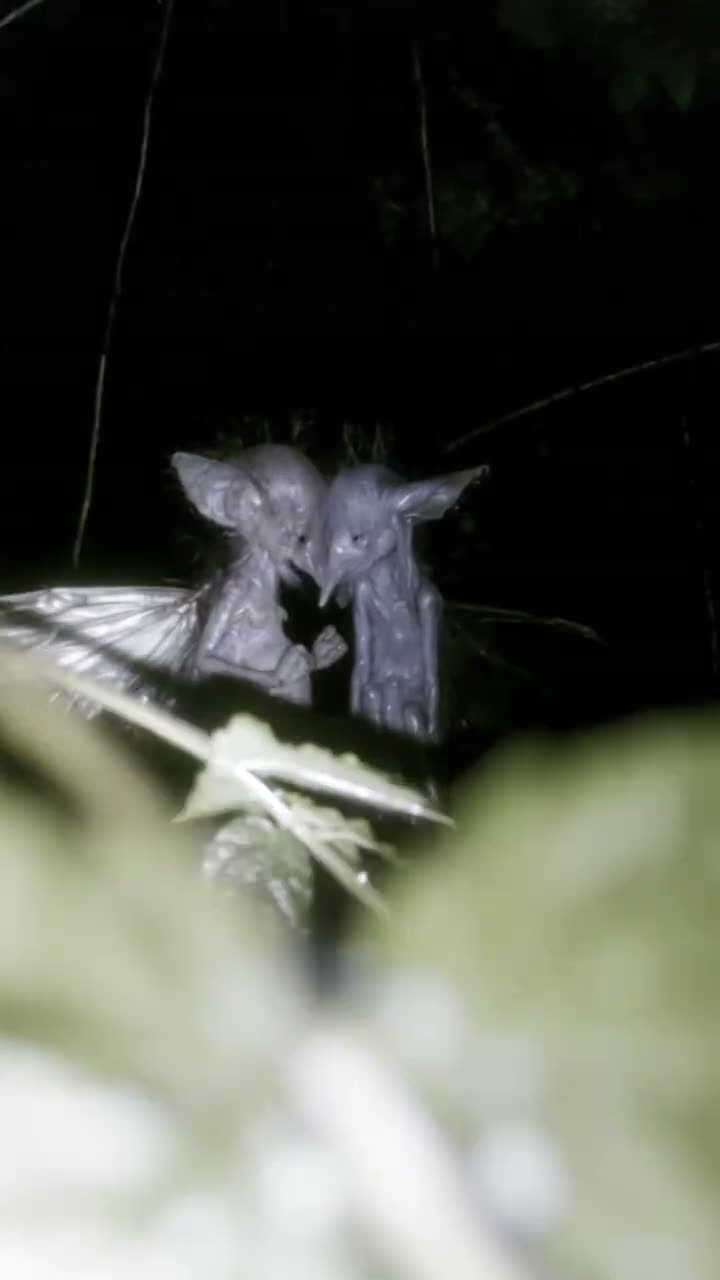
The Laughing Fairy Meme is a short woodland scene. One small winged figure peers from behind leaves, then two figures turn toward one another, lean in as if whispering, and draw apart laughing. The scene leaves the secret unexplained. The AI Trend Club version uses two separate photos, one for each figure, while keeping the woodland setting and the sequence of beats as its reference.
The linked TikTok by @fae.eyes was posted on October 6, 2026. When checked on November 14, 2026, it showed 9.5M views and 1.2M likes. Those numbers describe the reference post when it was checked, not a promise about a new video. This page does not name the figures. The configured recipe has not been checked against a generated sample, so the whispering sequence and character details may vary.
| Time | Beat |
|---|---|
| Shot 1 | A small winged figure peers out from behind leaves. |
| Shot 2 | Two figures turn toward each other in the woodland. |
| Shot 3 | They lean close as if whispering. |
| Shot 4 | They draw apart and laugh together. |
02How to make the Laughing Fairy Meme AI video from two photos
The trend page uses the linked TikTok as a visual reference and gives each figure a separate photo. You do not need to write a prompt on AI Trend Club. Choose two different portraits, assign one to each figure, and review the credit amount shown on the button before submitting. The page is configured for a nine-second vertical video.
- Open the fairy trend pageOpen the Laughing Fairy Meme page on AI Trend Club and press Create your own. Review the linked reference to see the woodland setting and the whisper-then-laugh sequence.
- Add the first figureChoose one consenting adult portrait or a photo of your own pet for the first figure. Keep this photo assigned to its role.
- Add the second figureChoose a different consenting adult portrait or a photo of your own pet for the second figure. The two roles use separate photos.
- Choose a resolution and check creditsThe standard 480p video uses 415 credits, and the 720p option uses 934 credits. The button shows the exact amount before you spend.
- Make and download the videoTap Make my video and allow a few minutes for the result. Download with the trend sound or choose the silent, vertical 9:16 version. The recipe follows the reviewed sequence, but the generated result may vary.
03The photos that work for the two fairy roles
Use two separate photos and keep one photo assigned to each fairy. Each role can use a consenting adult portrait or a photo of your own pet. The reference page describes the two figures as small winged characters in a woodland scene.
- Use one photo for the first figure and a different photo for the second.
- Each photo can show a consenting adult or your own dog or cat.
- Keep each photo assigned to its own role instead of using one photo for both figures.
- Use a photo only when you have permission to use it.
- If a pet’s markings change, the material suggests trying a clearer photo of your own pet.
- The recipe has not been checked against a generated sample, so results may vary.
04A Laughing Fairy Meme AI video prompt
On AI Trend Club, you do not need to write a prompt. The page already has a two-role recipe based on the linked clip. If you want to try the concept in another video model that accepts reference photos and a reference clip, use the prompt below as a starting point.
Use the vertical reference clip and two separate reference photos. The person in the first reference photo becomes one small winged figure, and the person in the second reference photo becomes the other. If a reference photo shows a pet, keep that pet as the figure for its role. Keep both identities distinct. In a dark woodland, let one figure peer from behind leaves, then frame both figures as they turn toward each other, lean close as if whispering, draw apart, and laugh together. Keep the camera steady and both figures visible during the paired action. Follow the reference rhythm. Do not add names, text, logos, or a watermark.05CapCut template or AI video?
A CapCut template can arrange clips you record or select yourself. It cannot place your face or your pet into the woodland scene from the original clip. The AI video setup uses the linked reference and maps two separate photos to the two winged figure roles. The setting and action come from the reference, while the photos determine who appears in each role. The setup is intended to preserve the scene where the figures lean together and then laugh, but it has not been checked against a generated sample.
After downloading, you can use CapCut to add subtitles or the trend sound. The page offers the video with its original sound or a silent download. If you post a remake, credit @fae.eyes as the creator of the reference and describe your result as an AI remake. That keeps the source and your new edit clear to viewers.
06Is the Laughing Fairy Meme AI video free?
Watching the linked post and viewing this tutorial are free. Creating a video uses credits. A new account receives 25 welcome credits, enough for a few images but not enough for this trend video. The standard 480p version uses 415 credits, and the 720p version uses 934 credits. The page shows the exact amount on the button before you spend. If a video fails, its credits come back automatically.
The lowest listed purchase that covers one standard video is the $6.99 Week pass, which includes 800 credits. The 1,000-credit pack costs $9.90. Check the button before you submit and confirm that the displayed credit amount matches the resolution you selected.
| Option | Price | Credits |
|---|---|---|
| Week pass | $6.99 | 800 |
| 1,000 credits | $9.90 | 1,000 |
07Post it with the original creator credited
The trend sound is included in the download, and a silent version is available too. If you share your remake, credit @fae.eyes and say that the clip is an AI version based on the linked reference. The scene is playful because the figures seem to share a secret, then laugh. You can keep your caption about that small moment without inventing a story about what they whispered.
- A woodland whisper that turns into a laugh.
- Two little fairies sharing a secret, then cracking up.
- The secret stays a secret. The giggles do not.
08Questions
- What is the Laughing Fairy Meme?
- It is a short woodland scene where two small winged figures lean together and then laugh.
- How do I make the Laughing Fairy video?
- Add two different photos, assign one to each figure, and use the linked clip as the reference.
- Which AI makes the Laughing Fairy Meme video?
- Use an AI video model guided by the original clip. AI Trend Club has a two-photo setup based on the linked reference.
- Can I use my pet?
- Yes. Each role can use a photo of your own pet or a consenting adult.
- Who posted the original?
- The linked TikTok reference is by @fae.eyes and was posted on October 6, 2026.