01What happens in the Mini Me trend
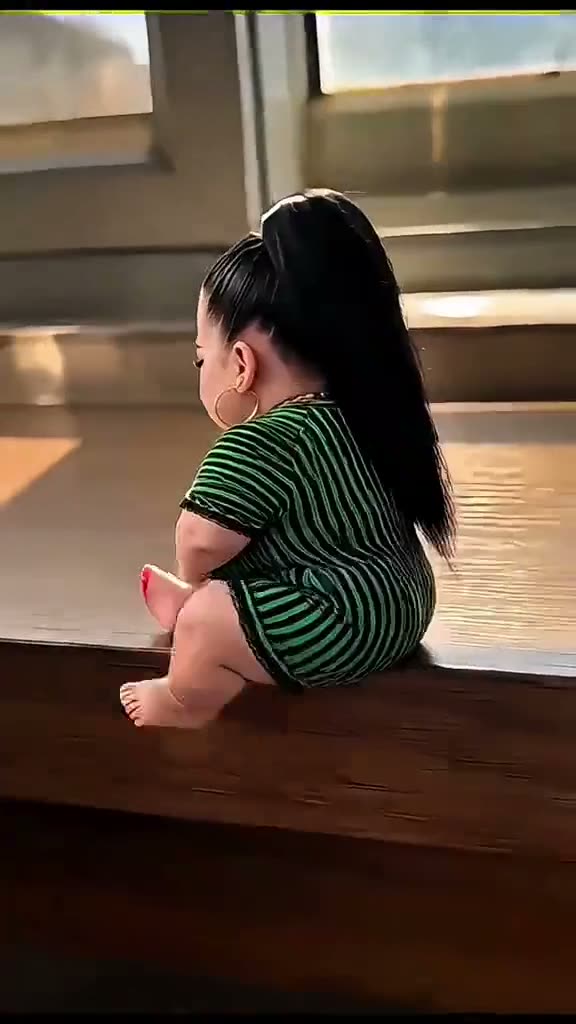
The Mini Me scene shows an adult as a tiny copy sitting on a wooden window ledge. A giant hand brings an ice cream cone into the scene, and the miniature adult takes it and eats it. The page uses an eight-second excerpt from the beginning of the original post, before the later examples and tutorial screen appear.
| Time | Beat |
|---|---|
| Shot one | A tiny adult copy sits on a wooden window ledge. |
| Shot two | A giant hand brings an ice cream cone into the scene. |
| Shot three | The tiny adult takes the cone and eats it. |
| Shot four | The selected excerpt ends on the ice-cream scene. |
02How to make the Mini Me AI video from one photo
The AI Trend Club page turns the original scene into a one-photo flow. It uses the source clip as a guide, so there is no prompt to write on the page. Add one adult photo and confirm that you have permission to use it. The page displays the credits for each quality before you spend.
- Open the trend pageGo to the Mini Me page on AI Trend Club and watch the selected source excerpt.
- Start your versionPress Create your own to open the trend flow.
- Add one adult photoChoose the adult identity for the tiny lead, then confirm permission to use the photo.
- Choose a quality480p uses 369 credits. 720p uses 830 credits. Review the button before spending.
- Make and downloadTap Make my video. When it is ready, download it with the original sound or as a silent clip.
03The photo that works
This trend uses one adult photo. It puts the person in that photo into the miniature adult role while the window ledge, hand, cone, and action stay from the source. The photo should be of a person you have permission to use. The site accepts the image in a browser, and there is no extra prompt field to fill in.
- Use one adult photo for the tiny adult role.
- Choose the person whose identity should appear in the scene.
- Keep the giant hand and ice cream cone in the action.
- Use the selected first eight seconds, before the later examples or tutorial interface.
- The page links to the full original post while its excerpt keeps this one scene.
04The Mini Me prompt
You do not have to write a prompt on AI Trend Club. If you want to recreate the idea in a different video model that accepts a reference image, start with this scene description and adjust it for that model.
The person in the reference photo replaces the tiny adult copy sitting on the wooden window ledge. Keep the same adult identity and adult proportions while making the person miniature in scale. A giant hand brings an ice cream cone into view, and the tiny adult receives the cone and eats it. Keep the ledge, hand, cone, vertical camera framing, and source action. Follow the opening scene only; do not switch to later examples or show a tutorial interface.05CapCut template or AI video?
A CapCut template is for arranging your own recorded clips. It cannot put your photo into the original ice-cream scene. The AI video starts from the original clip and uses one adult photo for the miniature lead, while the ledge, giant hand, cone, and action remain part of the source scene. That is the useful distinction when you are looking for a Mini Me trend template or an AI remake.
Once the video is ready, download it with its original sound or choose the silent version. You can add captions or the trend sound in CapCut after download. The AI Trend Club flow runs in a browser, so you can open the page on a phone and do not need to install an app. The page also links to the original post, while the version used for the trend ends before its later tutorial screen.
- CapCut template: arranges video clips you record.
- AI video: puts your photo into the original scene as the tiny adult.
- Use CapCut after download for captions or sound.
06Is the Mini Me AI video free?
Viewing the original and the trend page does not cost anything. A new account gets 25 welcome credits, which are enough for a few images but not enough to make this trend video. The video uses 369 credits at 480p or 830 credits at 720p. If a video fails, its credits come back automatically. The page shows the number of credits before you spend.
The lowest-cost entry is the Week pass at $6.99 per week for 800 credits, which covers the 480p video. For the listed 720p option, the 1,000-credit pack is $9.90. Check the quality and credit count shown on the button before you start.
| Option | Price | Credits |
|---|---|---|
| Week pass | $6.99 per week | 800 credits |
| 1,000 credits | $9.90 | 1,000 credits |
07Post it
The source excerpt includes the original sound. Download it with sound or select the silent version and add the trend sound in TikTok or CapCut. Credit the original creator in your post: @user3577540320181 posted the TikTok on Oct 26, 2026. The trend page links to the complete source post.
- A little version of me, sharing the cone.
- Same person, tiny spot on the ledge.
- The giant hand brought the treat.
08Questions
- Which AI makes the Mini Me video?
- It uses an AI video model guided by the original clip. The AI Trend Club page handles the flow without a prompt field.
- Can I make it on my phone?
- Yes. AI Trend Club runs in a browser, so there is no app to install.
- Can I view the original for free?
- Yes. The source post and trend page can be viewed without paying. Making the video uses credits.
- Who made the original?
- @user3577540320181 posted the TikTok on Oct 26, 2026. The trend page links to the original post.