01What happens in the Dancing Crocodiles trend
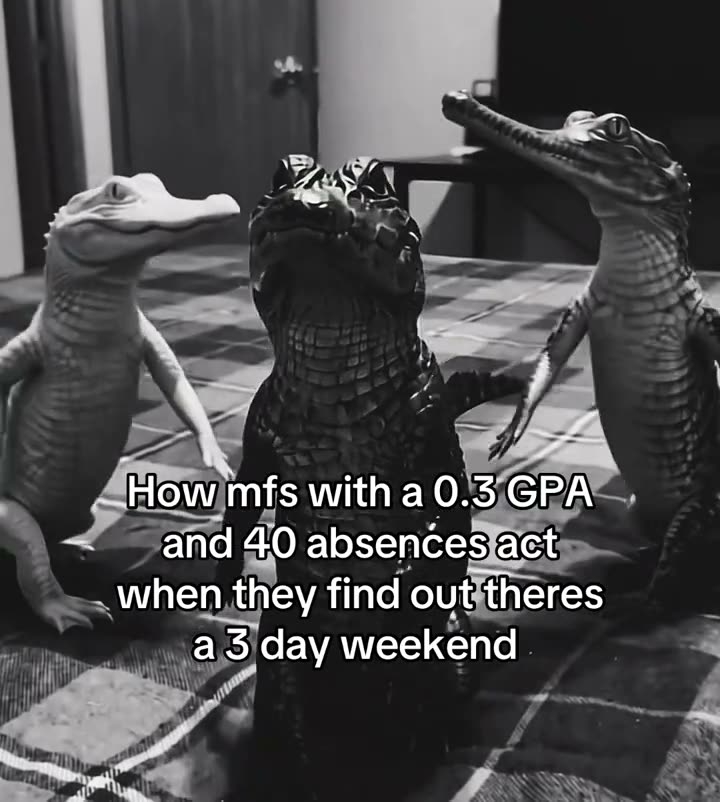
Three crocodiles move together in a black-and-white indoor room. The largest one holds the center while two smaller crocodiles move at its sides. The remake uses one photo to put you or your pet in the center role, while the other crocodiles, room, movement, and framing stay with the original scene. The selected clip runs for eight seconds and includes the original sound.
| Time | Beat |
|---|---|
| Shot one | Three crocodiles face the camera in the black-and-white indoor room. |
| Shot two | The large center crocodile holds the foreground while the two side crocodiles move beside it. |
| Shot three | All three keep dancing as the room and camera framing stay the same. |
02How to make the Dancing Crocodiles AI video from one photo
The AI Trend Club page keeps the steps in one browser flow. It uses the original clip as the scene guide, so there is no prompt field to fill in. Before making the video, confirm that you have permission to use the photo you add. The page offers both standard and HD output, and it shows the credit amount before you spend.
- Open the trend pageGo to the Dancing Crocodiles page on AI Trend Club and watch the linked source clip.
- Start your versionPress Create your own to open the page flow for this trend.
- Add one photoUpload a photo of yourself or your pet, then confirm that you have permission to use it.
- Choose a quality480p uses 369 credits. 720p uses 830 credits. Check the button before you spend.
- Make and downloadTap Make my video. When it is ready, download it with the original sound or as a silent clip.
03The photo that works
Choose one photo of the person or pet you want in the center. The trend page is built around one lead image, and the large center crocodile is the role that changes. The photo should belong to someone who has given permission for its use. The two crocodiles on the sides remain part of the original scene.
- Use one adult or pet photo for the center crocodile.
- Keep the photo choice to a single lead identity.
- The center crocodile is the one that changes; both side crocodiles stay.
- Keep the black-and-white room and original camera framing.
- The trend page uses the eight-second source clip with its original sound.
04The Dancing Crocodiles prompt
AI Trend Club fills in the scene for you, so you do not need to write a prompt on the site. If you want to try the idea in a separate video model that accepts a reference image, this prompt is a starting point.
The person in the reference photo replaces the large crocodile in the center of the source scene. Keep the same recognizable identity, or the same pet identity if the reference is a pet photo, at the center position. Leave the two crocodiles on either side in their original positions. Follow the same dance movements in the black-and-white indoor room and keep the original camera framing. Preserve the source overlay if it appears in the chosen frame. Add no extra lead or new scene.05CapCut template or AI video?
A CapCut template arranges clips that you film yourself. It does not put your photo into the original crocodile scene. The AI video uses your one photo to take the center crocodile’s place while the side figures, room, and movement stay from the source clip. That is the main difference when you search for an alligator dancing AI video: one approach edits your own footage, while the other follows the existing scene.
After the video is ready, you can download it with the trend sound or without sound. If you choose the silent download, add the original sound when you post in TikTok or CapCut. You can still use CapCut to add captions or make a final edit after downloading. AI Trend Club runs in a browser, so there is no app to install.
- CapCut template: combines clips you record.
- AI video: uses one photo and the original scene to change the lead.
- A silent download can be finished with the trend sound in TikTok or CapCut.
06Is the Dancing Crocodiles AI video free?
You can view the original clip and the trend page without paying. A new account gets 25 welcome credits, enough for a few images but not enough for this video. Making the video uses 369 credits at 480p or 830 credits at 720p. A failed video returns its credits automatically. The credit amount appears on the button before you spend.
For the lowest-cost entry, the Week pass gives 800 credits for $6.99 per week. That covers the standard 480p version. The 1,000-credit pack costs $9.90 and gives enough credits for the listed 720p option. These are paid options, so check the exact quality and credits on the page before you make a choice.
| Option | Price | Credits |
|---|---|---|
| Week pass | $6.99 per week | 800 credits |
| 1,000 credits | $9.90 | 1,000 credits |
07Post it
The original sound is included with the source clip. Download with sound, or choose the silent version and add the trend sound in TikTok or CapCut. Credit the creator in your caption: the original is by @migueury_5 on TikTok, posted Oct 28, 2026. The linked original post appears on the trend page.
- Three crocodiles, one center spot.
- My pet took the lead in the room.
- The center role is mine this time.
08Questions
- Which AI makes the Dancing Crocodiles video?
- The video uses an AI video model guided by the original clip. AI Trend Club handles the scene flow, so there is no prompt to write on the site.
- Can I use a pet photo?
- Yes. The trend page accepts one photo of yourself or your pet for the center crocodile role.
- How much does the standard video cost in credits?
- The 480p version uses 369 credits. The 720p version uses 830 credits. The page shows the amount before you spend.
- Who made the original?
- @migueury_5 posted the original on TikTok on Oct 28, 2026. The trend page links to the post.