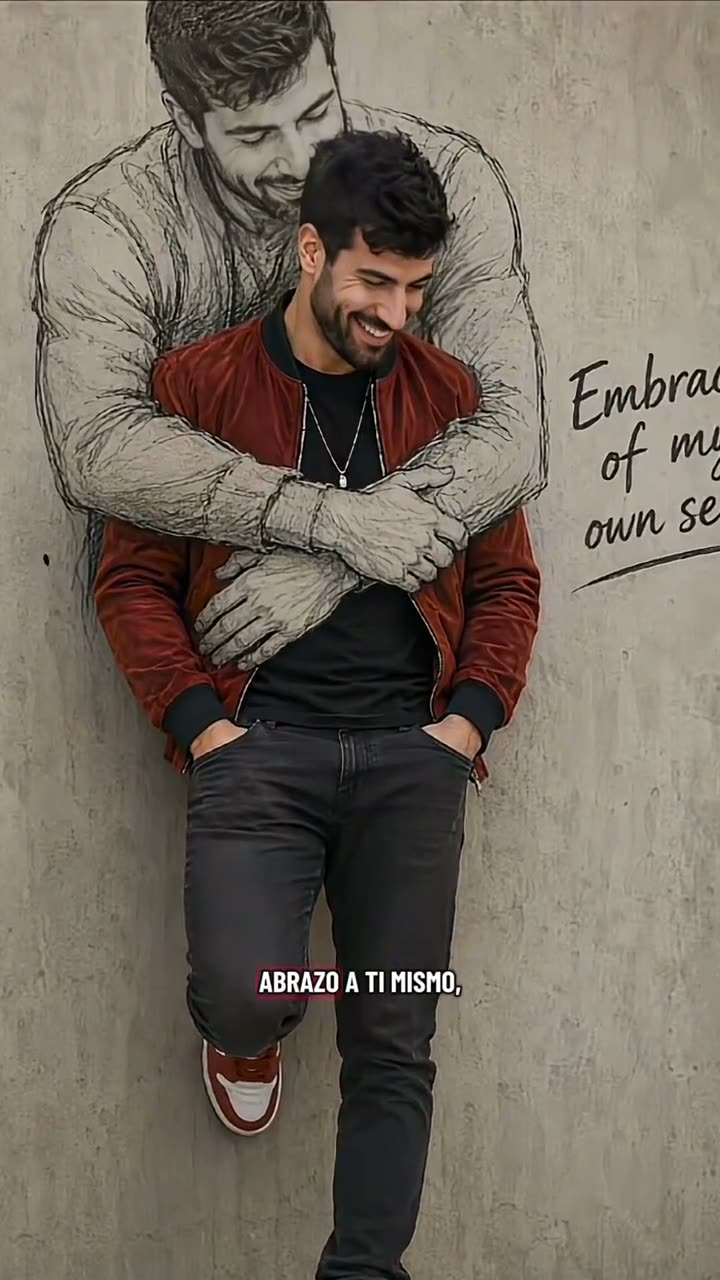
01What the Self Hug Sketch AI photo shows
The linked TikTok clip by @isolde3292 shows an adult standing in front of a much larger pencil drawing of the same person. The sketch’s arms wrap around the real figure, turning a portrait into a visual self-embrace.
The trend page follows that idea with one photo and the existing image editor. It creates a still image, not an animated video. The reference clip is credited on the page, while the editable prompt asks for a new interpretation rather than a copy of the creator’s finished artwork.
The post had 1.4M views and 28K likes when checked on Nov 16, 2026. Those counts describe the linked post at that time. The wider format’s first creator has not been verified, so the guide credits the selected reference without claiming it originated the idea.
02Choose one portrait of the person
Use one clear portrait that you own or have permission to edit. The uploaded person is also the person represented by the pencil drawing. This page does not ask for a current photo plus a childhood photo.
Keep the idea simple: one real adult and one illustrated version of that same adult. The larger figure should read as a sketch on a wall, with its arms forming the embrace. The page’s prompt says this is not a younger version of the person.
- Use one clear portrait.
- Keep the adult and sketch as the same person.
- Use a photo you have permission to edit.
- Make the larger figure read as a pencil drawing.
- Do not treat this as a two-age photo edit.
03Review the included sketch prompt
The trend page fills in the scene description for you. It asks the editor to keep the same adult recognizable and place a large graphite drawing behind them. The drawn figure’s arms make a gentle hug around the person in front.
The page prompt explicitly separates the illustration from a second real person or a younger version of the subject. It uses a simple studio wall and soft light, and asks for no extra people, words, brands, logos or watermarks. You can read the wording before you submit.
Edit the uploaded portrait into one still, warm self-acceptance image. Keep the same adult recognizable. Show them gently embracing an oversized graphite drawing of themselves on a wall, with the drawn figure’s arms forming a soft hug around the real person. Make the large figure clearly a pencil sketch, not a second real person or a younger version of the subject. Use a simple studio wall, natural proportions and soft light. Preserve the person’s identity and avoid extra people, words, brands, logos or watermarks.04Create the still image
Open the Self Hug Sketch page and use its button to carry the prompt into the image editor. Add one permitted portrait. Read the prompt and confirm that the same adult appears in both the real and drawn roles.
The editor shows the current credit price before you submit. One image edit uses 5 credits. Confirm the price in the editor, then submit the image request when the portrait and wording are ready.
- Open the pageUse the trend page button to open the existing image editor.
- Add one portraitChoose a permitted portrait and read the included prompt.
- Create and inspectCheck the displayed price, submit, then review the face and sketch before saving.
05Fix common sketch and identity issues
If the portrait is hard to recognize, choose one clear portrait of the person who should appear in the edit. The prompt asks the editor to preserve the same adult. Review the face and the illustration before sharing the result.
If the image looks like a two-age hug, return to the single-photo idea. The drawn figure is a sketch of the same adult, not a separate childhood photo or a second uploaded person. The page’s instructions keep the scene to one person and an illustration.
If the sketch looks too realistic, make the pencil-drawing description more prominent and keep it on the wall behind the real person. If the arms do not read as an embrace, repeat that relationship in the prompt. Treat the output as a new interpretation, not as a guaranteed match to the reference.
| What you see | What to adjust |
|---|---|
| The face is hard to recognize | Use one clear portrait of the intended adult. |
| The image looks like a two-age hug | Keep one adult and a drawn version of that same person. |
| The sketch looks like another real person | Emphasize the pencil drawing on the wall. |
06Keep the reference credit when sharing
The linked TikTok reference is by @isolde3292. Credit the creator and link to the post when you discuss the source idea. The post’s counts were checked on Nov 16, 2026; they are a dated snapshot, not a forecast for your image.
Describe your result as an AI-edited still image. The concept is a person embracing a drawn version of themselves. Do not describe it as a real event or as the creator’s original artwork. The page links to the creator’s post so viewers can distinguish the reference from your result.
07A final check before posting
Confirm that the image uses one portrait and shows the same adult in the real and sketched roles. Make sure the large figure is visibly drawn and that the arms communicate a self-embrace.
The page is separate from Hug Your Younger Self, which asks for two photos from different ages. Self Hug Sketch uses one adult portrait and an illustrated version of that person. Keep those ideas distinct when you name or explain the image.
When the result is ready, describe it as a still AI edit. Credit the linked TikTok reference if you discuss its source, and review the image before sharing. The included prompt can be changed, but the core one-person-and-sketch relationship should stay clear.
08Questions
- What is the Self Hug Sketch AI photo?
- It is a still image showing an adult beside a large pencil sketch of the same person in a drawn embrace.
- Do I need two photos?
- No. This page uses one portrait and creates an illustrated version of the same adult.
- Is this the Hug Your Younger Self trend?
- No. Hug Your Younger Self uses two photos from different ages; this page uses one portrait and a sketch.
- How much does one image edit cost?
- The image editor shows the current price before submission. One image edit uses 5 credits.
- Who posted the linked example?
- The selected TikTok post is by @isolde3292. The page links to the reference.