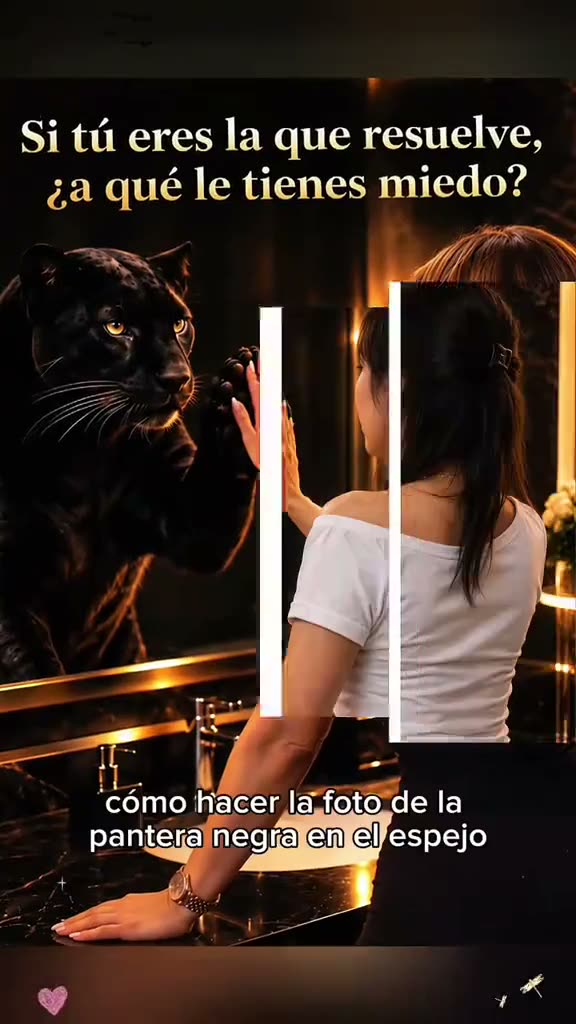
01What the Mirror Panther photo shows
The Mirror Panther format pairs a portrait with a dramatic reflection. A person stands at a dark mirror, raises an open palm, and sees a black panther on the other side of the glass. The two paws appear to meet at the mirror surface. The image feels cinematic because the room is dim and the panther's coat catches warm light, while the person's pose stays simple.
The linked tutorial by @fflora77 shows this still-photo idea and how the creator demonstrates it. The post was published on Oct 20, 2026. It showed 422,000 views and 4,568 likes when checked on Nov 16, 2026. Those are a dated snapshot of one post, not a forecast for another creator's result. The linked post is an example; we have not verified who first made the format.
This page opens the existing image editor. It creates one still image from a portrait and an edit prompt. It does not make a moving video, and no real panther is present. The panther belongs only in the fictional reflection, so the final image should be shared as an edited scene rather than a real animal encounter.
02Choose a portrait with room to pose
Start with one adult portrait that you own or have permission to edit. The face, hair and skin tone should be easy to see. A waist-up or full-body view gives the editor more information about posture and leaves room for the mirror, the raised hand and the reflected animal. A simple wall or uncluttered room helps the new setting read clearly.
The person in the reference is turned toward a mirror, with one hand lifted. A photo with a visible shoulder and a relaxed arm gives the prompt useful visual information. A front-facing headshot can still work, but the editor may need to invent more of the room and body pose. Avoid a group photo because the prompt is designed around one person and one reflection.
Use a clear image in even light. Very dark selfies, heavy filters, sunglasses and hair covering the face leave the image editor less to preserve. Check the photo background for private details such as an address, a school name or a family member who did not agree to appear. Only upload an image you are allowed to use.
- One adult portrait with the face and hair visible
- Enough space to show the person's shoulders and raised hand
- Even lighting and a background without private details
- Permission to edit the photo
03Review the mirror prompt
The trend page includes a prompt that asks for one cinematic still image. It keeps the uploaded person human and recognizable, then places an ordinary black panther only in the mirror. It also describes warm room lighting, a flat reflective surface and the hand-to-paw pose. The prompt leaves out lettering, costumes and logos so the image stays focused on the reflection.
Read the prompt before creating. Make sure the person remains outside the mirror, the animal remains inside it and the scene is described as a photo edit. If your input image shows a seated person or a different arm position, you can adjust the prompt to match what is visible. Do not add details that are absent from your photo if you want the result to preserve your own pose.
A prompt is a guide, not a guarantee. Image models can move the hand, alter the person's clothing or make the mirror look like an open doorway. The included wording keeps the request narrow, but you should inspect the finished image rather than assume every detail will match the example.
Edit the uploaded portrait into one still, cinematic mirror photo. Keep the same adult person recognizable, with the same face, hair, skin tone, and natural body shape. Show the person standing at a large dark mirror in a warmly lit, elegant room, seen from behind with their face turned gently toward the camera. In the mirror, show a realistic black panther as the person's reflection, standing close to the glass and touching the person's open palm with one paw. Keep the human outside the mirror fully human and unchanged; only the reflection is the animal. Use accurate mirror geometry, realistic black fur and soft amber light. Keep the scene calm and photorealistic. Do not add text, captions, costumes, symbols, brands, extra people, extra animals, or a watermark.04Create the still image
Open the image editor from the trend page so the prompt is already filled in. Add your portrait, confirm you have permission to edit it and read the wording once more. The editor shows the current credit price before you submit. One image edit uses 5 credits. Nothing is charged until you send the image request.
If you want to change the room, the mirror lighting or the person's pose, edit the prompt before submitting. Keep the main relationship clear: one human outside the mirror, one animal reflection inside it, and the palm and paw meeting at the glass. Adding several extra subjects or lines of text can make the result harder to read.
When the image is ready, check the face, body shape, hand, paw and mirror edge. Confirm that the panther appears only in the reflection. Save the result only if it looks acceptable to you. The editor may change small facial or clothing details, so review the output before sharing it.
- Open the image editorUse the button on the trend page to carry over the included prompt.
- Add and reviewUpload one permitted portrait, read the prompt and confirm the shown price.
- Create and inspectSubmit the edit, then check the face, mirror and paw placement before saving.
05Fix common mirror and pose problems
If the panther appears beside the person instead of in the reflection, simplify the prompt and repeat that the animal exists only inside the mirror. Use a portrait with a clear mirror-facing pose and avoid adding a second scene. Inspect the reflection boundary so it reads as glass, not a doorway or a portal.
If the palm and paw miss each other, choose an input with one hand raised and open. You can describe the hand and paw as touching opposite sides of a flat mirror. Keep that single action prominent instead of adding more props. The model may still adjust the exact contact point, so check the result before sharing it.
If the person no longer looks like the uploaded portrait, use a sharper image with the face and hair visible. Ask the editor to preserve the same adult face, hair, skin tone and natural body shape. The model can still alter details, and you should not promise someone an exact likeness from one edit.
If the room becomes too dark, ask for soft warm lighting on both the person and the reflection. If the mirror geometry looks confusing, keep the mirror flat and rectangular, remove extra reflections and ask for one animal reflection only. Make one prompt change at a time so you can tell which instruction helped.
| What you see | What to adjust |
|---|---|
| The animal is outside the mirror | Repeat that the panther belongs only in the reflection. |
| The paw and hand do not meet | Use a portrait with one open hand raised toward the mirror. |
| The room is too dark | Ask for warm, even light that keeps the face visible. |
| The reflection looks like a doorway | Describe one flat mirror and remove extra reflected surfaces. |
06Share the image with context
The Mirror Panther image is a fictional AI edit. If you post it, say that the panther was created in the reflection and that no animal was physically present. Do not present it as documentary evidence of a real meeting. The linked example belongs to its creator; credit @fflora77 when you discuss the reference post.
Use only a portrait you own or have permission to edit. If the image includes another person, ask before uploading or sharing it. Remove private information from the background, and review the finished image for unexpected people, text, marks or details that were not in your input.
The original post's view and like totals were checked on Nov 16, 2026. They describe that one post at that time. They do not show how many people will try your image or whether another post will receive similar attention. Keep the credit and the date attached when you quote those figures.
- Describe the panther scene as an AI-edited still image
- Credit the linked example when discussing it
- Use a portrait you have permission to edit
- Check the result for private details before sharing
07Questions about the Mirror Panther photo
The quickest route is to start on the trend page, where the edit prompt is included. You still choose the portrait and can read or change the wording before submitting. The image editor shows the current price before you send the request. Check the result carefully because a still-image model can vary the mirror, hand, face and animal details.
08Questions
- Is the Mirror Panther trend a video?
- The linked reference is a tutorial clip, but this page creates one still image with the existing image editor.
- What photo should I upload?
- Use one adult portrait with the face visible and space around the shoulders and raised hand.
- Will a real panther be in the room?
- No. The prompt puts a fictional panther only in the mirror reflection.
- What does one edit cost?
- The image editor currently uses 5 credits for one still image and displays the price before submission.
- Who made the linked example?
- The linked TikTok tutorial is by @fflora77. The first creator of the format has not been verified.