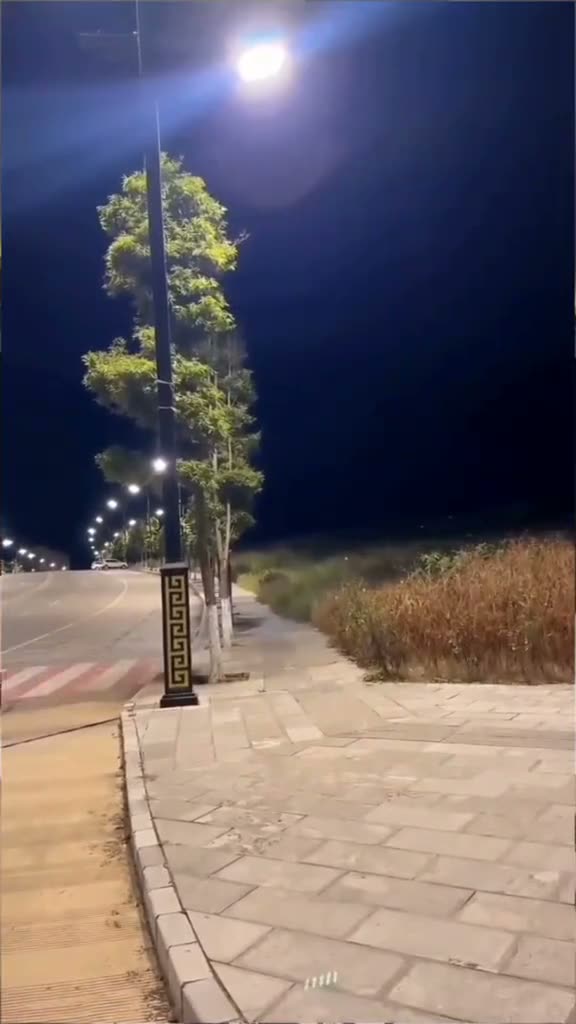
01What happens in the Street Light Slide trend
The Street Light Slide is a short night-time transition. A figure appears far down a paved path beneath a bright streetlight, then slides into a close-up. The version on this page uses a six-second effect segment from the original thirty-two-second TikTok demo and leaves out its tutorial interface.
The camera stays in one vertical night scene while the person moves toward the lens. Your photo takes the person’s place. The original sound is included on the trend page.
| Time | Beat |
|---|---|
| Shot 1 | A fixed night view shows a paved path, trees and a bright streetlight. |
| Shot 2 | A small figure appears on the path and begins to move toward the camera. |
| Shot 3 | The person slides into the foreground beneath the lamp. |
| Shot 4 | The close-up fills the frame while the night setting remains behind them. |
02How to make the Street Light Slide AI video from one photo
You can make the effect without writing a prompt on AI Trend Club. The original clip guides the motion and the uploaded photo supplies the lead. The step-by-step flow is the same on a phone or computer because the tool runs in your browser.
- Open the trend pageGo to the Street Light Slide page and press Create your own.
- Add one photoUpload one selfie with your face visible. This version uses one person photo.
- Confirm photo permissionUse a photo that you own or have permission to use. The generated video stays private to your account.
- Choose a resolutionAt 480p, the video costs 277 credits. At 720p, it costs 623 credits. The button shows the exact amount before you spend.
- Make and downloadTap Make my video and wait a few minutes. Download the result with the trend sound or silent. The original sound is also available on the page.
03The photo that works
This effect has one person in the lead. Use one clear selfie so the video can keep the same identity from the distant figure to the final close-up. You do not need a second photo for this trend.
- Use one photo of a person, not a pet.
- Keep the person’s face visible in the image.
- Choose a photo you own or have permission to use.
- Upload one image for the lead role.
- Check the selected image before submitting it.
04The Street Light Slide AI prompt
AI Trend Club does not ask you to write a prompt. If you want to test the idea in another video model that accepts a reference clip, begin with this description of the streetlight slide.
Create a vertical night shot based on the reference clip. Keep the paved walkway, bright streetlight, trees and fixed camera. Start with the person in the reference photo small and far down the path, then have them slide quickly toward the lens and arrive in a close-up beneath the lamp. Let their hair and clothes move with the slide, then hold the final look. Preserve the same night setting and motion timing. Leave out the tutorial interface and add no titles, text, logos or extra people.05CapCut template or AI video?
A CapCut template can assemble footage you record yourself, but it cannot put your photo into the night scene from the original post. An AI video uses a reference clip to guide the setting and motion, then places your photo in the lead role. That is why the result follows the slide into a close-up instead of simply cutting between your own clips.
After downloading, you can use CapCut to add captions or choose a sound for your post. The AI Trend Club creation flow stays in your browser, so you do not need to install a separate app to make the video.
06Is the Street Light Slide AI video free?
Watching the original and viewing the trend page are free. Generating a video uses credits. A new account gets 25 welcome credits, enough for a few images but not enough for this video. If a video fails, its credits come back automatically.
The Week pass costs $6.99 and provides 800 credits. That covers either this trend’s 480p version, at 277 credits, or its 720p version, at 623 credits. A 1,000-credit pack costs $9.90. Confirm the number on the button before submitting, since it is the exact amount you will spend.
| Option | Price | Credits |
|---|---|---|
| Week pass | $6.99 | 800 |
| 1,000 credits | $9.90 | 1,000 |
07Post it
The original clip and the page version include the original sound. If you post your own version, use the trend sound available in the social app and credit the creator, @dreamina_tao. The original TikTok is linked above. Keep the post focused on the night slide and the close-up.
Caption ideas: “From the end of the path to a close-up.” “A streetlight slide made from one photo.” “My photo took the lead under the lamp.”
08Questions
- What is the Street Light Slide effect?
- It is a short AI video transition in which a person slides from a distant point on a night path into a close-up beneath a streetlight.
- How do I make the Street Light Slide video?
- Open the trend page, press Create your own, add one photo, choose a resolution and tap Make my video. There is no prompt to write.
- How many credits does it use?
- The video costs 277 credits at 480p or 623 credits at 720p. The button shows the exact amount before you spend.
- Who posted the original demo?
- TikTok creator @dreamina_tao posted it on Oct 22, 2026. We link to the original above.
- Can I use a pet photo?
- This version is set up for one person photo. Use one clear selfie.