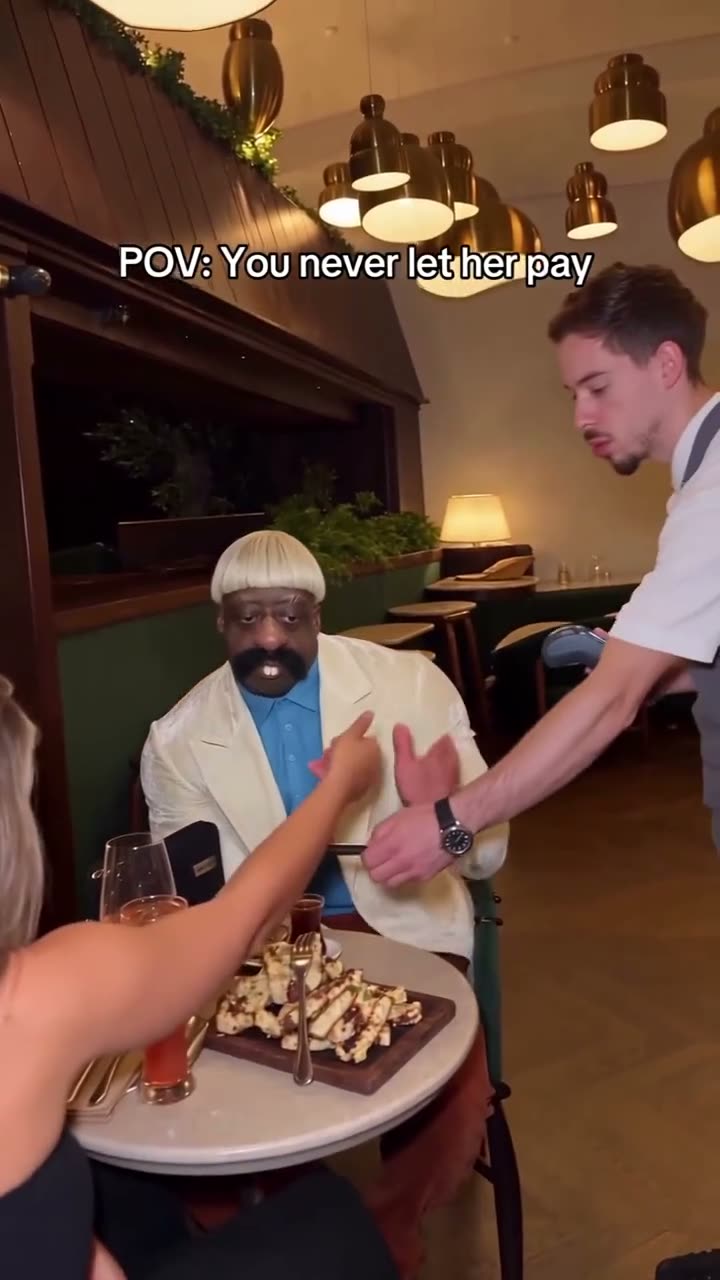
01What happens in the You Never Let Her Pay trend
The You Never Let Her Pay video is a short dinner-table comedy. One diner reaches for the bill, opens a wallet and finds a sponge inside. The joke then moves from the table into a kitchen. The sponge is the visual surprise, and the quick change of setting gives the clip its ending.
This page uses a 12-second vertical cut of the original. One photo supplies the lead role; the other diner and server stay part of the reference scene. The page links the source creator and shows the clip before the creation steps, so you can check which version the guide follows.
| Time | Beat |
|---|---|
| Shot 1 | A diner reaches for the bill at the table. |
| Shot 2 | An open wallet reveals a sponge. |
| Shot 3 | The server joins the joke. |
| Shot 4 | The scene moves into the kitchen. |
02How to make the You Never Let Her Pay AI video from one photo
The creation flow starts from the trend page and carries the linked video into the editor. There is no prompt field to fill in. Use one photo for the lead, confirm your right to edit it, and check the selected resolution price before the render begins.
- Open the trend pageWatch the original and check the creator credit, @boby.biggsjohnson. The source link is above the first creation button.
- Press Create your ownThe editor opens with the dinner scene selected. This trend uses one photo for the lead role.
- Add your photoUse one clear portrait of yourself. The task also supports a photo of your own pet for a pet version. Confirm you have permission to use the image.
- Choose a resolutionThe 480p version costs 553 credits. The 720p version costs 1,245 credits. Read the amount on the button before you spend.
- Make and download the videoTap Make my video. The site says a video is ready in a few minutes. Download the version with the trend sound or choose a silent file.
03The photo that works
Use one photo for the lead. The original includes other people, so the edit changes the diner role while the other characters and the restaurant stay in the scene. A pet photo is supported for the pet version, but the linked source itself shows people. Use an image you own or have permission to edit.
- Choose one portrait for the lead.
- Use yourself or your own pet for the pet version.
- Keep the photo clear enough to recognize the subject.
- Do not upload a group photo for this one-person role.
- Review the edit before sharing it.
04The You Never Let Her Pay AI prompt
The editor on AI Trend Club uses the linked clip to guide the action, so you do not need to type a prompt. If you are experimenting with a separate video model that accepts a reference photo and clip, the prompt below can describe the human lead version.
Recreate the vertical restaurant comedy from the reference clip. The person in the reference photo plays the diner who reaches for the bill and opens a wallet with a sponge inside. Keep the other diner and the server as separate people. Follow the same cut from the table into the kitchen, with the same framing and timing. Keep the wallet and sponge visible during the reveal. Preserve the restaurant setting and the original light, and add no extra people, text, logos or new ending.05A template edit or an AI video?
A preset template usually places your own recorded clips into prepared sections. It cannot put your portrait into the same filmed dinner scene by itself. The AI video workflow uses one photo as the lead identity and the linked clip as the scene reference. The other diner and the server remain part of the short comedy.
You do not need to film a dinner, buy a prop wallet or record a kitchen ending. The page already links the original so you can see the sponge reveal and sequence before you start. The generated edit is silent while it is made; the trend sound can be selected when you download it.
- A template arranges footage you recorded.
- This AI video places one photo into the reference scene.
- The original sound is available as a download choice.
06Is the You Never Let Her Pay AI video free?
A new account receives 25 welcome credits, which is not enough for this video. The 480p edit uses 553 credits and the 720p edit uses 1,245 credits. The button shows the amount before submission. If a video fails, its credits return automatically.
The Week pass is $6.99 for 800 credits and covers one 480p run. The 1,000-credit pack costs $9.90 and also covers the standard version. The pack does not cover the 720p price on its own. Check the other plans if you want enough credits for that resolution.
| Option | Price | Credits |
|---|---|---|
| Week pass | $6.99 | 800 |
| 1,000 credits | $9.90 | 1,000 |
07Post your You Never Let Her Pay video
Use the trend sound if you want the edit to match the source. Credit @boby.biggsjohnson and link the original post. Make it clear that your clip is an AI version of the sponge-wallet joke. Caption ideas can stay short and focus on the awkward bill moment or the surprise in the wallet.
- The bill was not the surprise.
- Wallet check: sponge edition.
- Dinner ended in the kitchen.
08Questions
- What is the You Never Let Her Pay trend?
- It is a dinner-table comedy where an empty wallet reveals a sponge and the action moves into a kitchen.
- Can I make the video from one photo?
- Yes. Add one photo for the lead role and check the credit price for your chosen resolution.
- Can my pet be the lead?
- Yes. This task supports one photo of your own pet for the lead role.
- Which AI makes this video?
- It uses an AI video model guided by the original clip.
- Who made the original?
- @boby.biggsjohnson posted the linked TikTok on Nov 10, 2026. We link to it above.