01What happens in the La Mujer del Pelotero trend
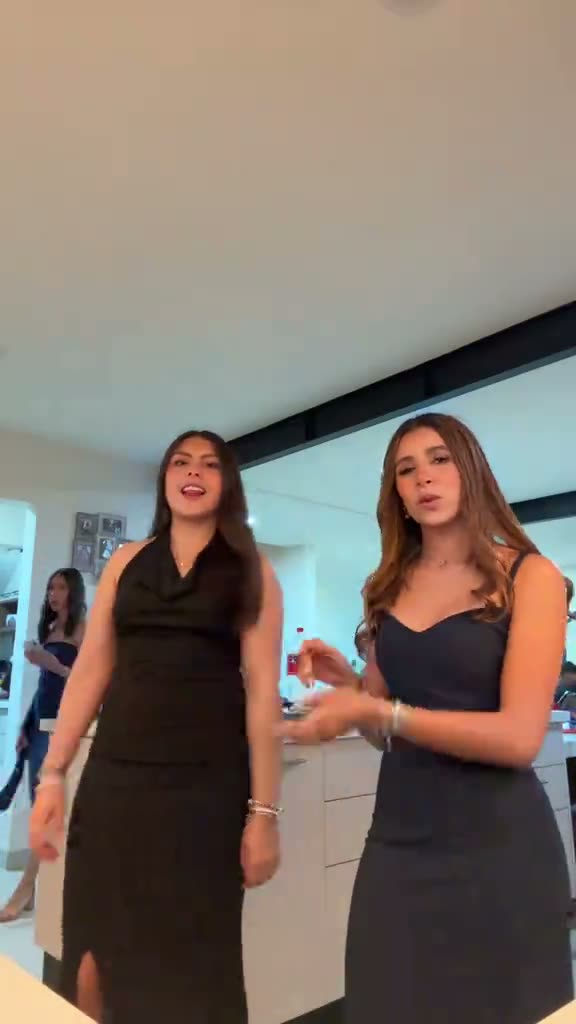
La Mujer del Pelotero is a paired dance set in a bright kitchen. Two dancers stand next to each other and move their arms and hands together. The trend page links to the selected TikTok reference by @valeguerrero.m, where you can watch the original clip and see the two roles.
The idea is a small cast with one shared setting. Each person gets a separate role, so a pair can appear in the same routine without combining their photos. The reference page describes the clip as a 12-second vertical video and says the original sound is included.
The view and like figures on the trend page are a dated snapshot of that linked post. They describe what the reference had when checked, not how another post will perform. The selected post is useful as an example of the dance, but it does not prove who first created the wider format.
| Time | Beat |
|---|---|
| Shot 1 | Two dancers stand side by side in a bright kitchen. |
| Shot 2 | They move their arms and hands together through the routine. |
| Shot 3 | The pair keep dancing in place as the short clip ends. |
02How to make the La Mujer del Pelotero AI video from two photos
The page uses the existing trend video workflow. It does not ask you to write a prompt. Add a portrait for each dancer, check the role labels, then choose the output quality shown on the creation button.
- Open the trend pageGo to the La Mujer del Pelotero page and press Create your own. The original clip and its creator credit appear there.
- Add two portraitsUse one adult portrait for the left dancer and a different adult portrait for the right dancer. Confirm you have permission to use both photos.
- Check the rolesMatch each photo to the dancer you want it to replace. Keep the two people in separate roles.
- Choose video qualityOne 480p video uses 553 credits. One 720p video uses 1,245 credits. Check the button before spending.
- Make and downloadStart the video, then download it with the trend sound or silent. The site says a render takes a few minutes; queue times can vary.
03The photos that work
The result depends on the two role photos you choose. Keep the pairing simple: one adult for each dancer. The page uses the same left and right roles shown in the reference, and each photo should belong only to its assigned person.
- Use two separate adult portraits, one for each dancer.
- Choose photos you have permission to use.
- Use a different photo for the left and right roles.
- Check the role labels before you start the video.
- Ask the other person before using their portrait.
04The La Mujer del Pelotero AI prompt
AI Trend Club fills in the video instructions, so there is no prompt to write on the trend page. You can use the description below as a starting point in another video model that accepts a reference clip and two reference photos.
Recreate the short paired dance from the reference video. Keep the person in the first reference photo in the left dancer role and the person in the second reference photo in the right dancer role. Preserve each adult’s separate face, hair, skin tone and identity throughout the routine. Show both dancers side by side in the bright kitchen, moving their arms and hands together in time. Keep their positions, the room, the camera framing and the original timing. Change only the two dancer identities. Do not add another person, text or a watermark.05CapCut template or AI video?
A CapCut template arranges footage that you record or choose yourself. It does not place your face into the kitchen scene from the original clip. An AI video edit uses the linked clip as its reference and puts the two people from your photos into the dancer roles.
If you want the same kitchen setup and paired movement, start from the trend page. If you only want to cut together your own clips, a regular editing template is a different route. After you download the AI video, you can add captions or the trend sound in CapCut.
The original sound is available with the trend video download. If you choose a silent download, add the sound in TikTok or CapCut before posting. Keep the reference creator credit in your caption when you discuss the source clip.
06Is the La Mujer del Pelotero AI video free?
Watching the original clip and opening the trend page do not cost credits. Making a video uses credits. A new account receives 25 welcome credits, enough for a few images but not enough for this video. A failed video automatically returns its credits.
| Option | Price | Credits |
|---|---|---|
| Week pass | $6.99 | 800 |
| 1,000 credits | $9.90 | 1,000 |
07Post it with the source in view
Use the trend sound when you post, and credit @valeguerrero.m if you refer to the original dance. The selected post is a reference example, so keep your caption about your own paired version rather than claiming to have made the source clip.
Keep the two people in the correct roles and check the final video before sharing. A simple caption can describe the pair and the dance without making claims about the trend’s origin or reach.
- Two roles, one kitchen dance.
- Our turn in the kitchen.
- A paired take on the routine.
08Questions
- Is there a La Mujer del Pelotero AI template?
- The trend page has a video workflow based on the linked kitchen dance. Add two separate portraits, one for each dancer.
- Which AI makes the La Mujer del Pelotero video?
- It uses an AI video model guided by the original clip. The page does not name a specific model.
- Can I make the video with a friend?
- Yes. Use one portrait for each dancer and make sure you have permission to use both photos.
- Does the download include the original sound?
- Yes. The trend sound is included in the download option, and a silent version is also available.
- Who posted the reference clip?
- The selected TikTok clip is by @valeguerrero.m. The trend page links to the post.