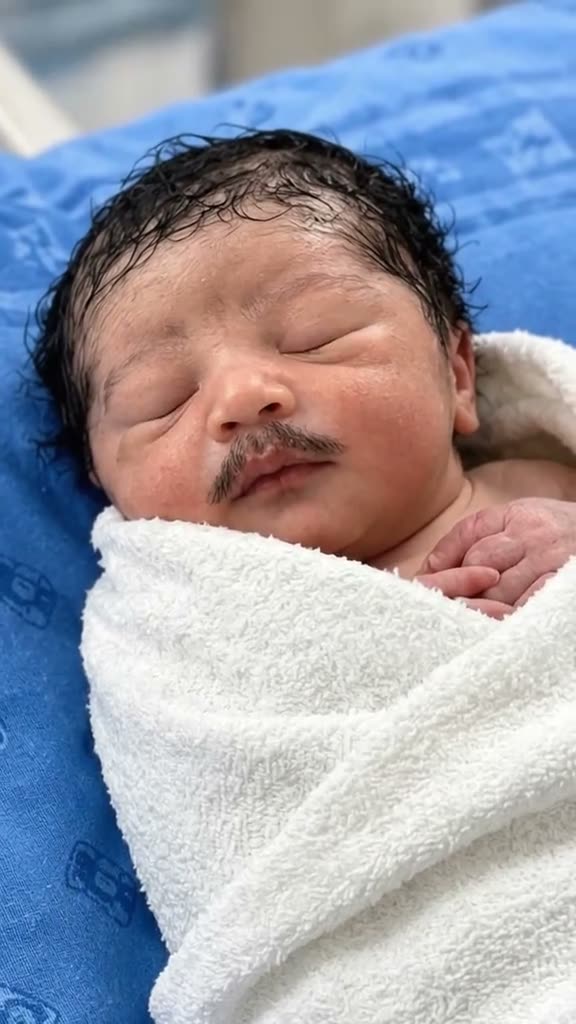
01What happens in the Baby With Mustache trend
The Baby With Mustache trend turns a close-up of a wrapped baby into a short visual joke. The adult-style moustache stays in place as the baby blinks, looks around and opens their mouth. The original clip is ten seconds long, vertical and presented as an AI effect. It is not a real newborn announcement.
Use the sequence below to understand the effect before you make your own version. The original sound is included on the trend page.
| Time | Beat |
|---|---|
| Shot 1 | A baby lies wrapped in white on blue hospital bedding. |
| Shot 2 | The baby opens their eyes, with the adult-style moustache still in place. |
| Shot 3 | The baby moves their mouth and starts to yawn. |
| Shot 4 | The baby looks to the side as the close-up ends. |
02How to make the Baby With Mustache AI video from one photo
You do not need to write a prompt on AI Trend Club. The page uses the original clip as a guide and places the person in your photo in the lead role. Before you start, make sure you have permission to use the photo you upload.
- Open the trend pageGo to the Baby With Mustache page on AI Trend Club and press Create your own.
- Add one photoUpload one adult selfie with your face visible. This trend is set up for one person photo.
- Confirm photo permissionUse a photo of yourself or another person only when you have permission to use it. The video stays private to your account.
- Choose a resolutionAt 480p, the video costs 461 credits. At 720p, it costs 1,037 credits. The button shows the exact credit amount before you spend.
- Make and downloadTap Make my video and wait a few minutes. Download the result with the trend sound or silent. The original sound is available on the page.
03The photo that works
The effect has one human lead. A single clear selfie gives the video model one face to carry through the close-up. It does not need a second role photo.
- Use one photo of a person, not a pet.
- Keep the person’s face visible in the image.
- Choose a photo you own or have permission to use.
- Upload one photo for the lead role.
- Check the selected image before you submit it.
04The Baby With Mustache AI prompt
On AI Trend Club, there is no prompt box to fill in. If you want to try the same idea in another video model that accepts a reference clip, you can start with this description. Keep the scene clearly framed as an AI effect.
Create a vertical close-up scene from the reference clip. Keep the baby-sized wrapped pose in the white blanket against the blue bedding, and place the person in the reference photo as the lead in this playful AI scene. Add an oversized adult-style moustache. Show a short sequence: eyes closed, eyes opening, a small mouth movement, then a yawn and a sideways glance. Keep the camera close and steady, preserve the blanket and background, and match the source timing. Add no labels, captions, logos or extra people.05CapCut template or AI video?
A CapCut template can assemble clips you record yourself. It does not place your face into the original scene from the TikTok post. This AI video uses a reference clip and one photo to generate a new version of the scene, with your photo taking the baby’s role.
You can still edit the downloaded result afterward. Add captions or select a sound in CapCut if you want to prepare a social post. The AI Trend Club page itself runs in your browser, so you do not need to install an app to create the video.
06Is the Baby With Mustache AI video free?
Watching the original and viewing the trend page are free. Making a video uses credits. A new account receives 25 welcome credits, which are enough for a few images but not this trend video. A failed video returns its credits automatically.
The Week pass is $6.99 for 800 credits. That covers the 461-credit 480p version, but not the 1,037-credit 720p version. The 1,000-credit pack costs $9.90; it also falls short of the 720p amount. Check the button before you submit because it displays the current credit cost.
| Option | Price | Credits |
|---|---|---|
| Week pass | $6.99 | 800 |
| 1,000 credits | $9.90 | 1,000 |
07Post it
The clip on the trend page includes the original sound. When you post your version, use the sound available in the social app and credit the original creator, @seherithup7. The original TikTok is linked above. Keep the caption about the AI effect so people do not mistake it for a real newborn announcement.
Caption ideas: “A tiny moustache, a big change in the scene.” “My photo took the lead in the baby mustache AI video.” “A playful baby mustache effect made with AI.”
08Questions
- What is the Baby With Mustache AI video?
- It is a ten-second AI effect with a wrapped baby, an adult-style moustache and a few small expression changes. The page describes it as an edit, not a real newborn event.
- How do I make it from one selfie?
- Open the trend page, press Create your own, add one photo, choose a resolution and tap Make my video. There is no prompt to write.
- How many credits does it use?
- The video costs 461 credits at 480p or 1,037 credits at 720p. The button shows the amount before you spend.
- Who posted the original clip?
- TikTok creator @seherithup7 posted it on Oct 24, 2026. We link to the original above.
- Can I use a pet photo?
- This page is set up for one person photo. Use one clear selfie.