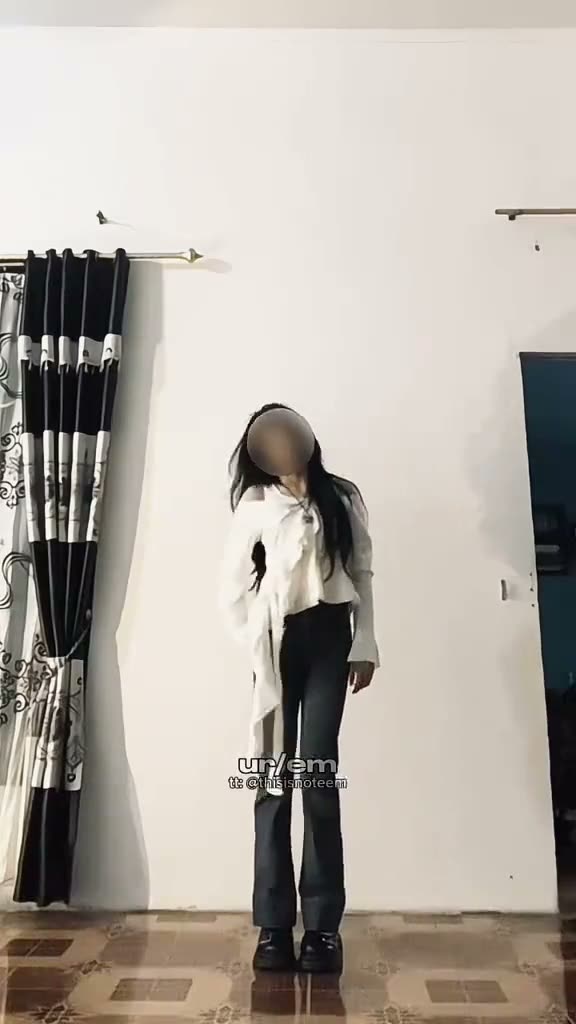
01What happens in the Next Chapter Dance trend
The original is a solo indoor dance. The performer stands in a plain room in front of curtains, moves both arms outward, steps to the side, swings the arms, and finishes with a final gesture. The page uses a 15-second vertical clip, so the scene stays focused on one dancer and one short movement sequence.
Creator @thisisnoteem posted the solo dance on TikTok on October 25, 2026. It had 346K views and 50K likes when checked on November 16, 2026. This page follows the ordinary dancer in the source clip, a solo indoor routine rather than a stage performance or a game character.
| Part of the dance | What happens |
|---|---|
| Start | The dancer stands in a plain room in front of curtains. |
| Arm routine | Both arms move outward as the dancer steps aside. |
| Turn | The dancer swings the arms and turns in the same room. |
| Finish | The solo routine ends with a final arm gesture. |
02How to make the dance video from one photo
Open the Next Chapter Dance page and watch the source clip. The trend page shows which role your photo will take and the room where the movement happens. The reference video supplies the dance and camera framing, so you do not need to write a prompt or record the routine yourself.
Choose a photo you have permission to use. The process runs in your browser, and finished videos stay private to your account. Review the credit amount shown on the quality button before you start. If the render fails, its credits are returned automatically.
- Open the trendGo to the Next Chapter Dance page and review the original movement.
- Start your versionPress Create your own to open the photo step.
- Add one photoChoose a clear standing image and confirm you have permission to use it.
- Choose qualitySelect 480p or 720p and check the exact credit amount on the button.
- Create and downloadTap Make my video and review the clip before downloading it.
03Choose a photo with room to dance
Use a clear standing photo with your face and arms visible. The page recommends a full-body photo if the pose looks stiff, so include enough of the body to show the role. The original routine has arm movements and side steps, and the template keeps that reference sequence.
If your face looks soft, the page recommends a sharper photo with even light. The reference supplies the room and curtains, so your uploaded photo does not need to match that background. Confirm that you have permission to use the image before creating the video.
- Choose a standing photo.
- Keep your face and arms visible.
- Use a sharper photo with even light if your face looks soft.
- Choose a full-body photo if the pose looks stiff.
- The room and curtains come from the reference clip.
04Scene description for the dance
There is no prompt box to fill in on the trend page. The short description below explains the movement shown in the original clip. The site uses the reference video and your photo to prepare the template.
The role is a single dancer in a plain room. Review the finished clip for the arm sequence and the side steps. If the lead is difficult to recognize, start with a clearer standing photo before trying again.
Use the person in the photo as the solo dancer in the plain indoor room. Keep the curtains, fixed vertical camera, arm movements, side steps, turn, and final gesture from the reference. Change only the lead's identity and do not add another dancer or a new scene.05Keep the movement and source in view
The source clip stays in a single indoor setting with one dancer. The page does not add a second performer or change the room. That makes the dance easier to follow than a multi-person routine, but the generated result may still vary with the uploaded image and movement in the reference.
Watch the full clip after it is made. Check that the face remains consistent as the arms move and the dancer turns. The original source is linked on the trend page, so you can compare the movement and framing with the result before downloading.
06Check video credits before creating
A new account receives 25 welcome credits, enough for a few images but not enough for a trend video. This template uses 692 credits at standard quality or 1,556 credits at HD quality. The button shows the current amount before you start, so check that display before spending.
The Week pass costs $6.99 and includes 800 credits, enough for one standard video. Other passes and credit packs are separate purchase options with different credit totals. Choose the quality you want and review the price and credits before completing any purchase. A failed video returns its credits automatically.
| Choice | Credits or price |
|---|---|
| Standard quality, 480p | 692 credits |
| HD quality, 720p | 1,556 credits |
| Week pass | $6.99 for 800 credits |
| Welcome credits | 25 credits for new accounts |
07Choose sound and review the result
The trend page offers the original sound or a silent download. The template uses the source dance clip as its reference, while the sound choice is handled in the download flow. The result is vertical and suited to short-form video. Check the movement and your likeness before keeping the file.
Use only photos you have permission to use. Finished videos are private to your account. If the face or movement does not look right, return to the photo step and choose a sharper image with even light, keeping your face and arms visible. You can then decide whether the result is ready to share.
08Questions
- What is the Next Chapter Dance trend?
- It is a solo dance routine with arm movements, side steps, and a turn in a plain indoor room.
- Do I need to know the dance?
- No. The original clip supplies the movement reference. Add one clear standing photo to take the lead role.
- How many credits does the video use?
- The page lists 692 credits at 480p and 1,556 credits at 720p. Check the amount before you create.
- Who made the original?
- Creator @thisisnoteem posted the solo clip on TikTok on October 25, 2026. We show the original and link back to it above.