01What happens in the Talk Dirty Dance trend
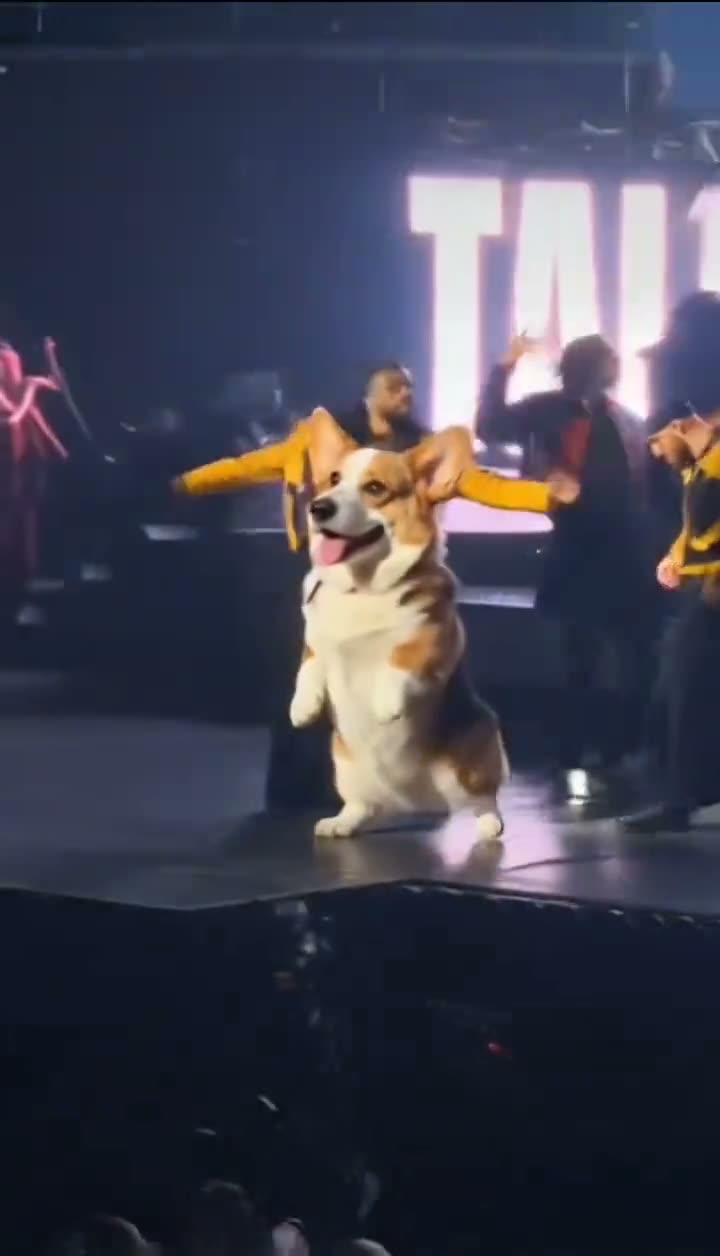
The Talk Dirty Dance AI video puts a Corgi at the front of a concert-style stage. Other dancers line up behind the dog, and flame effects appear around the stage. The linked clip from @soylolalaya is the pet-led version used for this page. The singer's human lead version is not part of this workflow.
The reference is a 9-second vertical clip. Add one photo of your own dog or cat to replace the foreground Corgi. The stage, backup dancers and framing follow the reference. The generated download is silent, so the source audio is not attached to your edit.
| Time | Beat |
|---|---|
| Shot 1 | A Corgi stands at the front of a concert stage. |
| Shot 2 | Dancers line up behind the dog as flame effects rise. |
| Shot 3 | The Corgi moves in front while the crew follows the routine. |
| Shot 4 | The camera stays on the pet through the stage dance. |
02How to make the Talk Dirty Dance AI video from one photo
AI Trend Club uses the linked video as the scene guide. You do not need to write a prompt or install an editing app. Use one photo of your own dog or cat for the lead role, then check the resolution and credit amount shown before you start.
- Open the trend pageWatch the pet-led reference and check the creator credit for @soylolalaya. The original post is linked beside the video.
- Press Create your ownThe editor opens with the Corgi-led stage clip selected. This workflow has one lead role.
- Add one pet photoChoose one photo of your own dog or cat. The uploaded pet takes the Corgi's place at the front; the dancers remain in the scene.
- Choose a resolutionOne 480p video uses 415 credits. One 720p video uses 934 credits. The button shows the current amount before you spend.
- Make and downloadTap Make my video and review the pet's appearance. The download is silent. If you want audio for a social post, select it in the app where you share the video.
03The photo that works
Use one photo of a dog or cat that you own or have permission to edit. The uploaded pet takes the front position in the stage scene. The backup dancers and flame effects remain part of the reference rather than changing into additional versions of your pet.
- Use one photo of your own dog or cat.
- Choose a clear photo so the pet is easy to recognize.
- Use an image you have permission to edit.
- Do not upload a group of pets for this single role.
- Review the result before saving or sharing it.
04The Talk Dirty Dance AI prompt
There is no prompt to write in the AI Trend Club editor. If you are testing another video model that accepts a photo and reference clip, this starting prompt describes the pet role and keeps the stage performers separate.
Recreate the concert-stage dance from the reference clip. The pet in the reference photo replaces only the Corgi at the front of the stage. Keep the pet's species, face, coat and markings recognizable through the movement. Preserve the backup dancers and their separate appearances, the stage, flame effects, camera framing and timing. Follow the same dance sequence without adding a human lead, new performers, text, logos, music or audio.05CapCut template or AI video?
A preset editing template arranges clips that you recorded yourself. It does not place your pet into the stage scene from the linked video. The Talk Dirty Dance AI workflow uses the reference clip and one pet photo, so your dog or cat takes the foreground role while the other dancers stay behind it.
You do not need to record a concert or choreograph the movement yourself. Add the pet photo, check the credit amount and review the finished edit. The exported video is silent. If you want to add a track before sharing, choose it in the posting app.
- A preset template arranges your recorded clips.
- This AI video uses one pet photo in the reference scene.
- The generated file does not include the original soundtrack.
06Is the Talk Dirty Dance AI video free?
The video is not free to generate. A new account receives 25 welcome credits, which can make a few images but does not cover this video. The 480p edit uses 415 credits, and the 720p edit uses 934. If a video fails, its credits return automatically. The editor shows the exact amount before submission.
The Week pass is the lowest-priced option shown here and gives 800 credits. That covers one 480p run, but it does not cover one 720p run. A 1,000-credit pack covers either listed resolution at the current prices. Check the amount displayed in the editor before you submit.
| Option | Price | Credits |
|---|---|---|
| Week pass | $6.99 | 800 |
| 1,000 credits | $9.90 | 1,000 |
07Post your Talk Dirty Dance video
The exported edit is silent. If you want a track when sharing, choose it in TikTok or another posting app. Credit @soylolalaya and link the original pet-led clip. Keep the caption clear that your pet is taking the lead in an AI edit, while the dancers and stage come from the reference scene.
- My dog gets the center-stage spot.
- A pet takes the lead while the crew stays.
- One pet photo, one stage dance.
08Questions
- What is the Talk Dirty Dance trend?
- It is a stage dance clip with an AI Corgi taking the lead in front of a group of dancers.
- Can I use a pet photo?
- Yes. Use one photo of your own dog or cat for the lead role.
- Is there a Talk Dirty Dance AI template?
- This page uses an AI video edit guided by the linked pet-led clip, rather than footage you record yourself.
- Can I make it on my phone?
- The workflow runs in a browser, so you do not need to install an app for the edit.
- Who made the original?
- @soylolalaya posted the linked TikTok on October 25, 2026. We link to it above.