01What happens in the Rooster Concrete trend
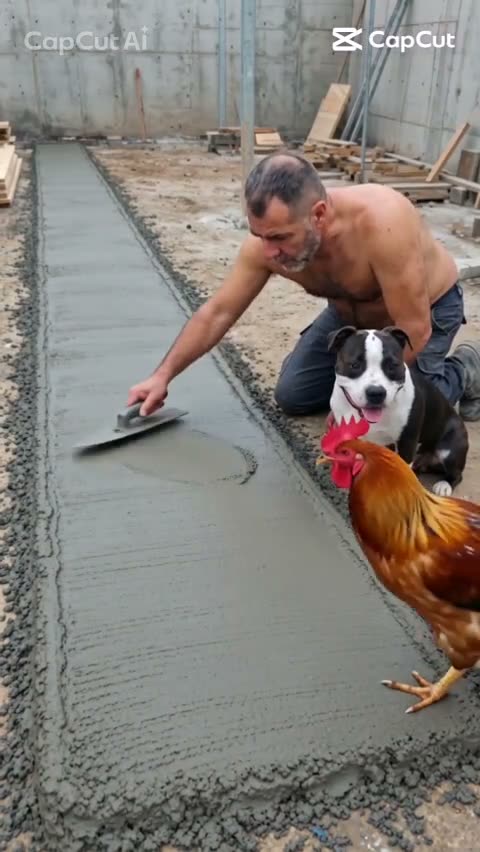
Rooster Concrete turns an ordinary wet-concrete job into a short animal scene. An adult smooths the concrete while a dog stays nearby, then a rooster crosses the surface and leaves a line of prints. The clip cuts to an outdoor meal with the adult and dog.
The video has four simple beats. Keeping them in order is what makes the ending read as a second surprise instead of a separate scene.
| Time | Beat |
|---|---|
| Shot 1 | An adult smooths wet concrete while a dog sits nearby. |
| Shot 2 | A rooster walks across the concrete and leaves a line of prints. |
| Shot 3 | The clip cuts to an outdoor meal with the adult and dog. |
| Shot 4 | The adult and dog look toward each other as the clip ends. |
02How to make the Rooster Concrete video from two photos
The AI Trend Club version follows the original scene and gives the adult and dog separate roles. You do not have to write a prompt on the site. Open the trend page, start your own version, and use the role labels to place each photo.
- Open the trend pageGo to the Rooster Concrete page on AI Trend Club and look at the linked original if you want to see the scene first.
- Start your versionPress Create your own to open the video flow.
- Add both photosChoose one adult photo for Adult and one separate dog photo for Dog. Confirm that you have permission to use both photos.
- Choose a qualityStandard 480p uses 461 credits. HD 720p uses 1,037 credits. The button shows the exact amount before you spend.
- Make and downloadTap Make my video. It is ready in a few minutes. Download it as a vertical 9:16 clip with the trend sound or without sound.
03The photos that work
This version needs two separate photos because the scene has two photo roles. Use the role names shown in the video flow so the adult and dog are assigned to the matching parts.
If the adult and dog appear in the wrong roles, check the Adult and Dog assignments before starting. If the dog is hard to recognize, choose a clearer, separate dog photo. Those are the listed fixes for this two-photo setup.
- Use one clear photo of an adult in the Adult role.
- Use one clear, separate photo of a dog in the Dog role.
- Check both role labels before you start the video.
- Do not put both roles in one photo or use the same photo for both.
- Upload only photos you have permission to use.
04The Rooster Concrete prompt
AI Trend Club does not ask you to write a prompt. If you want to try the scene yourself in another video model that accepts reference images, you can start with this description. It follows the original sequence and gives the adult and dog their own references.
Create a 10-second vertical video in four quick beats. Open on the person in the reference photo smoothing a strip of wet concrete while the dog in its separate reference photo sits nearby. Hold long enough to read their positions. Cut to a rooster walking across the fresh concrete and leaving one clear line of prints. Cut to an outdoor meal with the same person and dog. End as they look toward each other. Keep the rooster, concrete, and backyard setting consistent, with a quick visual reveal and natural pacing.05CapCut template or AI video?
A CapCut template can arrange footage you recorded yourself, but it does not put your face into the original wet-concrete scene. An AI video uses your photos in the adult and dog roles while following the original shots: smoothing the concrete, the rooster's tracks, and the meal at the end.
Use the linked original to understand the order of the scenes. The AI Trend Club flow makes a new video from your two photos; it does not ask you to type a prompt. After downloading, you can use CapCut to add captions or the trend sound. The download can include the trend sound or be silent.
06Is the Rooster Concrete video free?
Watching the original and opening the trend page are free. A new account gets 25 welcome credits, which are enough for a few images but not enough for this video. The 480p version uses 461 credits, and 720p uses 1,037. The exact credit amount appears on the button before you spend anything. A failed video returns its credits automatically.
The least expensive listed ways to get credits are the Week pass and the 1,000-credit pack. Compare the included credits with the quality you want before starting. The Week pass covers one standard video at 480p; 720p costs more credits than that pass includes.
| Option | Price | Credits |
|---|---|---|
| Week pass | $6.99 | 800 credits |
| 1,000 credits | $9.90 | 1,000 credits |
07Post it
The downloaded video can include the trend sound, or you can choose the silent version. In your caption, credit the original creator as @giulio.brisotto. The scene's joke is the line of rooster prints, followed by the meal as a second surprise, so keep the caption tied to those details.
- Wet concrete, one rooster, and a trail of prints.
- An ordinary outdoor job takes an odd turn.
- The prints are the first surprise. The meal is the second.
08Questions
- Is there a Rooster Concrete AI template?
- The AI Trend Club page has a photo-based video flow for this scene. Add an adult photo and a separate dog photo in their matching roles; there is no prompt to write.
- Which AI makes the Rooster Concrete video?
- Use an AI video model guided by the original clip. On AI Trend Club, the flow follows the scene and uses your adult and dog photos.
- Can I make it on my phone?
- The video flow runs in the browser, with no app to install. Open the trend page, add the two photos, and follow the on-screen steps.
- Can I use a photo of my dog?
- Yes. Add a clear dog photo in the Dog role and a separate adult photo in the Adult role. Use photos you have permission to upload.
- Who made the original?
- @giulio.brisotto posted the linked original. The trend page identifies the creator and links to the source clip.