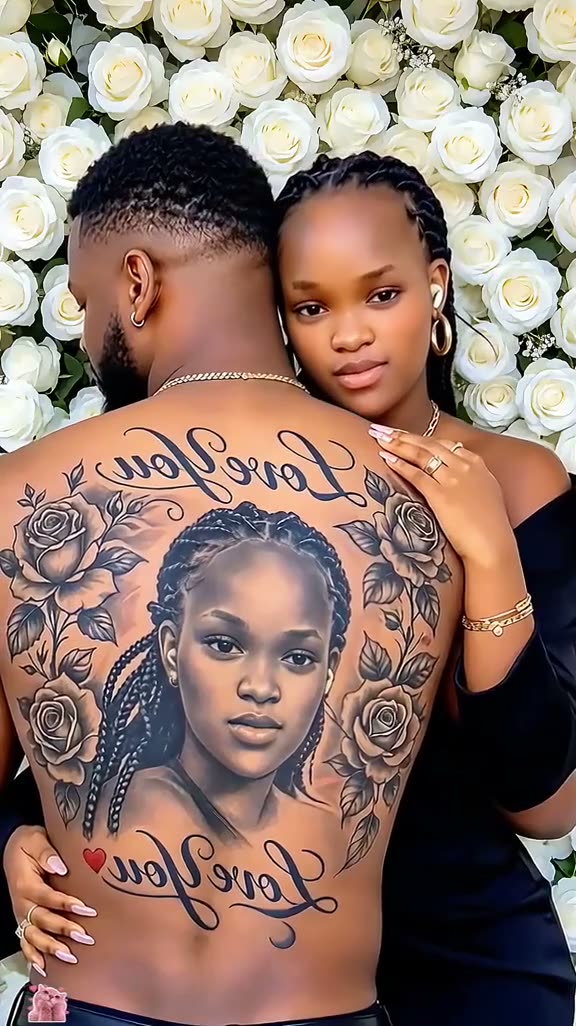
01What happens in the Couple Back Tattoo trend
The Couple Back Tattoo reference is a short tutorial clip around an AI-made couple image. It shows two adults close together, with a portrait tattoo concept on one person’s upper back. The clip then turns to a phone screen to demonstrate the edit.
The image page creates one new still image from one consenting adult portrait. The uploaded face becomes the portrait design on the back of another consenting adult in a gentle embrace. It does not animate the tattoo, create a video or make real ink.
| Time | Beat |
|---|---|
| Shot 1 | Two adults appear together in a close indoor pose. |
| Shot 2 | The view reveals a portrait tattoo concept on an upper back. |
| Shot 3 | The clip shows a phone-screen editing demonstration. |
| Shot 4 | The finished couple image returns. |
02How to make the Couple Back Tattoo AI photo from one portrait
The photo editor carries a prompt from the trend page. You can read it before creating the still image. Use one portrait of an adult who has agreed to the edit, and do not add a second person’s photo.
- Open the trend pageReview the linked reference clip and read the source credit for @user4947097136093. The page shows the tutorial and image idea.
- Choose Make the couple photoThe existing photo editor opens with the trend prompt ready. This workflow makes one still image, not a video.
- Add one adult portraitUse a clear portrait of a consenting adult that you own or have permission to edit. Confirm you can use the photo.
- Review the promptCheck that it describes a clothed couple, one portrait tattoo concept and a simple indoor setting. You can review the wording before submission.
- Create and inspectThe button shows the current 5-credit price before you submit. Inspect the still image before saving or sharing it.
03The photo that works
The page needs one clear portrait of a consenting adult. That image is used as the design reference for the tattoo portrait. A different adult appears as the person wearing the imagined tattoo, so the result is a fictional concept rather than a record of a real event.
- Use one clear portrait of an adult who consents.
- Use a photo you own or have permission to edit.
- Keep the face visible in the portrait.
- Do not add a second identity photo.
- Review the generated image before sharing it.
04The Couple Back Tattoo AI prompt
The prompt is already included in the image editor, so there is no need to write one on the trend page. You can review it before creating. If you want to test a separate image model, the example below keeps the image still and describes the tattoo as a fictional concept.
Use the uploaded portrait of a consenting adult as the reference for a tasteful, non-sexual tattoo portrait. Create one still image of two fully adult people in a gentle embrace. Show one adult from behind with the upper back visible from the shoulder blades to the waist. Place a detailed black-and-gray portrait of the uploaded person on that back, preserving the recognizable face in the design. Keep both people clothed, use a simple indoor background and natural lighting. Make one complete still image, not a collage or video. Add no text, logos, famous people or watermark.05A template edit or an AI photo?
A video template arranges recorded clips into a prepared sequence. This trend is an image edit: the uploaded portrait guides a new still picture, with a fictional tattoo concept on the back of another adult. The editor does not animate the image or copy a filmed tattoo transformation.
The source clip is useful for seeing the composition and the phone demonstration. The new result is one image made from your permitted portrait and the included prompt. Review it before posting, and describe it as an AI concept rather than a real tattoo or a real couple moment.
- A video template uses footage and cuts.
- This workflow makes one AI-edited still image.
- The tattoo is an imagined design, not real ink.
06Is the Couple Back Tattoo AI photo free?
The editor uses 5 credits for one image edit. New accounts receive 25 welcome credits, which can cover five edits at the current price. The price appears on the button before you submit. You can review the prompt first and only create the image when you are ready.
The Week pass costs $6.99 and provides 800 credits. A 1,000-credit pack costs $9.90. These are two ways to add credits if your account balance is too low; check the current price shown in the editor before starting.
| Option | Price | Credits |
|---|---|---|
| Week pass | $6.99 | 800 |
| 1,000 credits | $9.90 | 1,000 |
07Post your Couple Back Tattoo AI photo
If you share the result, credit @user4947097136093 and link the original tutorial. Label your image as an AI-generated tattoo concept, not a real tattoo. The idea is a personalized portrait made for a couple image, so keep your caption focused on the imagined design.
- A portrait turned into a tattoo concept.
- An imagined couple image, not real ink.
- One portrait, one fictional design.
08Questions
- What is the Couple Back Tattoo AI photo trend?
- It is a still image of two adults embracing, with a portrait used as a tattoo concept on one person’s back.
- How many photos do I need?
- Use one clear portrait of a consenting adult that you own or have permission to edit.
- Does this create a video?
- No. The existing image editor creates one still image and does not animate the tattoo.
- Is the tattoo real?
- No. It is a fictional tattoo concept on another consenting adult, not a real tattoo.
- Who made the original?
- @user4947097136093 posted the linked TikTok on Oct 23, 2026. We link to it above.