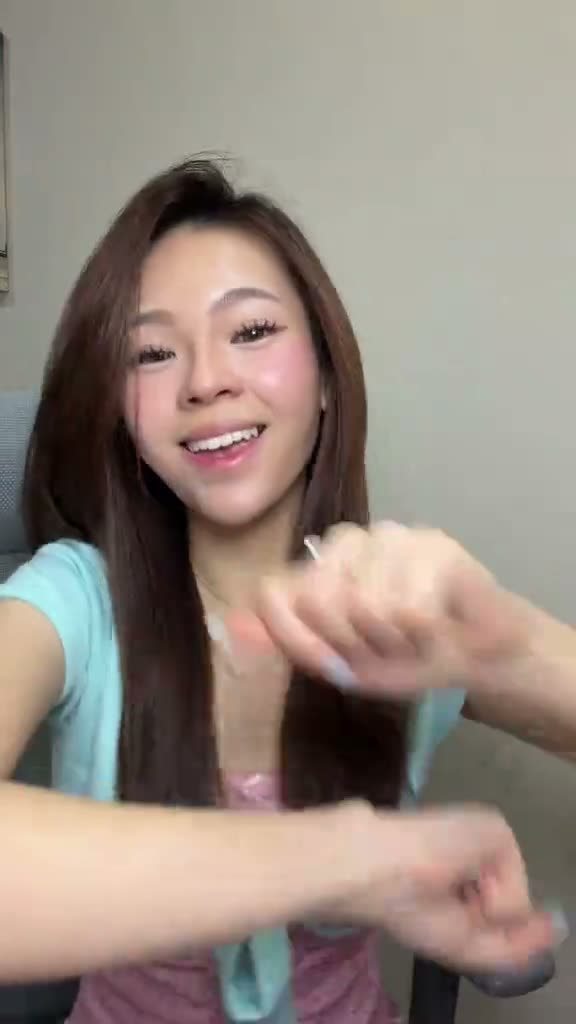
01What happens in the Stop the Wedding Dance trend
The Stop the Wedding Dance is a seated hand routine in a vertical TikTok clip. The performer stays on a grey chair while the gestures move from a hand crossing the frame to stacked fists, a close lens sweep and finger motions beside the face. The original was posted by @yuukiituru on Nov 12, 2026, and runs for 15 seconds. The trend page follows this routine, with one photo taking the dancer's place.
The actions stay close to the camera, so the hands are a big part of the look. The frame briefly fills with a hand when it reaches toward the lens, then returns to the seated view. A waist-up photo with both hands visible gives the video model a clear person to place in the original scene.
| Time | Beat |
|---|---|
| Shot 1 | The seated dancer starts with one hand moving across the frame. |
| Shot 2 | The hands stack together for a short tapping motion. |
| Shot 3 | One hand sweeps close to the lens and fills the view. |
| Shot 4 | The dancer lifts her fingers beside her cheek to finish. |
02How to make the Stop the Wedding Dance AI video from one photo
The trend page is free to view and links to the original. Make your version in the browser; there is no prompt to write and no app to install. Finished videos stay private to your account.
- Open the trend pageGo to the Stop the Wedding Dance page and watch the source clip. The page shows the original post and links to it.
- Start your versionPress Create your own to open the video setup for this trend.
- Add one photoChoose one adult, front-facing photo framed from the waist up. Keep both hands visible, then confirm that you have permission to use the photo.
- Choose a resolutionSelect 480p for 692 credits or 720p for 1,556 credits. The exact credit amount also appears on the button before you spend.
- Make and download the videoTap Make my video. The render usually takes a few minutes. Download it with the trend sound or silent, in the original vertical 9:16 shape.
03The photo that works
Those details match the original's seated view and the gestures around the face. A full-body picture can make the hands harder to see, while a close face crop leaves out the movement. For this trend, the middle ground is a front-facing waist-up image with the person's hands included.
- Choose one front-facing photo of an adult.
- Frame the person from the waist up.
- Keep both hands inside the image.
- Avoid cropping either hand out of the frame.
- Avoid a photo that only shows the face or is framed from far away.
- Use only a photo that you have permission to use.
04The Stop the Wedding Dance AI prompt
You do not need to write a prompt on AI Trend Club. It uses the original clip to guide the scene and your photo to set the lead. If you want to try a different video tool that accepts a reference image and clip, you can start with this prompt and adjust it to that tool's controls.
Create a vertical, front-facing video in a small room with a light wall and a grey chair. The person in the reference photo sits centered and performs the same seated hand routine as the reference clip. Begin with one hand moving across the frame, then stack both fists for a short tapping motion. Sweep one hand close to the lens, briefly filling the view. Finish with small finger gestures beside the face. Keep the camera fixed, preserve the chair and room, and follow the original timing. Add no text or new scene.05CapCut template or AI video?
A CapCut template arranges footage you record yourself. You film the seated routine, and the template lines your clips up with its timing. It does not put your photo into the original scene.
An AI video uses the source clip as a guide. You add a photo, and the video model places that person into the reference scene while the chair, camera and gestures stay. Download with the trend sound or silent, then use CapCut to add captions or audio if you want to edit the post further.
06Is the Stop the Wedding Dance AI video free?
Watching the original clip and opening the trend page are free. Making a video uses credits. A new account gets 25 welcome credits, enough for a few images but not enough for this video. One 480p video uses 692 credits, while a 720p video uses 1,556. The credit total is shown before you spend, so check the button for the resolution you selected.
The Week pass and the 1,000 credits pack are the two lowest-priced options listed in the current material. A Week pass gives 800 credits for $6.99 per week, which covers the 480p version. The credit pack costs $9.90 and provides 1,000 credits. Neither amount covers the 720p version on its own. A failed video returns its credits automatically.
| Option | Price | Credits |
|---|---|---|
| Week pass | $6.99 per week | 800 |
| 1,000 credits | $9.90 | 1,000 |
07Post it
Keep the source's seated framing and use the trend sound if you download with audio. In your caption, credit @yuukiituru as the creator of the original clip. If you post a silent download, you can add the sound in your editor before sharing.
The routine is built from a few clear hand gestures, so keep your caption short and let the clip carry the joke. These ideas stay close to what happens in the video:
- A seated hand routine, my turn.
- Hands first, camera second.
- One chair and a few quick moves.
08Questions
- Is there a Stop the Wedding Dance template?
- The source TikTok is a seated hand dance. On AI Trend Club, the page uses the original clip as the guide for a one-photo AI video. A CapCut template is for arranging footage you record yourself.
- Which AI makes the Stop the Wedding Dance video?
- The page uses an AI video model guided by the original clip. Add one adult photo and the source video guides the seated scene and hand movements.
- Can I make the Stop the Wedding Dance video on my phone?
- The site runs in a browser and does not need an app to install. Open the trend page, press Create your own and add your photo.
- Can I use a pet photo?
- The material lists a person as the lead for this trend. Use one adult photo framed from the waist up with both hands visible.
- Who made the original video?
- @yuukiituru posted it on TikTok on Nov 12, 2026. The trend page links to the original post.