01What happens in the Flower Nose trend
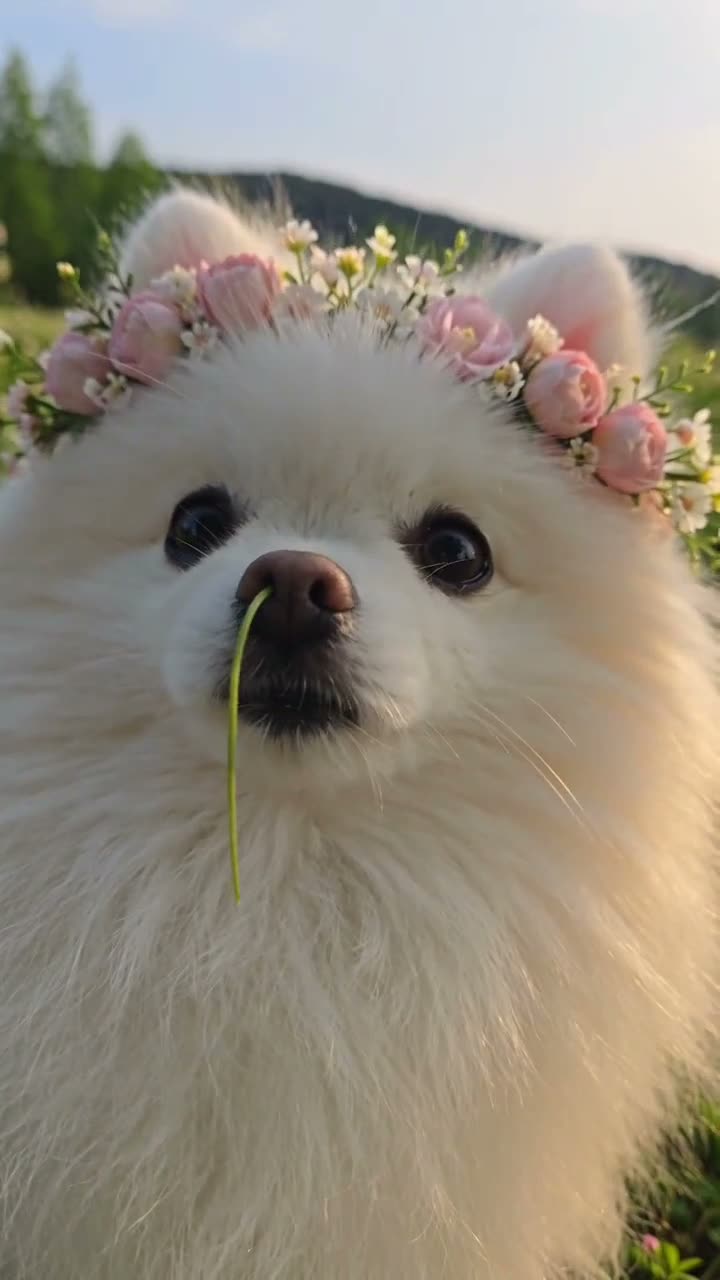
The selected Flower Nose video follows a white Pomeranian outdoors. The dog wears a flower crown, pulls a daisy from the stem at its nose, then offers the flower toward the camera. This pet version is eight seconds long. The trend page lets one pet photo take the lead role, with the crown, background, and flower sequence staying from the reference.
| Time | Beat |
|---|---|
| Shot one | A white Pomeranian wears a flower crown outdoors. |
| Shot two | A thin green stem rests at the dog’s nose. |
| Shot three | A paw pulls a small daisy out from the nose. |
| Shot four | The dog offers the flower toward the camera. |
02How to make the Flower Nose AI video from one photo
The AI Trend Club page guides the scene, so you do not need to write a prompt there. Add one photo of your pet, and confirm you have permission to use it. The video page shows the credit amount for each quality before you spend, and you can choose a version with the source sound or without it.
- Open the trend pageGo to the Flower Nose page on AI Trend Club and watch the linked pet original.
- Start your versionPress Create your own to open the one-photo flow.
- Add one photoChoose one person or pet photo and confirm you have permission to use it.
- Choose a quality480p uses 369 credits. 720p uses 830 credits. Check the button before you spend.
- Make and downloadTap Make my video. When it is ready, download it with the original sound or as a silent clip.
03The photo that works
The page needs one lead photo. The original pet version shows a dog, while the page facts allow a photo of a person or a pet to take the lead. The image you choose supplies the identity for the role. The flower crown, outdoor background, and daisy sequence stay from the source scene.
- Use one photo of your pet for the lead role.
- Use a photo that you have permission to use.
- Keep the flower crown and the outdoor setting from the source.
- The lead pulls the daisy from the stem and offers it toward the camera.
- The source is a short vertical video with the original sound.
04The Flower Nose prompt
AI Trend Club fills in the scene, so no prompt is required on its page. If you are trying a separate model that accepts a reference image, this prompt describes the original shot sequence.
In this prompt, “the person in the reference photo” refers to the uploaded pet. The pet in the reference photo takes the lead role of the white Pomeranian. Preserve that pet’s identity and natural features. Preserve the flower crown and outdoor background. A thin green stem rests at the lead’s nose; the lead pulls a small daisy from the stem and offers it toward the camera. Keep the original framing and short sequence. Do not add another lead, change the scene, or create a different action.05CapCut template or AI video?
A CapCut template arranges footage you record yourself. It does not place your photo into the original flower scene. The AI video uses one photo as the new lead in the existing clip, while the crown, outdoor background, and daisy-pull action stay from the reference. The two options have different starting points: your own footage for a CapCut template, or the original scene for this AI remake.
The original sound comes with the source version. You can download with sound, or choose a silent version and add the trend sound in TikTok or CapCut. Captions can also be added after you download. AI Trend Club runs in a browser, so the page can be opened on a phone without installing an app.
- CapCut template: puts together clips you record.
- AI video: uses one photo with the original scene as its guide.
- Finish in CapCut if you want captions or another edit.
06Is the Flower Nose AI video free?
You can view the original video and trend page without paying. A new account gets 25 welcome credits, enough for a few images but not enough for a trend video. The video costs 369 credits at 480p or 830 credits at 720p. Failed videos return their credits automatically, and the credit amount is shown before you spend.
The Week pass costs $6.99 per week and includes 800 credits, enough for the 480p option. The 1,000-credit pack costs $9.90 and covers the 720p credit amount listed for this video. Review the current quality and credits on the page before starting.
| Option | Price | Credits |
|---|---|---|
| Week pass | $6.99 per week | 800 credits |
| 1,000 credits | $9.90 | 1,000 credits |
07Post it
The pet original includes its sound. Download with the original sound or choose silent and add the trend sound in TikTok or CapCut. Credit @pomi_daily_life in your post. The original pet version was posted on TikTok on Oct 26, 2026, and the trend page links to it.
- A daisy pulled from a curious nose.
- One flower, offered right to the camera.
- A pet in the flower-crown role.
08Questions
- How do I make the Flower Nose pet video?
- Add one photo of your pet, then choose the Flower Nose page and make the video. The page follows the original scene.
- Can I use my dog photo?
- Yes. One photo of your pet can take the lead role. The reference version shows a white Pomeranian.
- Which AI makes the Flower Nose video?
- It uses an AI video model guided by the original clip. The AI Trend Club page has no prompt field.
- Who made the original?
- @pomi_daily_life posted the pet version on TikTok on Oct 26, 2026. The trend page links to the post.