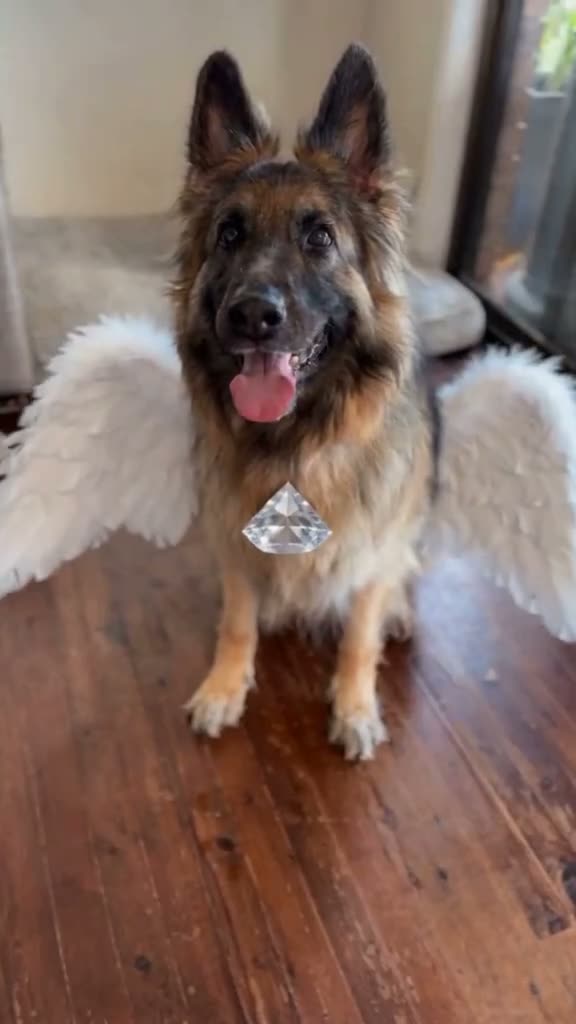
01What the Angel Of My Dreams photo shows
The Angel Of My Dreams photo is a still portrait of a dog or cat with large white feathered wings. The pet remains the focus, with its face visible and the wings placed behind it. The idea is a gentle angel look made from one pet photo. The page does not animate the wings or turn the picture into a video.
The linked TikTok example is by @indy_living and was posted on Oct 23, 2026. It shows a German shepherd wearing white wings. When checked on Nov 17, 2026, the post had 257 views and 22 likes. Those totals are a snapshot of this one post. They do not predict how an image you make or share will perform.
02Choose a pet photo with the face visible
Start with one clear photo of a dog or cat that you have permission to edit. The image editor needs to see which animal it should keep. A visible face and recognizable markings give the prompt useful details to preserve. You can use a seated or standing pet photo because the prompt allows either pose.
The prompt asks for white feathered wings behind the pet. Pick an input where there is room around the shoulders, but keep the pet as the main subject. The wings are a requested addition, while the pet’s species, face, coat color and markings should remain recognizable. The model may still change some details, so inspect the finished picture.
- One clear photo of your dog or cat
- The pet’s face and markings visible
- A seated or standing pose
- Permission to edit the photo
03Review the white-wing prompt
The trend page fills in an image prompt for you. It asks the editor to keep the same dog or cat recognizable and add soft white feathered wings behind the pet. It also requests a calm indoor setting and tells the model not to add lettering, a logo, jewelry, people or extra animals.
Read the prompt before you create. Check that it describes the pet you uploaded and that the wings stay behind the animal instead of covering its face. You can adjust the wording to fit your own photo. For example, keep a standing pet standing or describe a seated pose when that is what appears in your input.
Edit the uploaded pet photo into one new vertical still image. Keep the same dog or cat recognizable, preserving its species, face, coat color and markings. Add a pair of large, soft white feathered angel wings behind the pet without covering its face. Keep the pet in a calm seated or standing pose on a simple indoor floor with warm natural light. Do not add jewelry, lettering or a logo. Make one complete photo, not a collage or video. Do not add people, extra animals, a song reference or a watermark.04Create the still image
Open the Angel Of My Dreams page and choose the pet-photo edit button. The prompt is already there, and you can review or change it before you continue. Add one dog or cat photo that you have permission to use. Make sure the face is visible and the photo matches the animal you want in the result.
The image editor shows the current price before you submit. One image edit uses 5 credits. Viewing the reference and reading the page do not create an image. Check the amount shown in the editor, then submit only if you want to use those credits for a still picture.
When the image is ready, look at the pet’s face, coat markings and wing placement. Check that the wings do not cover the face and that the result has not added a person, extra animal, lettering or logo. Save or share the image only after you are comfortable with what changed.
- Open the image editorUse the button on the trend page to carry over its included prompt.
- Add and reviewUpload one permitted dog or cat photo and read the prompt.
- Check the priceThe editor shows the 5-credit cost before you submit.
- Create and inspectReview the pet’s face, markings and wings before saving.
05Fix common wing and face problems
If the wings cover the pet’s face, make the instruction about placement more direct. Ask for the wings to sit behind the shoulders and leave the face unobstructed. Keep the request focused on one pet and one pair of wings instead of adding extra objects.
If the animal’s markings or face change, use a clearer photo where those details are visible. Repeat that the same dog or cat should remain recognizable. The editor can still vary details, so compare the result with your uploaded photo before sharing it.
| What you see | What to adjust |
|---|---|
| Wings cover the pet’s face | Ask for wings behind the shoulders, away from the face. |
| The pet’s markings changed | Use a clear photo and ask to preserve its visible markings. |
| Extra objects appear | Keep the prompt focused on one pet and one pair of wings. |
| You expected motion | This page creates a still image, not an animation. |
06Share the image with context
Describe the result as an AI-edited pet portrait. The white wings are part of the generated scene, not something added to the pet in real life. If you discuss the linked reference, credit @indy_living and point people to the TikTok post above.
The selected post had 257 views and 22 likes when checked on Nov 17, 2026. Keep the check date with those figures if you repeat them. They describe one creator post at one time; they are not a forecast for a new photo or post.
- Call it an AI-edited still image
- Credit @indy_living when discussing the reference
- Use a pet photo you have permission to edit
- Review the image and background before sharing
07Questions about the Angel Of My Dreams photo
The page is for a single still-image edit. Add one dog or cat photo, check the prompt and look at the price before you send the request. You can read the linked TikTok example first, then compare your finished image with your original pet photo.
08Questions
- What is the Angel Of My Dreams AI photo?
- It is a still image edit that adds large white feathered wings behind a dog or cat while keeping the pet recognizable.
- Can I use a cat photo?
- Yes. The prompt works with one clear dog or cat photo and asks the editor to preserve the pet’s visible features.
- Does this make moving wings?
- No. The current image editor creates one still image and does not animate the wings.
- How much does one image edit cost?
- The editor shows the current price before submission. One still image edit uses 5 credits.
- Who posted the linked example?
- The selected TikTok example is by @indy_living, posted on Oct 23, 2026. We have not verified who first made the wider style.