01What happens in the Passenger Princess trend
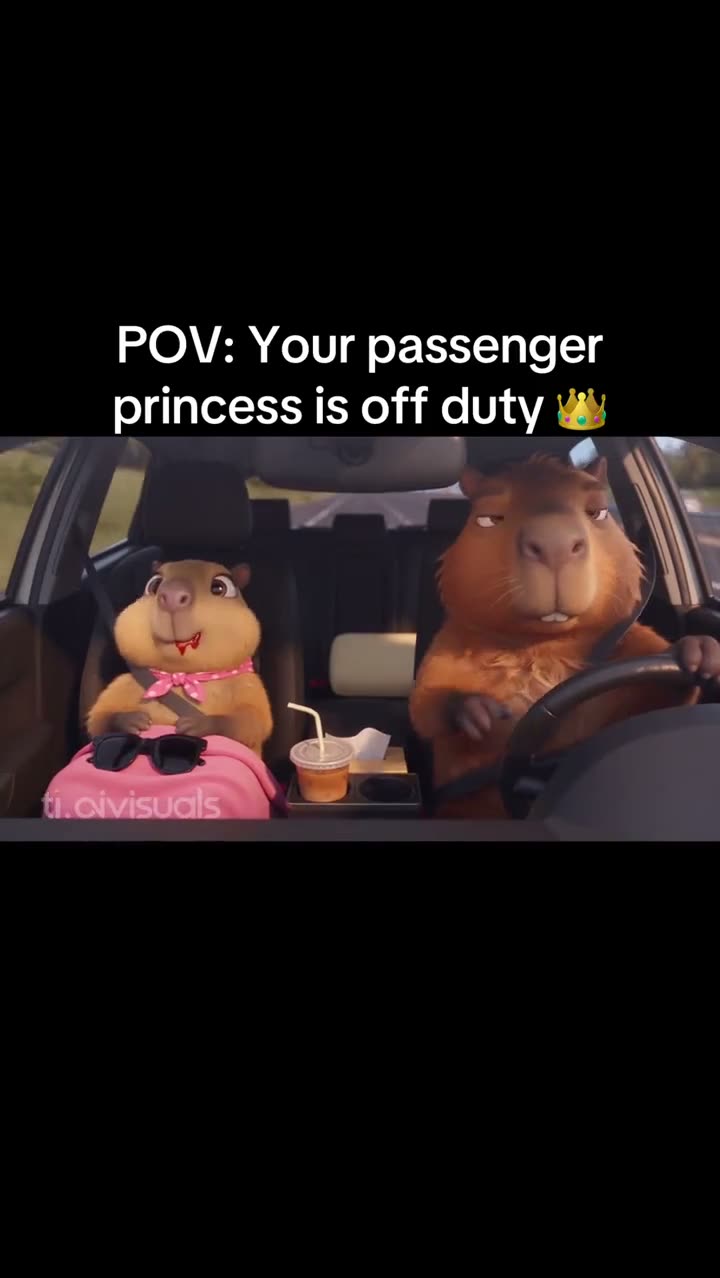
The Passenger Princess trend turns a familiar car joke into a short scene. The TikTok clip by @capisean_capisara shows a cartoon passenger sitting beside a driver, holding a drink and relaxing while the road remains visible. The joke is that the passenger is off duty while someone else handles the drive.
The original is 15 seconds long and includes its sound. This version is about the passenger in a car, separate from the Capybara Couple lounge scene. One photo takes the passenger role while the driver, car interior and road view stay part of the reference.
Use this sequence table to see the parts that make the joke clear.
| Time | Beat |
|---|---|
| Shot 1 | The camera looks toward the front seats from inside the car. |
| Shot 2 | The passenger sits back with a drink while the driver holds the wheel. |
| Shot 3 | The passenger relaxes as the road and car interior remain visible. |
| Shot 4 | The clip holds on the off-duty passenger joke. |
02How to make the Passenger Princess AI video from one photo
The page gives you the car scene and the passenger role. You do not have to record a drive or write a prompt. Add one photo that you are allowed to use, then check the credit amount shown for the resolution you want.
Here is the short Passenger Princess tutorial.
- Step 1: Open the trend pageOpen the Passenger Princess trend page on AI Trend Club in a browser. The site runs in the browser, with no app to install.
- Step 2: Choose Create your ownPress the button to open the setup for this car scene. The reference clip and passenger role are already selected.
- Step 3: Add one photoUpload a clear photo of your own pet or a consenting adult. Confirm you have permission to use it. This photo is for the passenger role.
- Step 4: Pick video qualityAt 480p, the video uses 692 credits. At 720p, it uses 1,556 credits. The exact amount is shown on the button before you spend.
- Step 5: Make and downloadTap Make my video. Download the finished vertical clip with the trend sound, or choose a silent download if you want to add sound in an editor.
03The photo that works
Only one image is needed for the passenger. Use an image you have permission to use.
- Choose one clear photo of your own pet or a consenting adult.
- Keep the person or pet you want to show easy to identify.
- Use the image for the passenger seat, not the driver role.
- Get permission before using another person's photo.
- The driver, car interior and road view stay from the source scene.
04The Passenger Princess AI prompt
AI Trend Club does not ask you to write a prompt. The template uses the source clip to guide the car scene and keeps the driver in place.
For a separate video model that accepts reference images, you can start with this scene description.
Recreate the car scene with the person in the reference photo taking the passenger role. If the reference shows a pet, let the pet in the reference photo take that role. Keep the driver as a separate character, with both front seats visible from inside the car. The passenger sits back with a drink and looks relaxed while the road remains visible beyond the windshield. Preserve the car interior, window light, seated pose and camera view. Change only the passenger. Add no extra characters, labels or watermark.05CapCut template or AI video?
A CapCut template helps arrange clips and effects from footage you film or select. It does not put your photo into the original car scene. An AI video uses the source clip as a reference and places the subject from your photo in the passenger seat.
Choose this AI video format when you want the driver, road view, seat positions and car interior from the original scene to stay. A CapCut edit can help if you are building your own car joke from footage you recorded instead.
After you download the finished clip, CapCut can be used to add subtitles or another sound. The original sound is available with the download, and a silent version is also an option.
06Is the Passenger Princess AI video free?
Watching the original and reading this trend page are free. Making a video uses credits. A new account receives 25 welcome credits, enough for a few images but not enough for this video.
This version uses 692 credits at 480p or 1,556 credits at 720p. The button shows the exact total before you spend. If a video render fails, the credits come back automatically.
The lowest entry choices on the site are a Week pass or a 1,000 credits pack. The Week pass renews each week, so read the plan terms before choosing it. The credit pack is a one-time option.
| Option | Price | Credits |
|---|---|---|
| Week pass | $6.99 per week | 800 |
| 1,000 credits | $9.90 | 1,000 |
07Post your Passenger Princess video
The original sound is included. If you post the result, credit @capisean_capisara and note the visible watermark tl.ovisuals. The original post is linked above so viewers can see where the car version came from.
Keep the caption focused on the relaxed passenger and the person handling the drive. Two short ideas:
- Passenger duties: officially off.
- I brought the passenger energy.
08Questions
- Is there a Passenger Princess AI template?
- Yes. The trend page has a ready-to-use passenger-in-a-car scene. Press Create your own to add one photo.
- Which AI makes the Passenger Princess video?
- It is an AI video model guided by the original clip. The scene and passenger role are set up on the trend page.
- Can I make the Passenger Princess video on my phone?
- The site runs in a browser and does not require an app. Open the trend page in a browser to begin.
- What does passenger princess mean?
- It is a playful name for the passenger who rides along while someone else handles the drive.
- Who posted the original Passenger Princess video?
- TikTok creator @capisean_capisara posted the car clip on October 27, 2026. The visible watermark reads tl.ovisuals. The trend page links to the source.