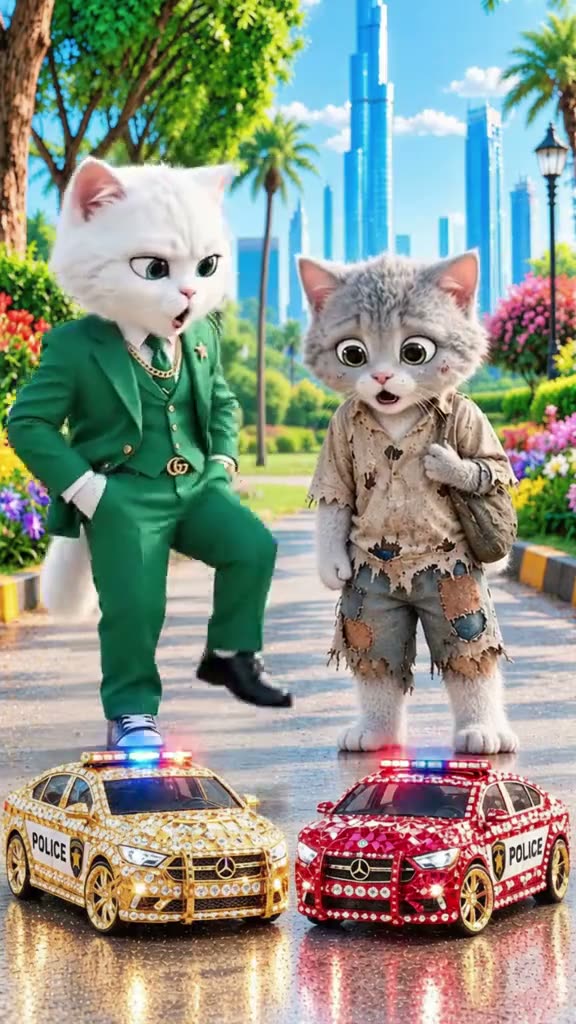
01What happens in the AI Cat Story trend
The selected scene shows two dressed cats on a bright city street beside toy police cars. A small gray kitten stands near a richer white cat, then reacts as the other cat walks away. The scene later shifts to the white cat beside a gold car. The page uses a short section of the original story, so the main idea is one small cat character in one brief moment.
The source was posted by @mewomimimagicx99 on TikTok on October 26, 2026. It had 1.1M views and 23K likes when checked on November 16, 2026. The full source is 63 seconds long, while this page uses a 10-second section. The shorter clip keeps the kitten scene focused and does not promise a full story or voiceover.
| Part of the scene | What appears |
|---|---|
| Opening | Two dressed cats meet beside toy cars. |
| Reaction | The gray kitten reacts as the white cat moves away. |
| Later moment | The story shifts to the white cat by a gold car. |
| Your version | One cat photo takes the gray kitten role. |
02How to make the video from one cat photo
Start from the AI Cat Story trend page. It shows the original clip, the kitten role, and the photo guidance before you begin. You do not need to write a prompt or build the scene yourself. The reference clip supplies the setting and action, while your uploaded cat photo is used for the lead role.
Use a photo you have permission to use. The trend page runs in your browser and keeps finished videos private to your account. Review the credit amount shown on the quality button before submitting. If the render fails, the credits are returned automatically, so you can choose a clearer image and try again.
- Open the trendGo to the AI Cat Story page and watch the original scene.
- Start your versionPress Create your own to open the photo step.
- Add a cat photoChoose a clear picture of your cat and confirm that you have permission to use it.
- Choose qualitySelect 480p or 720p, then check the exact credit amount shown on the button.
- Make and downloadTap Make my video. When it is ready, download it with the trend sound or silent.
03Choose a photo that fits the kitten role
Use one clear photo of your cat with the cat facing the camera. This gives the recipe a clear reference for the small gray kitten. The page asks for one cat photo because that specific role takes the poor kitten's place in the short story.
You do not need to include the white cat, toy cars, clothing, or sunny street in the uploaded photo. The original reference supplies those details, and they remain in the scene. Use a cat photo you have permission to use. The recipe is designed for a cat as the lead, while the other animal roles remain part of the scene.
- Use one clear photo of a cat.
- Choose a photo with the cat facing the camera.
- Keep the intended lead to one cat.
- The white cat and street scene come from the reference clip.
- Confirm you have permission to use the photo.
04Scene description for this trend
You do not type a prompt into the trend page. This description simply summarizes the scene the page is built around. The original clip guides the motion, framing, and setting after you add your photo.
The sequence is short, and the cat remains the lead throughout the selected section. Check the finished video to make sure the kitten role looks right and the surrounding cats and scene remain recognizable.
Use the cat in the photo as the small gray kitten in the short animated street scene. Keep the dressed white cat, toy cars, sunny city setting, and original camera movement. Change only the kitten's identity and do not add another character or new text.05What the page does and does not recreate
The source is a 63-second animated story, but the trend page uses a 10-second segment. It is designed for a brief scene, not for making a new long story, a sequence of episodes, or voiceover. The original sound is available as a download option, but that does not mean the site generates new dialogue.
The role is specific: your cat plays the small gray kitten. The dressed white cat, toy cars, street, and short story beats stay in the reference. A clear photo helps, but results can vary from one image to another. Check the output before keeping or sharing it.
06Check credits before you create
A new account receives 25 welcome credits, enough for a few images but not a trend video. This clip uses 461 credits at standard quality or 1,037 credits at HD quality. The current credit amount is shown on the button before you spend, so check it on the page before starting.
The Week pass costs $6.99 and includes 800 credits, which covers one standard video. Credit packs and other passes have different amounts. Choose the option that fits how often you plan to create, and confirm the displayed price and credits before completing any purchase. Failed video renders return their credits automatically.
| Choice | Credits or price |
|---|---|
| Standard quality, 480p | 461 credits |
| HD quality, 720p | 1,037 credits |
| Week pass | $6.99 for 800 credits |
| Welcome credits | 25 credits for new accounts |
07Download and review your cat story
When the render is ready, choose whether to download with the trend sound or silently. The page produces a vertical clip, and the sound option is part of the download flow. Watch the complete result once to check that the uploaded cat is recognizable and the scene still follows the short kitten story.
Only use an image you have permission to use. The generated video stays private to your account. If the result does not look right, check whether the cat is clearly visible and facing the camera, as the page recommends. You can then decide whether to keep the clip or leave it in your account.
08Questions
- Can I use a dog photo for AI Cat Story?
- This recipe is built around a kitten, so use a clear cat photo for the lead role.
- Do I need to write a prompt?
- No. The trend page uses the original clip to guide the scene after you add a cat photo.
- How many credits does the video use?
- The current page lists 461 credits at 480p and 1,037 credits at 720p. Check the amount on the button before you spend.
- Who made the original?
- Creator @mewomimimagicx99 posted it on TikTok on October 26, 2026. We show the original and link back to it above.