01What happens in the What If You Fly trend
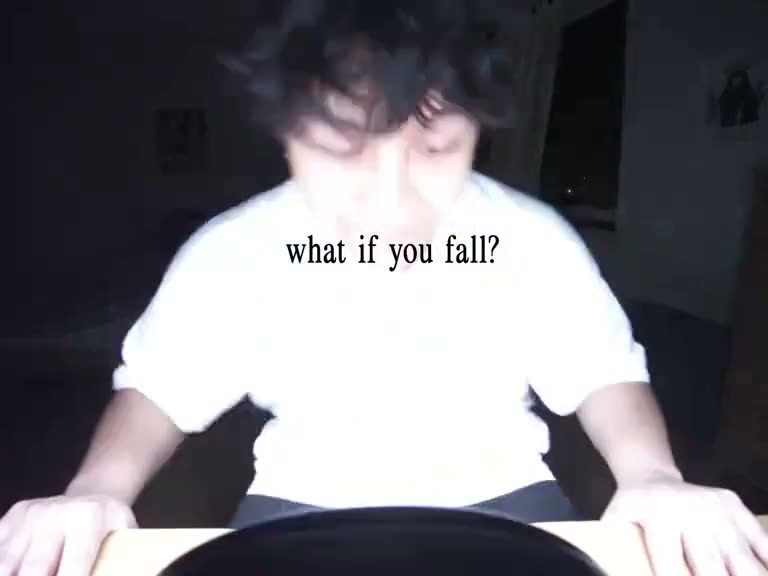
The What If You Fly AI video starts near a bedroom floor and turns a fall into a flight. The lead rises with a bright trail of fire, then appears above water and clouds. The idea is built around a sharp change from an ordinary room to an imagined sky scene.
The version on this page is a 15-second landscape cut of the linked reference. One photo supplies the lead. The page keeps the source video and creator credit visible, then shows four frames in order so you can see the scene before making your own edit.
| Time | Beat |
|---|---|
| Shot 1 | The lead is down near the bedroom floor. |
| Shot 2 | The movement turns upward. |
| Shot 3 | A fire trail follows the rise. |
| Shot 4 | The lead flies over water and clouds. |
02How to make the What If You Fly AI video from one photo
The trend page carries the original clip into the video editor. You do not need to write an AI prompt. Confirm that the photo is yours to use, then read the price beside the resolution before starting.
- Open the trend pageWatch the reference and check the credit for @jnl.creatives. The source video is linked above the step list.
- Press Create your ownThe editor opens with the What If You Fly reference selected. This trend uses one photo of yourself for the lead.
- Add your portraitChoose one photo that clearly shows you and confirm you have permission to edit it. Videos stay private to your account.
- Choose a resolution480p costs 692 credits. 720p costs 1,556 credits. The button shows the amount before you spend.
- Make and download the videoTap Make my video. The site says it is ready in a few minutes. Choose a download with the trend sound or a silent version.
03The photo that works
Use one clear portrait of yourself and make sure you have permission to edit it. The photo is the reference for the lead, while the source clip supplies the bedroom, fire trail and flight sequence. Keep the photo simple enough that you can recognize yourself when you review the final video.
- Use one photo of yourself.
- Choose a clear portrait with your face visible.
- Use a photo you own or have permission to edit.
- Do not add extra people to the input photo.
- Review the result before you share it.
04The What If You Fly AI prompt
On AI Trend Club, the original clip guides the scene, so there is no prompt to write. If you are experimenting with a video model that accepts a reference photo and clip, you can start with the example below. It describes the scene in order and keeps the lead tied to the photo.
Recreate the wide bedroom-to-sky sequence from the reference clip. The person in the reference photo is the same lead throughout. Begin close to the bedroom floor as the lead falls, then let the person rise with a bright fire trail. Keep the face recognizable during the upward movement. Transition into open sky above water, then show the person flying among clouds. Preserve the scene order and camera direction. Use natural movement, one lead, and no added text, logos or extra characters.05A template edit or an AI video?
A preset video template usually joins clips you recorded yourself at prepared cut points. This trend uses a different workflow: your portrait is placed into the reference scene so you take the lead in the fall and flight. The scene, fire trail and cloud setting come from the linked original.
The page does not ask you to upload a matching bedroom or sky clip. Add one photo, let the reference guide the edit and review the result. The generated video is silent during the edit. On download, you can choose the trend sound or a silent file.
- A template edit arranges your own video clips.
- This AI video uses your portrait in the reference scene.
- The generated edit can be downloaded with the trend sound or without it.
06Is the What If You Fly AI video free?
A new account receives 25 welcome credits. That amount is enough for a few images, but not for this 692-credit 480p video or the 1,556-credit 720p version. The editor shows the current credit amount before you submit, and credits for a failed video return automatically.
The Week pass is the lowest-priced option listed here and provides 800 credits, enough for one 480p run. A 1,000-credit pack also covers the 480p version. Neither listed option has enough credits for one 720p run, so check the other current plans if you choose that resolution.
| Option | Price | Credits |
|---|---|---|
| Week pass | $6.99 | 800 |
| 1,000 credits | $9.90 | 1,000 |
07Post your What If You Fly video
When you share your edit, use the trend sound if it fits and credit the original creator, @jnl.creatives, with a link to the source post. Keep the caption clear that your clip is an AI version. The original turns a worried setup into a surprising flight, so a short line about changing direction fits the idea.
- One fall, then a new direction.
- A little room for a brighter ending.
- Floor to clouds in one edit.
08Questions
- What is the What If You Fly AI video?
- It is a 15-second reference video that turns a bedroom-floor fall into a flight above water and clouds.
- Can I make it from one photo?
- Yes. Add one portrait, choose 480p or 720p, and start the edit after checking the displayed credit amount.
- Which AI makes the What If You Fly video?
- It uses an AI video model guided by the original clip.
- Can I use a pet photo?
- This page is set up for one person photo.
- Who made the original?
- @jnl.creatives posted the linked TikTok on Nov 6, 2026. We link to it above.