01What happens in the Cat Mogging trend
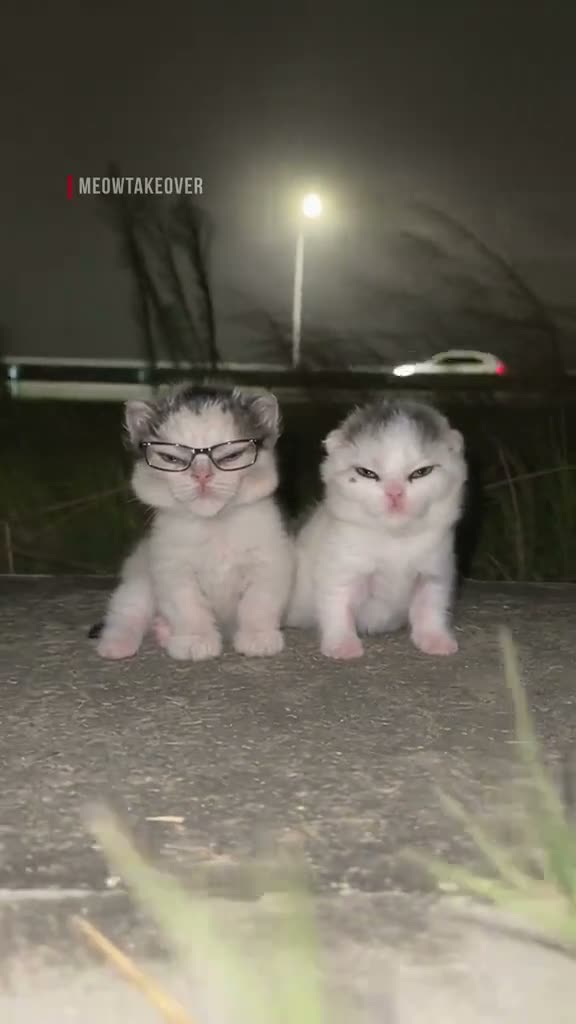
The clip shows two cats side by side under roadside lights. One has an exaggerated, confident expression. Later shots keep the comparison between cats and the same dim outdoor setting. The joke depends on the contrast between their faces, not on a story or a product.
The page uses a short vertical excerpt from the original post. It keeps the source sound and links back to the creator. One pet photo takes the featured cat’s place, while the other cat and the road scene remain.
| Time | Beat |
|---|---|
| Shot 1 | A gray kitten in glasses sits beside a white kitten at night. |
| Shot 2 | The cats hold a smug look beside the road. |
| Shot 3 | A close shot shows an exaggerated cat expression. |
| Shot 4 | Another pair of cats face each other under the streetlights. |
02How to make the Cat Mogging AI video from one photo
The site uses a fixed recipe based on the linked source clip. You do not need to write a prompt or describe the cats yourself. Add one pet photo and the page assigns it to the featured role.
The source is a short cat comparison. The new pet appears where the gray cat leads, while the white cat and roadside setting stay in the sequence. The result follows the source timing, but each render can vary.
- Open the trend pageOpen the Cat Mogging page in AI Trend Club. The linked original is shown above the instructions.
- Start your versionPress Create your own to open the browser workflow. There is no app to install.
- Add a pet photoChoose one photo of a pet you have permission to use. Confirm that you have the right to use it.
- Choose a qualitySelect 480p for 692 credits or 720p for 1,556 credits. The button shows the exact credit amount before you spend.
- Make and downloadTap Make my video. When it is ready, download it with the trend sound or as a silent clip.
03The photo that works
The photo supplies the identity of the featured pet. The source has two cats, so the upload should clearly identify the one pet you want to place in the lead role.
- Use one pet photo that you have permission to use.
- Keep the pet’s face, ears and markings visible.
- Choose a clear picture of the pet.
- Avoid a group photo with several pets competing for focus.
- Avoid a blurred or covered face.
- Keep the joke about cats. This page is not for scoring human appearance.
04A starting prompt for another video model
AI Trend Club already has the scene and timing, so there is no prompt to write on this page. If you want to try the idea in a different video model that accepts a reference clip and image, you can start with this plain description.
Use the source clip as the timing and scene reference. Replace only the featured gray cat on the left with the pet in the reference photo. Keep that pet’s species, face, ears, fur, markings and natural proportions. Preserve the white cat and every other animal. Keep the dim roadside, streetlights, low camera and the close cat-to-cat comparison. Follow the original sequence of paired shots and exaggerated, smug expressions. Do not add a person, score anyone’s appearance, invent a new scene, or add text, logos or a watermark.05CapCut template or AI video?
A CapCut template is an editing layout. It can arrange clips or photos that you record or choose yourself, but a template does not put your pet into the linked source scene. The AI video workflow uses the original clip as a reference and places the pet photo into its featured role.
The difference is the source of the moving scene. With an edit template, you provide the footage. With this AI version, the existing cats, road and timing guide the result. After downloading, you can use CapCut to add captions or a sound you want.
- Use the AI version when you want the pet to take the featured cat’s place in this scene.
- Use an editing template when you want to arrange your own footage.
- The page can download the result with the source sound or silently.
06Is the Cat Mogging AI video free?
Watching the original and reading the trend page are free. A new account receives 25 welcome credits, which cover a few images but not this video. The 480p render uses 692 credits and the 720p render uses 1,556 credits. The site shows the charge before you submit the video.
The Week pass costs $6.99 and includes 800 credits. That covers one 480p video, but not the 1,556-credit 720p version. The 1,000-credit pack costs $9.90 and also covers the 480p version, but not 720p. A failed video returns its credits automatically.
| Option | Price | Credits |
|---|---|---|
| Week pass | $6.99 | 800 |
| 1,000 credits | $9.90 | 1,000 |
07Post it
If you want the same sound, download the version with the trend sound. When you publish, credit @meowtakeover and link to the original post. The page links to the source so viewers can find the creator.
Keep your caption about the playful expression and the cat comparison. Here are a couple of short starting points.
- A confident look under the streetlights.
- My cat came ready for the close-up.
08Questions
- What is the Cat Mogging trend?
- It is a short cat-to-cat comparison built around an exaggerated, confident expression beside another cat.
- How do I make the Cat Mogging video?
- Add one pet photo on the trend page, then tap Make my video. The site follows the linked source clip and does not ask you to write a prompt.
- Can I use my own cat photo?
- Yes. Use one clear pet photo that you have permission to use. The photo takes the featured cat’s place.
- Which AI makes the cat video?
- AI Trend Club uses an AI video model guided by the original clip and the photo you add.
- Who made the original?
- @meowtakeover posted the original on TikTok on Nov 13, 2026. We link to it above.