01What happens in the Whiny Dog trend
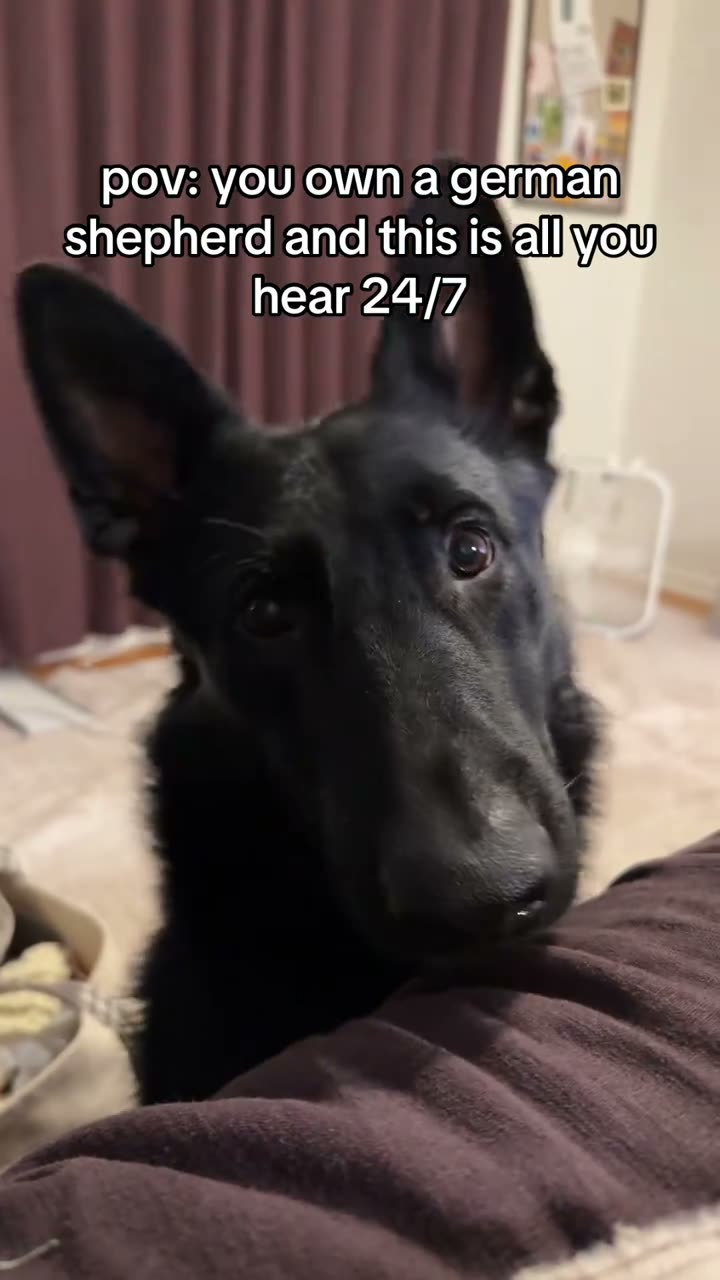
Whiny Dog is a five-second vertical pet video built around one close camera moment. In the linked version, a black German Shepherd turns toward the phone, pauses, tilts its head, then moves close enough for its face to fill the frame. An uploaded pet photo supplies the lead, while the original clip supplies the setting and timing.
This page follows the newer black German Shepherd close-up post by @trailsofgrizz. Its room and cushion make the sequence feel like a quick moment filmed at home. The trend is short, so the turn and approach do most of the work.
| Time | Beat |
|---|---|
| Shot 1 | A black German Shepherd sits behind a soft cushion and looks toward the phone. |
| Shot 2 | The dog turns its head and holds the camera's gaze. |
| Shot 3 | It tilts its head, then moves closer to the lens. |
| Shot 4 | The dog's face fills the frame at the end. |
02How to make the Whiny Dog AI video from one photo
AI Trend Club uses the reference clip to guide the scene. You do not need to write a prompt or film the cushion setup yourself. Start with one clear photo of the pet you want to feature, then follow the page flow.
- Open the trend pageGo to the Whiny Dog page on AI Trend Club. You can view the linked original clip and read the steps before choosing a photo.
- Start the videoPress Create your own to open the creation flow for this trend.
- Add one pet photoUpload a clear photo of your dog or cat, and confirm you have permission to use it. This one-photo recipe uses that pet as the lead in the reference scene.
- Choose a resolutionPick 480p for 231 credits or 720p for 346 credits. The button shows the exact credit amount before you spend.
- Make and downloadTap Make my video. It is ready in a few minutes. This recipe creates a silent video, so choose any sound separately if you later share it.
03The photo that works
Choose one simple pet photo that makes the face easy to identify. The photo supplies the dog or cat; the reference video supplies the cushion, room, camera position and movement.
- Use one clear photo of a dog or cat.
- Keep both eyes and the muzzle visible.
- Choose the single pet that should take the lead role.
- Avoid a group of pets in one photo.
- Do not cover the pet's eyes or muzzle.
- Expect the original room and cushion to come from the reference clip, not your photo.
04The Whiny Dog AI prompt
You do not need a prompt on AI Trend Club. If you want to try the idea in another video model that accepts both a reference photo and a reference clip, you can start with this description and adjust it to that model's controls.
Use the reference video for the timing and room. Use the reference photo as the identity source for one natural dog or cat. Open with the pet sitting behind a soft cushion in a vertical home video. Have it turn toward the phone, pause, tilt its head, then move closer until its face fills the frame. Keep the room, cushion, curtains, camera angle and movement. Preserve the animal's species, face, eyes, muzzle, fur and markings. Do not add any text, logo, extra animal, voice or soundtrack. Keep the result silent.05CapCut template or AI video?
A standard CapCut template can arrange clips you record and add. It does not by itself put your pet into this original camera scene from one photo. The AI video flow uses a reference clip and your uploaded pet photo to make a new version of the same close-up sequence.
The two approaches can work at different stages. Use an editing app after downloading if you want to add captions or other finishing touches. This recipe's output is silent, and the Whiny Dog page links to the source post so you can check the reference before you start.
06Is the Whiny Dog AI video free?
You can watch the original clip and read the trend page without paying. The free image preview lets you check how a pet photo fits one frame; it is not a finished video. Making and downloading the full video uses credits.
A new account receives 25 welcome credits. That is enough for a few images, but not enough for this video. A failed video returns its credits automatically. Check the button before confirming because it shows the current cost for the selected resolution.
| Option | Price | Credits |
|---|---|---|
| Week pass | $6.99 | 800 credits |
| 1,000 credits | $9.90 | 1,000 credits |
07Post it
The remake is silent, so add a sound only if you have permission to use it. Credit @trailsofgrizz and link to the original post when you share a version of the trend.
Keep the caption focused on the camera-close reaction. These ideas describe the pet's movement without claiming that a generated video has been tested.
- My dog saw the camera and had to get closer.
- One head tilt, then right up to the lens.
08Questions
- Is there a Whiny Dog AI template?
- AI Trend Club has a page for this pet video trend. Add one clear dog or cat photo to place your pet in the close-up reference scene.
- Which AI makes the Whiny Dog video?
- The page uses an AI video model guided by the original clip. You do not need to choose a model or write a prompt in the AI Trend Club flow.
- Can I make it on my phone?
- Yes. Open the page in a browser, press Create your own and add the pet photo you want to use. There is no app to install.
- Can I make the video for free?
- You can view the page, original clip and one-frame image preview without paying. The full video costs credits; 25 welcome credits are not enough for it.
- Who made the original?
- The linked black German Shepherd post was published by @trailsofgrizz on TikTok on Nov 10, 2026.