01What happens in the Singing Dog trend
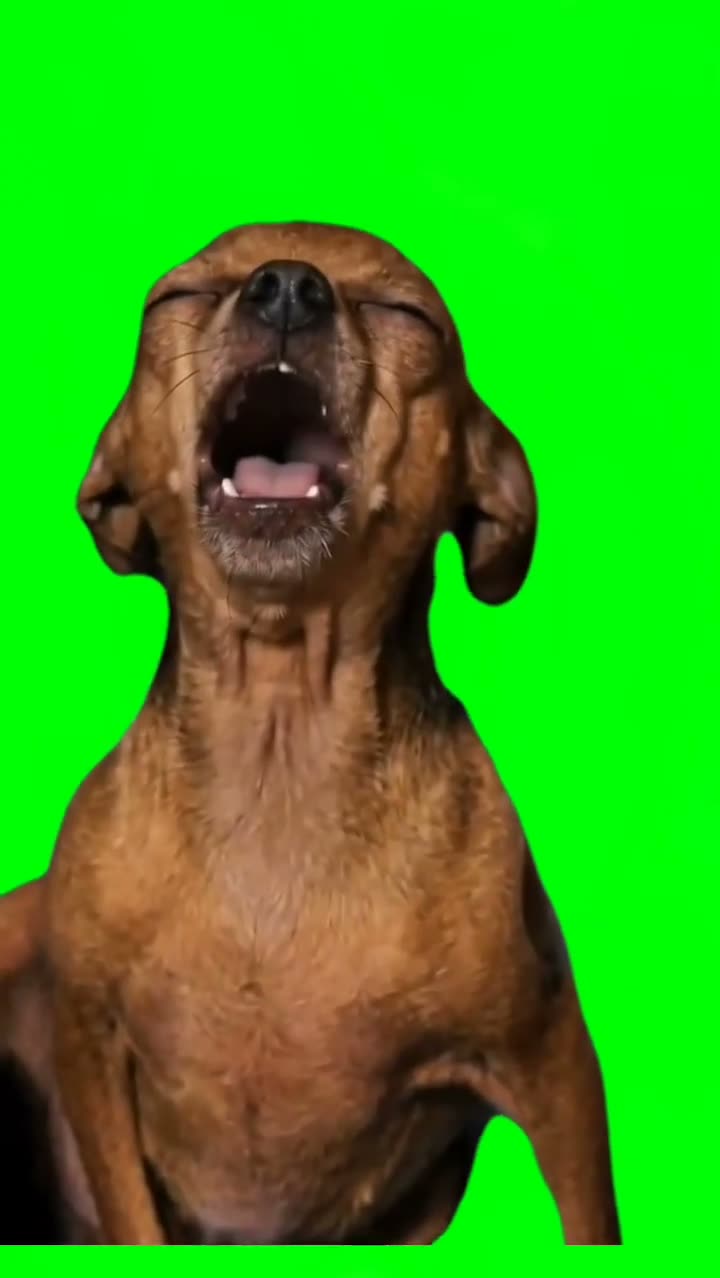
The reference clip shows a brown dog facing the camera against a flat green background. The dog lifts its muzzle, opens its mouth, pauses, and opens it again before turning slightly. The simple background keeps attention on the animal’s face and the timing of those expressions.
The selected TikTok post by @editscc446 is the original shown on the page. It had 2.7M views and 189K likes when checked on Nov 20, 2026. The page also notes newer examples of the format, but this creator post is the reference for the workflow. The generated video is a separate edit using a photo of your own dog.
| Part of the reference | What the prompt aims to keep |
|---|---|
| Background | Flat green screen |
| Camera | Fixed frontal view |
| Action | Muzzle lift, pause, second open-mouth beat |
| Audio | Silent generated output |
02Make a silent video from your dog photo
Open the trend page and check the creator post first. When you choose to make your version, add a clear photo of your own dog. The reference clip stays attached to the workflow so the editor can follow its framing and movement. The page asks for a silent output; it does not add the original music or dialogue.
Use the controls shown in the current editor. Read the price on the submission button before you start. The video request can take time, so keep the page open until the job reports a final result. If a request has an unknown status, check that same job before submitting another one.
- Open the trend pageReview the linked post by @editscc446 and the silent-video description.
- Choose a dog photoUse a clear front-facing photo of your own dog.
- Read the promptCheck that only the dog changes while the green background and camera remain.
- Check the priceAs checked on Nov 20, 2026, standard 480p uses 600 credits and HD 720p uses 1,348 credits. The editor button shows the current amount before you start. The video request can take time, so keep the page open until the job reports a final result. If a request has an unknown status, check that same job before submitting another one.
- Review and downloadInspect the finished clip and choose silent download if that option is shown.
03Choose a useful photo of your dog
The most useful starting photo is a clear view of one dog’s face, muzzle, ears and upper body. Keep the dog facing the camera so the model can read the shape of the nose and eyes. A photo taken in ordinary light is easier to inspect than one with a heavy color effect. The green background from the reference is kept by the prompt, not by the photo.
Use a photo of a dog you own or have permission to use. Do not upload a stranger’s pet photo from a social account without permission. Avoid a group photo because this workflow has one lead dog. If the picture cuts off the muzzle or hides the ears, choose another one before submitting.
The generated video may adjust fur details, mouth shape or expression. Review the result for a natural canine face and body. The prompt does not ask for a human face, human teeth or a second animal. If the model changes those features, do not share that result as though it were a faithful portrait of your pet.
- Use one dog, seen from the front.
- Keep the eyes, muzzle and ears visible.
- Choose a sharp photo with ordinary lighting.
- Use only an animal photo you have permission to edit.
04What the motion prompt means
The prompt asks the model to replace the brown dog in the reference with the dog in your photo. It aims to preserve the flat green background, fixed frontal framing and sequence of mouth movements. It describes a lifted muzzle, a short pause and another open-mouth beat, followed by a small turn.
The reference was posted with a song-related caption, but the generated edit is silent. The page does not provide a music license or copy the source audio into your video. If you later choose to add music, use a sound you are authorized to use on the platform where you share it.
Recreate the sequence shown in the reference video with the dog in the uploaded photo replacing only the brown dog. Keep one dog facing the camera against the plain green background. Preserve the fixed frontal framing, lifted muzzle, first open-mouth expression, brief pause, second open-mouth expression and slight turn. Keep a natural canine face, fur and body. Do not add music, dialogue, text, extra animals or a watermark. Return a silent vertical video with the same overall timing as the reference.05Check the result before downloading
Watch the whole clip once for identity and once for motion. Check that the dog still resembles your photo, stays canine and remains against a green background. Look at both open-mouth moments and the pause between them. The short turn at the end should not replace the main action or cut off the dog.
The edit is not guaranteed to match every frame. Fur markings, eye shape and mouth movement can vary. If the dog is hard to recognize, use a clearer source portrait. If the background changes, make the plain green setting more explicit in the prompt. Change one instruction at a time so you can tell whether the result improved.
06Keep music and pricing separate
The reference TikTok may contain its creator’s sound, but the generated workflow is silent. Do not treat the original audio as a track you can reuse. The page credits the creator and shows the original reference; it does not package that music with a new video. Add a sound only if you have permission to use it in the place where you publish.
The live editor displays the credit cost before submission. Check that amount before confirming. A page view or a preview image is not a paid video sample, and this tutorial does not start a generation job. If the job takes time, return to the same task record to confirm its status before making another request.
| Item | What to know |
|---|---|
| Trend page | Links and credits the creator post |
| Generated edit | Silent video using your dog photo |
| Credit cost | Shown by the editor before submission |
| Music | Not included in the generated video |
07Share a checked pet edit
Only keep a result that still looks like your dog and does not add an unwanted face, extra animal or misleading scene. If the dog appears distressed or the movement looks unnatural, choose not to share it. The prompt asks for a playful expression, not an injury or a real singing performance.
When you post the result, identify it as AI-edited if viewers could mistake it for real footage. The original clip belongs to its creator, @editscc446, and remains linked on the trend page. Do not present your output as the creator’s video or claim that they endorsed your version.
The flow is simple: add a permitted dog photo, review the prompt and credit amount, create a silent edit, and inspect it before downloading. The model follows a reference but can vary. Keeping the photo clear and the request focused makes the result easier to review.
- Review the dog’s face and body.
- Confirm the generated clip is silent.
- Keep the creator credit with the reference.
- Share only a result you are comfortable identifying as AI-edited.
08Questions
- Can I use a photo of my dog?
- Yes. Use a clear photo of a dog you own or have permission to edit.
- Will the generated video include the original song?
- No. The generated edit is silent and does not include the original music.
- Will my dog look exactly like the source dog?
- The prompt replaces the source dog with the dog in your photo, but facial and fur details can vary. Review the clip before downloading.
- Who posted the reference clip?
- The selected TikTok post is by @editscc446. The page links to that creator.