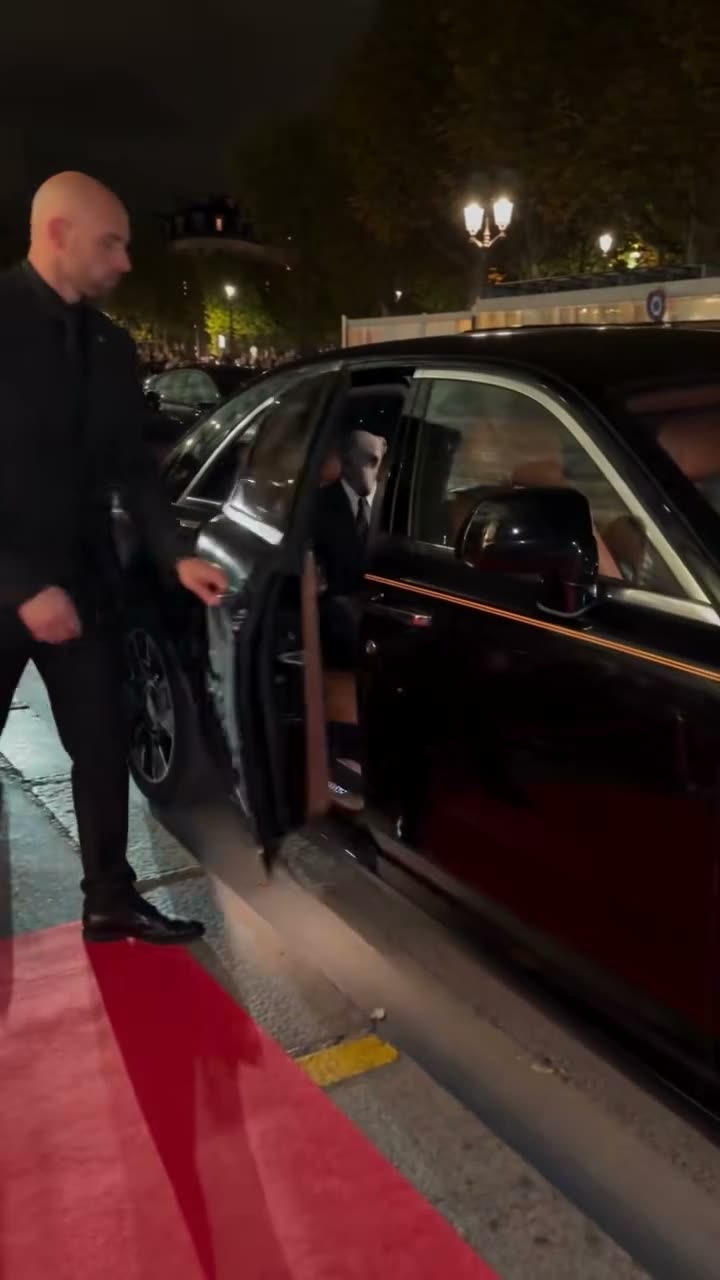
01What happens in the Pet Red Carpet Arrival trend
A dog in a dark suit arrives by car and steps onto a red carpet. An escort walks nearby while photographers and onlookers watch. The dog poses for pictures before the group continues toward a venue. The trend page lets one pet photo play the dog's role in the opening arrival scene.
The linked TikTok post by @shoto_cut was published on Nov 10, 2026. It had 3,500,000 views and 328,400 likes when checked on Nov 19, 2026. These numbers describe that post at that time and can change. The linked source is about 10 seconds long, while the video recipe uses its first 4 seconds as the reference.
| Part of the clip | What happens |
|---|---|
| Arrival | A suited dog begins to leave a dark vehicle. |
| Red carpet | The dog steps onto the carpet with an escort nearby. |
| Photos | Photographers take pictures as the dog pauses. |
| Walk-in | The dog and escort head toward the venue. |
02How to make the Pet Red Carpet Arrival AI video from one pet photo
The page opens a video workflow guided by the first part of the linked clip. Add one pet photo and confirm that you have permission to use it. The site uses the photo for the dog in the arrival scene. The escort, photographers, crowd and red carpet remain part of the reference.
Before submitting, check the preview details and the credit amount shown for your chosen resolution. The workflow is prepared, but no generated sample has been reviewed for this trend. Treat the original as a scene reference, not a promise that every output will match it exactly.
- Open the trend pageWatch the linked original and read which part of the arrival scene the recipe uses.
- Choose the creator workflowPress Create your own to start the video workflow for this trend.
- Add a pet photoUpload one photo of a pet you have permission to use, then confirm that permission.
- Review the priceChoose 480p or 720p and check the credits shown before spending anything.
- Create and inspectSubmit the video, then check that your pet, the escort and the red carpet scene look right.
03The pet photo that works
Use one photo of your pet. The linked original features a dog in a suit, and the recipe is designed for a pet to take that role. A clear view of your pet's face and coat markings gives you details to compare with the result. The output may vary, so review it before you save or share it.
The recipe changes the featured pet. It does not promise to change the paper portrait or signature visible in the original scene. The escort, crowd and photographers are part of the source, so check that they remain distinct from your pet in the generated video.
- Use one pet photo that you have permission to use.
- Choose an image that clearly shows the pet's face and markings.
- Use a cat or dog photo for the pet role.
- Check that the escort and crowd stay separate from your pet.
- Review the paper portrait and signature; they are not promised to change.
- Watch the result before sharing it.
04A starting prompt for the Pet Red Carpet Arrival
AI Trend Club uses the linked clip to guide the video, so there is no prompt to type on the site. If you use another video model that accepts a reference clip and photo, this description can help explain the scene.
Recreate the opening red carpet arrival using the pet in the reference photo as the suited dog stepping out of a dark vehicle. The pet walks onto the red carpet as a human escort stays nearby and photographers and onlookers watch from behind a barrier. Keep the camera framing and the brief arrival timing. Preserve the crowd, vehicle and paper portrait as separate scene details. Change only the pet. Keep the result silent, and do not add text, logos or a brand endorsement.05CapCut template or AI video?
A preset editing template arranges clips or photos that you record or choose yourself. It does not place your pet into the linked arrival scene. The AI video workflow starts with the reference clip and uses your pet photo to adapt the featured role.
The workflow is prepared, but its generated result has not been checked on a sample video. The image on the trend page is the original creator's scene, not a remake made by AI Trend Club. If you download your own result, you can edit it later or add text in a separate editor.
06Is the Pet Red Carpet Arrival AI video free?
The original clip and trend page are free to view. New accounts receive 25 welcome credits, which can make a few images but are not enough for this video. One video uses 185 credits at 480p or 415 credits at 720p. A failed video returns its credits automatically.
The lowest listed option that covers one standard video is the Week pass at $6.99. A 1,000-credit pack costs $9.90 and also covers the standard video. The exact amount is shown before you submit, so check the button and your balance before starting.
| Option | Price | Credits |
|---|---|---|
| Week pass | $6.99 | 800 |
| 1,000 credits | $9.90 | 1,000 |
07Post the pet arrival
Watch the full result before posting. Check that your pet stays recognizable and that the arrival scene remains easy to follow. The reference includes a paper portrait and signature, but the workflow does not promise to change either one. Credit @shoto_cut when you refer to the linked original.
The clip includes the source sound. If you share your own remake, use sound and attribution that fit your post, and make clear that the scene is an AI edit. Here are a couple of short caption ideas based on the red carpet arrival format.
- My pet made a red carpet entrance.
- A little tuxedo moment for the camera.
08Questions
- What is the Pet Red Carpet Arrival AI video?
- It is a short arrival scene where your pet takes the place of a suited dog walking onto a red carpet.
- Can I make it on my phone?
- The site workflow runs in a browser. Add one permitted pet photo and review the shown credit price before submitting.
- How much does it cost?
- One video uses 185 credits at 480p or 415 credits at 720p. The editor shows the price before you submit.
- Who posted the original?
- The linked TikTok post is by @shoto_cut and was published on Nov 10, 2026. We link to it above.