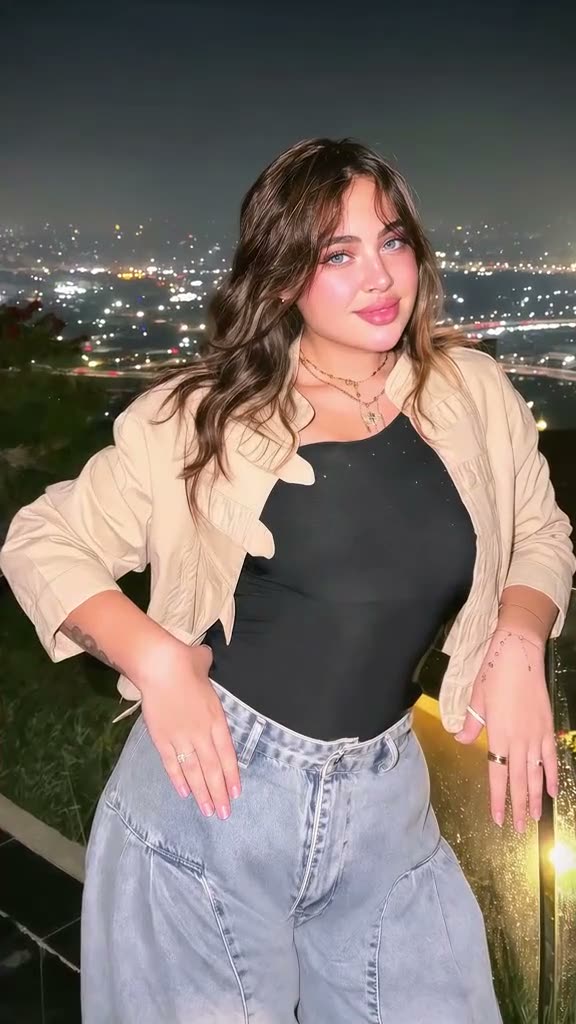
01What the Lofi Dusk Filter changes
The Lofi Dusk Filter is a lighting treatment for one portrait. The reference shows a darker setting, a warm outline along the hair and shoulders, and enough gentle light on the face to keep the expression visible. The page adapts those details to the existing image editor and creates one still image.
The linked TikTok post by @aheem94qw2 is a style reference. It does not mean the image editor applies a named camera filter or reproduces the creator’s finished photo. You add a portrait, read the filled-in prompt and decide whether to create a new interpretation. The output is not a video or a real dusk photograph.
| Visual detail | How it guides the edit |
|---|---|
| Background | A subdued dusk tone |
| Hair and shoulders | A narrow warm backlight |
| Face | Soft front light that keeps features visible |
02Make the portrait in the image editor
The trend page opens the image editor with the lighting description ready to review. A result depends on the original photo as well as the prompt. Pick an image with a clear face, visible hair or shoulders, and a background that can be changed without confusing the subject.
The editor shows the current credit amount before it submits the request. Read that amount and the prompt, then continue only if the description matches what you want. The result is one still image. It does not add camera movement, music or animation.
- Open the pageReview the Lofi Dusk Filter reference and the description of the look.
- Add a photoChoose one portrait you own or have permission to edit.
- Review the lightCheck for a muted background, warm edge light and soft face light.
- Check the priceRead the credit amount displayed by the editor before submission.
- Inspect the resultReview the face, hair, clothing and background before saving.
03Pick a photo that gives the light room
A useful starting photo has a visible face and some separation between the person and the background. The image can be taken indoors or outside. The prompt changes the lighting impression, so it does not require a real evening location. Keep the face bright enough to see, especially around the eyes.
Use one photo of an adult who has agreed to the edit. A portrait with hair visible around the shoulders gives the edge light an area to follow. If the person wears a head covering or distinctive clothing, check that the result keeps those details. The prompt guides the editor, but cannot guarantee that every piece of clothing or background stays identical.
Avoid starting with a photo that is almost black or has a strong flash that erases detail. If the face is already hard to see, the editor may not have enough visible information to preserve it. A simple image gives the lighting treatment a clearer job: darken the background, outline the subject gently, and keep a soft light on the face.
- Keep the face visible in the source image.
- Choose a portrait with hair or shoulders separated from the background.
- Use a photo you have permission to edit.
- Remove heavy filters when they hide facial detail.
04Review the prompt before you create
The prefilled prompt asks for a muted dusk background and a narrow warm light along the person’s hair and shoulders. It also asks for soft front light on the face. Those are the important parts of the look. Keep them in place if you change the color palette or atmosphere.
A useful edit request describes the visible result rather than promising a particular camera, lens or film stock. The editor works from a single photograph, so it may change background details. If you care about a specific feature, state it plainly and inspect the image when it is done.
Edit the uploaded portrait of one consenting adult into a subdued dusk still image. Keep the same recognizable person, facial features, skin tone, hair, clothing and pose. Darken the background to a calm dusk tone. Add a narrow warm backlight along the hair and shoulders, and preserve soft natural light on the face. Make one complete still image, not a video or animation. Do not add extra people, text, logos or a watermark.05Judge the light, not only the color
A dark blue or purple background alone does not make the requested look. Check whether the person remains clear against it and whether a restrained warm outline helps separate the hair and shoulders from the scene. The face should still look softly lit. A strong halo, overexposed edge or completely black face may move away from the requested style.
Compare the generated result with the source portrait for identity, eye shape, skin tone, hairstyle and clothing. The model may change background objects or small textures. If a feature matters, mention it in the prompt and inspect the next result carefully. Do not assume the system can keep every pixel unchanged.
06Credits and realistic expectations
The page uses the existing image editor, which shows a five-credit price before submission. The displayed price is the amount to read when deciding whether to continue. The editor creates a single still image; it does not animate the portrait, make a short film or create a camera preset you can install.
The term dusk describes the visible lighting style on this page. It is not a promise that the generated background will match a real city or a particular time of day. Clothing, hair and fine highlights can shift. Check the preview at full size before saving it.
| What you add | What the editor makes | What it does not promise |
|---|---|---|
| One permitted portrait | One AI-edited still image | An exact copy of a real location |
| A clear face and visible shoulders | Soft face light and a warm rim | Unchanged pixels or clothing texture |
| A reviewed prompt | A new interpretation of dusk lighting | A moving video or filter app |
07Save a version you have checked
If the first image feels too bright, ask for a subtler outline and a less luminous background. If the face looks dark, emphasize soft front light. Keep the instruction about preserving the person’s visible features. Adjust one part at a time so you can see what changed.
Use the result as an AI-edited portrait and review it before sharing. If someone else is pictured, make sure they agreed to the edit. The linked creator post belongs to @aheem94qw2; this page provides a new prompt and does not reuse the creator’s generated output.
The editor’s price appears before submission, so you remain in control of whether to create another version. A new attempt can still vary. Choose a source photo that makes the desired lighting clear, use precise wording, and keep the final image only if the person and treatment look right to you.
- Check the face and eyes at full size.
- Revise the light direction with plain wording.
- Keep permission for the uploaded photo.
- Describe the result as AI-edited when you share it.
08Questions
- How many photos do I need?
- Use one clear portrait you have permission to edit.
- Does this create a video?
- No. The image editor creates one still portrait.
- Can it reproduce the linked creator’s exact image?
- No. The linked post is a reference for visible lighting, not a sample to copy.
- Who posted the reference?
- The linked TikTok post is by @aheem94qw2. The wider trend origin has not been confirmed.