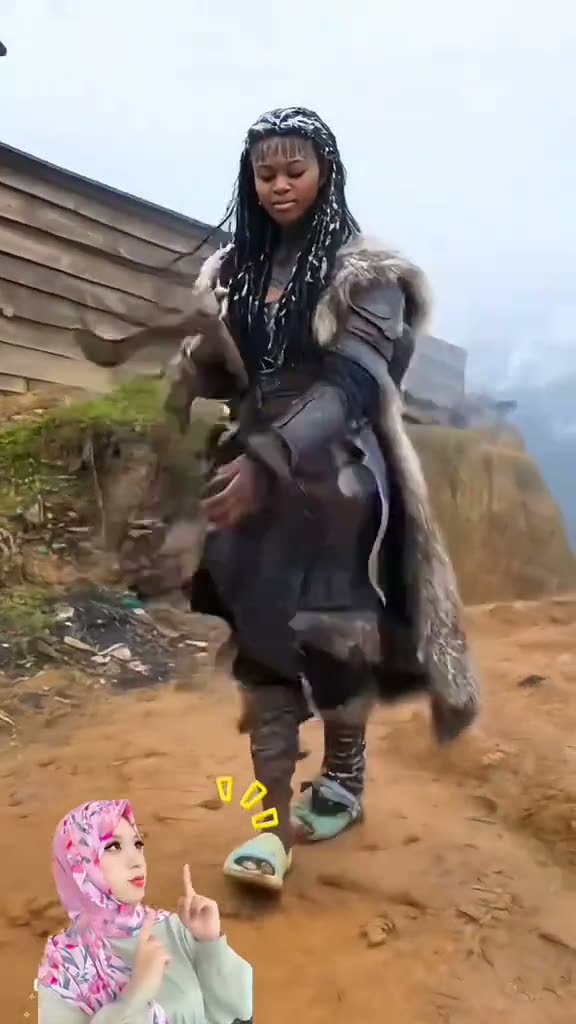
01What happens in the Frozen Viking Warrior trend
The Frozen Viking Warrior look combines a dark fur outfit with a snowy mountain reveal. The action reference opens indoors, moves through a spin and ends with a full-body stance. The axe stays resting on the performer’s shoulder in the final pose.
This page links two different creator videos for clarity. The TikTok tutorial by @user6146384046736 shows the snowy result in its opening seconds before moving to phone-editing steps. The action reference used by the video recipe is a separate 8.08-second clip by @brivaelbackup. The page identifies both creators so the tutorial and the reference action are not confused.
| Time | Beat |
|---|---|
| Shot 1 | The performer appears indoors in a dark fur-covered outfit. |
| Shot 2 | A spin leads into the snowy mountain reveal. |
| Shot 3 | The warrior holds a still pose with the axe resting on the shoulder. |
02How to make the Frozen Viking Warrior AI video from one photo
Use one adult full-body photo for the warrior role. The AI Trend Club page uses the separate action reference as the video guide and keeps the snowy reveal sequence in view. You can read the tutorial and check the reference links before starting. Everything runs in your browser, so you do not need to install an app.
Follow these steps to create the video:
- Step 1: Open the trend pageOpen the Frozen Viking Warrior page and review the linked tutorial and action reference.
- Step 2: Start your projectPress Create your own to open the video setup.
- Step 3: Add a full-body photoUpload one adult photo for the lead role. Confirm that you have permission to use the image.
- Step 4: Choose the resolutionThe 480p version costs 373 credits. The 720p version costs 838 credits. The button shows the exact amount before you spend.
- Step 5: Make and downloadTap Make my video. Download the silent result when it is ready. Add a sound in TikTok or CapCut if you want one.
03The photo that works
The uploaded image supplies the warrior’s identity. Since the action shows a full-body transformation and a final standing pose, use a photo that shows the adult clearly. Check the free preview before paying for the complete video. The preview helps you see whether the person is placed into the snowy setting as intended.
- Use one adult full-body photo.
- Choose an image you have permission to use.
- Review the free preview before making the full video.
- Keep the request focused on the dark fur outfit and snowy mountain reveal.
- Keep the axe in the final shoulder-rest pose.
04The Frozen Viking Warrior AI prompt
AI Trend Club does not require a written prompt. If you are trying another video model that accepts a reference image, you can use the text below as a starting description. It is for a separate workflow, not a required step on the trend page.
This description follows the separate action reference and keeps the transformation simple. It identifies the uploaded person as the lead and leaves the costume, mountain and pose in the same order.
Show the person in the reference photo in the sequence from the action reference. Start indoors with the person in a dark fur-covered Viking outfit. Have the person spin as the scene changes to a snowy mountain. Reveal the same person in a full-body warrior look, keeping the fur clothing and snow-covered peaks. Finish with the person standing still and the axe resting on the shoulder. Preserve the camera framing and order of the actions. Replace only the lead. Add no extra people, text, logos, or sound.05CapCut template or AI video?
A CapCut template arranges footage that you record or choose yourself. It can add timing, cuts or text to your own clips, but it cannot put your photo into the original snowy mountain transformation. It also does not replace the lead in the action reference.
The AI video uses a reference clip and maps your uploaded photo to the main role. In this case, the recipe uses the separate action clip by @brivaelbackup, while the page also links the French tutorial by @user6146384046736. The distinction matters because each creator contributes a different source.
The finished AI video is silent. After downloading it, you can use CapCut to add a sound or caption. If you make a separate template edit from your own footage, label it as your own edit and do not suggest that the creator’s source scene is part of your recording.
06Is the Frozen Viking Warrior AI video free?
The tutorial, original action link and trend page are free to view. A new account gets 25 welcome credits, enough for a few images but not enough for this video. The 480p version uses 373 credits. The 720p version uses 838 credits. Review the number shown beside the resolution before you submit.
The Week pass costs $6.99 and includes 800 credits. It covers one standard 480p video in this format. A 1,000-credit pack costs $9.90 and covers the listed 720p amount. The Week pass is a subscription. If a video fails, its credits come back automatically.
| Option | Price | Credits |
|---|---|---|
| Week pass | $6.99 | 800 |
| 1,000 credits | $9.90 | 1,000 |
07Post it
The generated file is silent, so add a sound in TikTok or CapCut if you want audio in the post. Credit both creators in context: @user6146384046736 for the linked tutorial and @brivaelbackup for the separate action reference used by the recipe.
Keep any caption focused on the costume change and the snow scene. For example: “Indoor start, snowy finish,” “The fur look meets the mountain scene,” or “A still pose at the summit.” Those ideas describe the visual sequence without presenting the AI version as the original clip.
08Questions
- Is there a Frozen Viking Warrior AI template?
- The page links a tutorial and the action reference used for the remake. A CapCut template is a different format.
- Which AI makes the Frozen Viking Warrior video?
- AI Trend Club uses an AI video model guided by the original action clip.
- Can I make it on my phone?
- Yes. The AI Trend Club page works in a browser, with no app to install.
- Who made the tutorial and action reference?
- The tutorial is by @user6146384046736. The separate 8.08-second action reference is by @brivaelbackup.
- Does the download include sound?
- No. The generated video is silent. Add a sound separately in TikTok or CapCut if you want one.