01What happens in the Virgin Guadalupe Hug trend
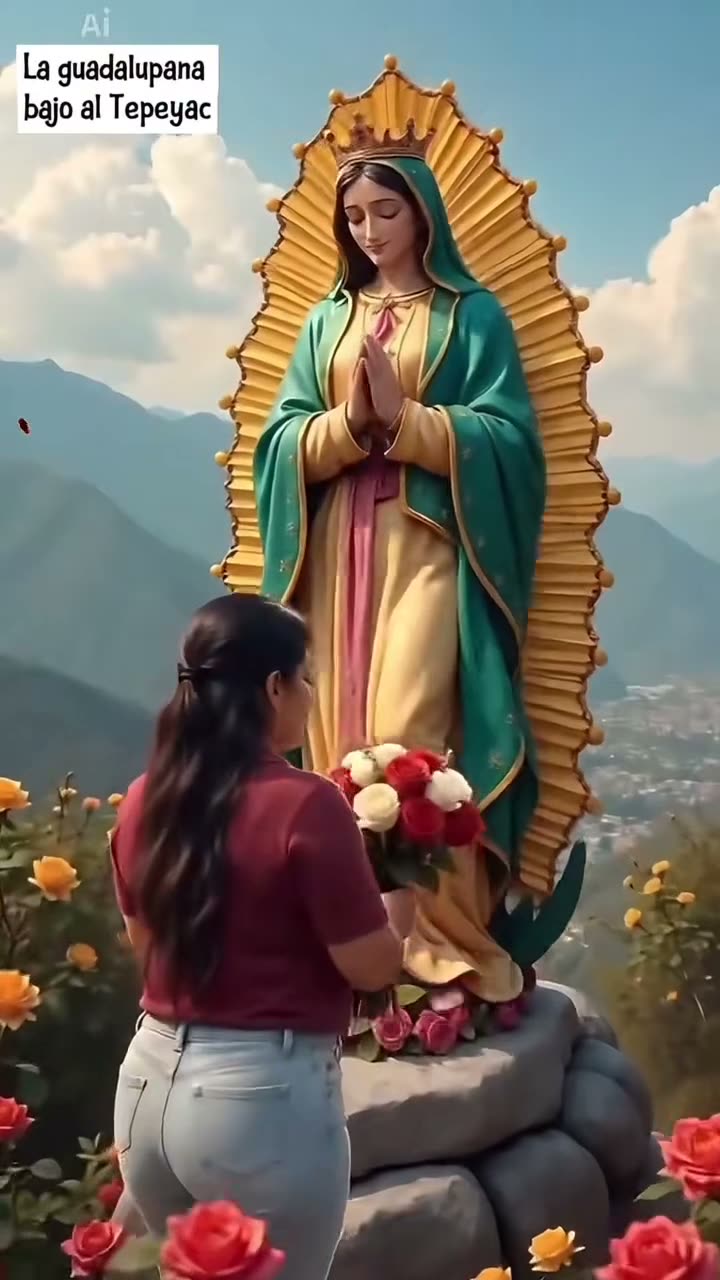
The Virgin Guadalupe Hug AI trend shows an adult woman approaching the Virgin of Guadalupe figure with flowers. The figure reaches toward her, and the two move into a gentle embrace. The linked example is an 8-second silent excerpt from a post by @c0pe6zs0b9, dated Nov 18, 2026.
The AI Trend Club page uses that short source scene as a reference. One adult photo takes the woman's role. The Virgin figure stays separate, along with the bouquet, rose petals, hillside garden, and camera sequence. The page links to the creator's post, so viewers can open the original context.
The post caption calls it a Virgin of Guadalupe hug effect and asks how to make it. This guide explains the AI video version: choose one portrait, let the video model follow the reference, then download a silent clip. It does not claim that the account linked above created the first version of the idea.
| Time | Beat |
|---|---|
| Shot 1 | A woman in a burgundy top approaches the Virgin figure with a bouquet. |
| Shot 2 | She raises the flowers as the figure reaches toward her. |
| Shot 3 | They move closer while the garden and rose petals remain in view. |
| Shot 4 | The excerpt ends with a gentle embrace in the same vertical frame. |
02How to make the Virgin Guadalupe Hug AI video from one photo
You do not need to write a prompt on AI Trend Club. The trend page already connects the reference clip, the role to replace, and the details that should stay. Review the source and the photo role before you start. The site asks you to confirm that you have permission to use the photo you upload.
The create page shows the credit amount beside each resolution before you spend. The 8-second reference is silent, and the generated clip is silent too. Add any sound separately after downloading if you want a version with music.
- Open the trend pageOpen the Virgin Guadalupe Hug page and review its linked original post. The page shows the short reference scene and credits the creator.
- Choose one portraitAdd one adult photo of the person who should take the woman's role. Confirm that you have permission to use the image.
- Check the sceneThe source excerpt shows the woman with flowers approaching the Virgin figure. The recipe keeps the figure, flowers, petals, and hillside setting in the scene.
- Choose a resolutionSelect 480p for 369 credits or 720p for 830 credits. Check the button before you spend, because the exact amount appears there.
- Make and downloadTap Make my video and wait for the render. Download the silent vertical clip when it is ready. If the render fails, the credits are returned automatically.
03The photo that works
Use one adult portrait for the person who replaces the woman approaching the Virgin figure. The photo role is limited to that adult; it is not a second role in the scene.
- Choose a photo of the adult who should appear in the video.
- Use an image that you have permission to use.
- Keep the adult's face easy to identify in the photo.
- Add one photo only. The source figure remains part of the reference scene.
- Do not ask the video model to replace or alter the Virgin figure.
- If you want sound, add it after download from an audio library available to you.
04The Virgin Guadalupe Hug AI prompt
AI Trend Club does not ask you to write a prompt. It uses the original clip to guide the scene and the uploaded portrait for the woman's role. If you want to try a similar idea in another video model that accepts reference images, you can start with this prompt and adapt it to that model's controls.
Recreate the gentle sequence in the reference video. The person in the reference photo approaches the Virgin of Guadalupe figure, presents a bouquet, and moves into a calm embrace. Keep the figure separate and unchanged. Preserve the flowers, rose petals, stone platform, hillside garden, vertical camera framing, and the original order of movement. Change only the adult woman’s identity. Keep the interaction respectful and the motion natural. End on the embrace. Do not add text, logos, dialogue, or music.05CapCut template or AI video?
A CapCut template and an AI video workflow do different things. A template can assemble clips you filmed yourself, but that is not the same as placing your portrait into this linked scene. The AI video flow uses the source clip as a reference and puts one adult photo into the woman's role while keeping the Virgin figure and scene around her.
The creator's post describes the effect as a template, but AI Trend Club does not provide that third-party template. It gives you a separate way to create a version guided by the original clip. You can still open the downloaded video in CapCut to add a caption or select a sound. The generated file stays silent unless you add audio yourself.
06Is the Virgin Guadalupe Hug AI video free?
Viewing the original and the trend page is free. Making the video uses credits. A new account receives 25 welcome credits, which can make a few images but are not enough for this video. A failed video returns its credits automatically. The site displays the exact amount on the resolution button before you spend.
The Week pass costs $6.99 and includes 800 credits. That covers one 480p video at 369 credits, with credits left for other eligible uses. A 720p video uses 830 credits, so the Week pass does not cover a single 720p render by itself. The 1,000-credit option costs $9.90 and covers one 720p video at the listed rate.
| Option | Price | Credits |
|---|---|---|
| Week pass | $6.99 | 800 |
| 1,000 credits | $9.90 | 1,000 |
07Post it
The downloaded clip is silent. If you want the same sound as a version you saw, choose an audio track that is available for your account in TikTok or CapCut. Check the platform's current sound permissions before posting. Credit the original creator by handle: @c0pe6zs0b9. The source link is on the trend page.
Keep your caption simple and describe your own video. Do not imply that the original creator made your version. Here are a few short caption ideas based on the gentle, grateful tone of the scene.
- A quiet moment of gratitude.
- Flowers, faith, and a gentle embrace.
- A small tribute, made with care.
08Questions
- Is there a Virgin Guadalupe Hug AI template?
- The linked post caption describes the effect as a template. AI Trend Club offers a reference-video workflow: add one adult photo, and the video model follows the original scene.
- Which AI makes the Virgin Guadalupe Hug video?
- It uses an AI video model guided by the original clip. AI Trend Club does not require you to select a model or write a prompt.
- Can I make the Virgin Guadalupe Hug video on my phone?
- Yes. AI Trend Club runs in a browser, so you can open the trend page on a phone without installing an app. The create page shows the credits before you spend.
- Who made the original Virgin Guadalupe Hug video?
- The linked post is by @c0pe6zs0b9 and is dated Nov 18, 2026. AI Trend Club links to the creator's post and does not present it as its own sample.