01What happens in the Kiss Your Phone trend
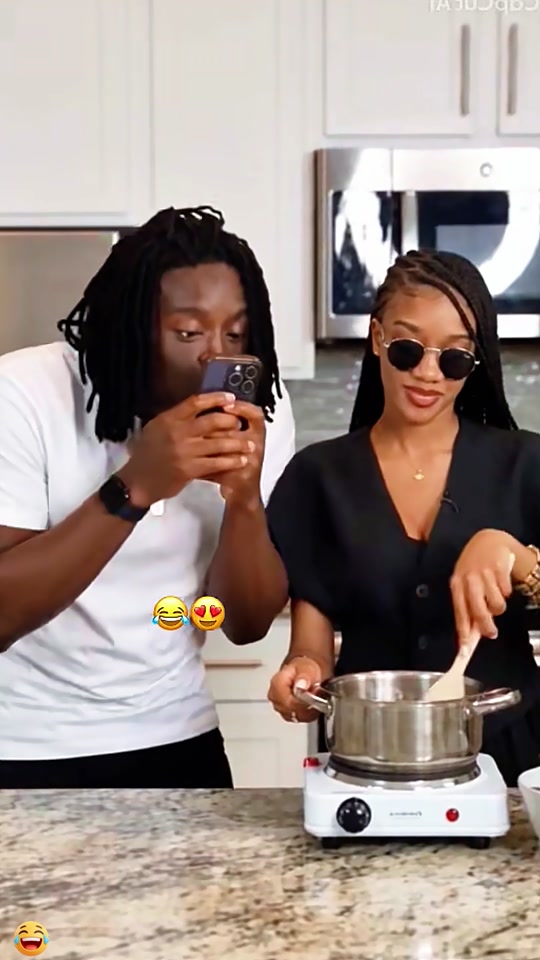
The Kiss Your Phone trend is a playful kitchen moment. One adult holds a phone, leans toward its screen and kisses it while a friend stays by the stove. The page embeds the creator’s TikTok post. The site’s silent video recipe follows a separate public five-second demo with different clothes, so the demo is a recipe reference, not the post shown above.
The linked TikTok post is by @user4947097136093 and was published on Nov 17, 2026. Its source metadata showed 457K views and 37K likes when checked on Nov 19, 2026. We have not confirmed who first made the wider format.
| Time | Beat |
|---|---|
| Shot 1 | In a kitchen, an adult holds a phone up in front of the camera. |
| Shot 2 | They lean toward the screen and kiss the phone. |
| Shot 3 | A friend stays beside the stove and pot as the joke plays out. |
02How to make the Kiss Your Phone AI video from one photo
AI Trend Club uses a prepared edit recipe, so you do not need to write a prompt. The photo you add plays the phone holder. The friend remains a separate person in the kitchen scene.
The editor keeps the friend, phone, pot and kitchen as the scene. It is meant to show one person kissing a phone. It does not make two people kiss. The result is private to your account, and you can download it when it is ready.
- Open the trend pageGo to the Kiss Your Phone page and view the original TikTok post linked there. The separate recipe demo is identified as a reference, not as the creator’s clip.
- Start your videoPress Create your own. The site opens the video workflow with the trend selected.
- Add one adult photoChoose one photo of an adult who has agreed to be in the edit. The photo is used for the person holding the phone, not the friend by the stove.
- Choose a resolutionThe button shows 231 credits at standard quality, 480p, and 519 credits at HD, 720p. Check the exact amount before spending.
- Make and review the videoTap Make my video. The render takes a few minutes. It is silent, and a failed video automatically returns its credits.
03The photo that works
You can review the prompt before the video starts. It spells out which person your photo replaces and which parts should stay. If the result is not right, check the lead role and scene instructions before trying again.
- Choose one adult photo for the phone holder.
- Use a photo of someone who has agreed to be in the edit.
- Keep the other person as a separate character in the scene.
- Review the prompt and check that the phone, friend, pot and kitchen stay in the setup.
- If the output changes the joke into a kiss between people, do not share it as the intended trend.
04The Kiss Your Phone AI prompt
There is no prompt to write on AI Trend Club. The edit recipe is set up for this scene. If you want to try another reference-video model, you can start with this description and adapt it to that model’s input fields.
Edit the supplied vertical reference video as a silent clip. Keep the kitchen, the pot, counter, phone, camera position, friend and reaction as they appear. Replace only the adult holding the phone with the person in the reference photo. The person keeps holding the phone, leans toward it and gives the phone a playful kiss. Do not make the two people kiss. Preserve the sequence and framing. Do not add music, dialogue, captions, text, logos or a watermark.05CapCut template or AI video?
A CapCut template assembles footage you record yourself. It can help add cuts, text or sound, but it does not put your photo into the kitchen scene. The AI video workflow uses a separate public demo clip to guide the phone-kiss action and places your photo in the lead role.
This Kiss Your Phone recipe produces a silent video. It does not include the post’s original sound or other audio. If you want a soundtrack, add the sound yourself in TikTok or CapCut after downloading. The page does not claim that the TikTok creator’s audio is included in your result.
The page still links to and embeds the creator’s original TikTok post. A separate public demo guides the edit action. Those are different clips. The demo is not presented as the original post or as an AI Trend Club result.
06Is the Kiss Your Phone AI video free?
You can view the trend page and linked original clip without paying. Creating a video uses credits. A new account receives 25 welcome credits, which is enough for a few images but not enough for this trend video. The editor shows the cost before you submit.
The Week pass provides 800 credits for $6.99. The 1,000-credit pack costs $9.90. Either option covers one Kiss Your Phone video at standard 480p or HD 720p. A failed video automatically returns its credits.
| Option | Price | Credits |
|---|---|---|
| Week pass | $6.99 | 800 |
| 1,000 credits | $9.90 | 1,000 |
07Post your Kiss Your Phone video
The video downloads without sound. If you add audio, choose the trend sound in TikTok or CapCut yourself. Credit @user4947097136093 when you refer to the creator’s original post, and link to that post so people can see the source. Do not label the separate recipe demo as the creator’s video.
The joke depends on the person kissing the phone and the friend staying nearby. Keep that setup clear in your caption. These short ideas describe only the playful phone moment and the friend’s reaction.
- One phone, one very serious kiss.
- My friend saw everything.
08Questions
- Is there a Kiss Your Phone AI template?
- AI Trend Club has a prepared reference-video recipe. You add one adult photo and do not need to write a prompt.
- Which AI makes the Kiss Your Phone video?
- It uses an AI video model guided by the original clip.
- Can I make it on my phone?
- The site workflow runs in your browser. There is no app to install.
- Does the video include the sound?
- No. The result is silent. Add the trend sound yourself in TikTok or CapCut if you want it.
- Who made the original?
- The linked TikTok post is by @user4947097136093 and was published on Nov 17, 2026. We link to it above.