01What happens in the Thank You Baby Pet trend
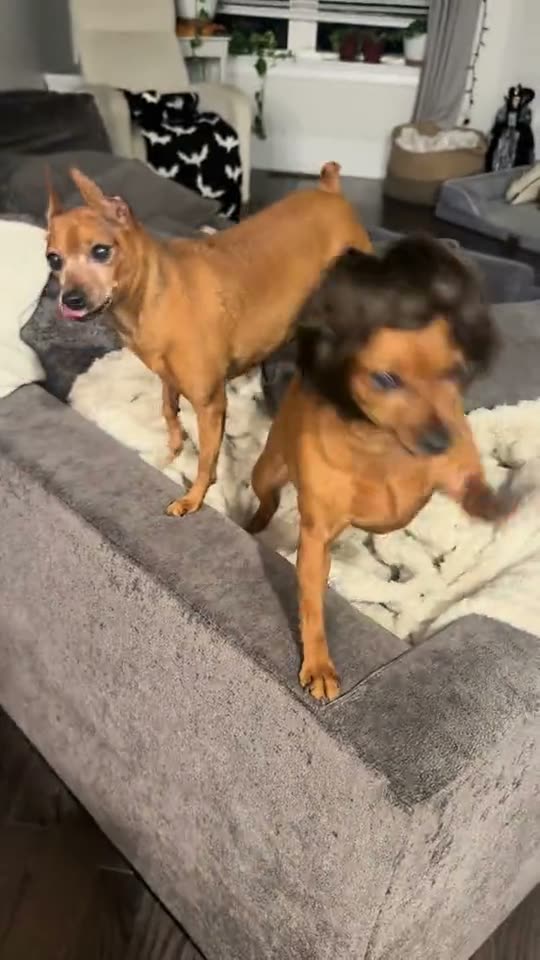
The Thank You Baby Pet trend puts a small visual joke in the middle of an ordinary living room. A brown dog wears a short dark bob wig and sways on a sofa while a second dog stays in the background. The scene is simple, which makes the wig and the dog's movement the main things to notice.
The original TikTok from @packofpinschers is the clip featured on this page. The page version is silent. It lets one dog from your photo take the foreground role while keeping the second dog, sofa and room in the scene.
| Part | What happens |
|---|---|
| Opening | Two dogs are on a living-room sofa; the foreground dog wears a short dark wig. |
| Movement | The foreground dog sways and shakes its head while the other dog stays behind it. |
| Ending | The clip holds on the same pet scene as the wig-wearing dog continues moving. |
02How to make the Thank You Baby Pet AI video from one dog photo
You can make the Thank You Baby Pet AI video in the browser. The page uses the original clip as a guide, so there is no prompt to write and no separate template to install. Use one dog photo for the foreground role. The second dog remains a separate part of the scene.
- Open the trend pageVisit the Thank You Baby Pet page on AI Trend Club and choose Create your own.
- Add a dog photoChoose one clear photo of a dog and confirm you have permission to use it.
- Check the video optionThe create control uses the available standard 480p setting. Review the credit amount shown on the button before starting.
- Make the videoTap Make my video. The service uses an AI video model guided by the original clip and your photo; there is no prompt field to fill in.
- Save and postWhen the video is ready, download it. The file is silent, so add a sound from the music library on the platform where you share it.
03The dog photo that works
This trend uses a dog as the lead. One photo is enough. The reference clip has a second dog, but you do not need to upload another image for that role. Your photo is used for the foreground dog only; the other dog, the sofa and the room are meant to stay as they appear in the source.
The original has a short dark wig. The generated version is intended to keep that detail with the dog and retain the sofa scene. A different photo or a fresh generation can produce a different result, so check the preview and the final video before you post.
- Choose a clear photo of one dog.
- Keep the dog's face and markings visible.
- Use a sharp picture with even light.
- Avoid a group photo where it is unclear which dog is the lead.
- Avoid heavy blur or shadows over the dog's face.
- Only upload a photo you have permission to use.
04A Thank You Baby Pet AI prompt to try elsewhere
AI Trend Club does not ask you to write a prompt. If you are trying a different video model that accepts a reference clip, this prompt can help describe the same pet scene. Keep the source clip and the dog photo in their assigned roles.
Create one vertical pet video guided by the reference clip. The dog in the reference photo takes the place of the brown dog in the foreground. Keep the second dog in the background and preserve the living room, sofa, camera framing and timing. Keep the short dark bob wig on the lead dog. Have the lead dog sway and shake its head naturally, with the same dog face, fur and markings throughout. Keep the animal a natural dog. Do not add extra dogs, people, captions, logos, music or a watermark. End on the same two-dog sofa scene.05CapCut template or AI video?
A CapCut template is useful when you want to arrange your own recordings, captions or transitions in a familiar editor. It does not automatically put your dog into this particular original clip. This page uses an AI video workflow: it takes a photo and the source clip as references to make a new version of the pet scene.
The goal is to keep the sofa, second dog and camera setup while your dog plays the foreground role. Generative video can vary between runs, so the wig, head movement and likeness may not match every frame exactly. You can still use an editor after downloading to trim the clip or add text. Keep the original creator credit when you share it.
06Is the Thank You Baby Pet AI video free?
You can watch the original and read the trend page without paying. Making a video uses credits. The current create control offers standard 480p for this trend, and the button shows the exact amount before you spend. A failed video returns its credits automatically.
A new account gets 25 welcome credits, which are enough for a few images but not this video. The options below show two ways to get credits. The Week pass renews each week; the 1,000-credit pack is a one-time purchase. Check the checkout summary before confirming any purchase.
| Option | Price | Credits |
|---|---|---|
| Thank You Baby Pet video, 480p | Shown before you create | 461 |
| Week pass | $6.99 per week | 800 |
| 1,000-credit pack | $9.90 once | 1,000 |
07Post your Thank You Baby Pet video
The reference used on this page is silent, and the new video does not include the original song. If you want music, choose it from the sound library on TikTok, Reels or the platform where you post. That keeps the audio selection in the platform's own posting flow.
Credit the original creator, @packofpinschers, and link back to the source post. The clip was posted on TikTok on Oct 20, 2026. A short caption is enough; describe your dog and the wig without suggesting that the clip contains the original song.
- My dog found the sofa spotlight.
- The wig stayed, and my dog took the lead.
- A small pet edit for a quiet night in.
08Questions
- What is the Thank You Baby Pet AI trend?
- It is a pet video with two dogs on a sofa. The foreground dog wears a short dark wig and sways while a second dog stays in the room.
- Can I make the video with a cat or another pet?
- This page is set up for one dog photo because the lead in the reference is a dog. Use a dog for the foreground role.
- How long is the Thank You Baby Pet video?
- The reference clip is 10 seconds long and vertical. The generated video follows that clip, though individual results can vary.
- Does the download include the original song?
- No. The page uses a silent version of the reference. Add audio from the music library on the platform where you post.
- Who posted the original pet clip?
- @packofpinschers posted the original on TikTok on Oct 20, 2026. We link to it above.