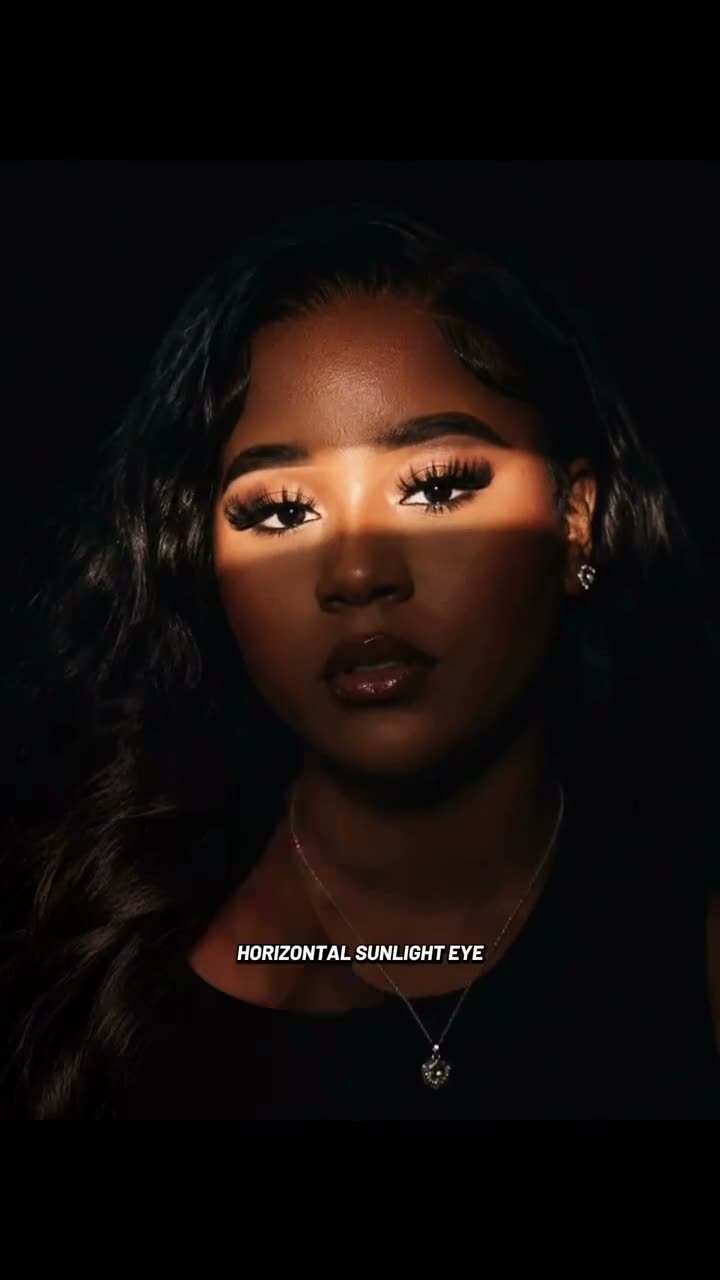
01What the portrait trend looks like
The look is a close portrait with a narrow band of warm light crossing the eyes. The surrounding portrait stays darker, which gives the eye-level strip a clear place in the frame. The page is for a still image edit, not a moving video.
The linked TikTok post by @moussakitchin shows this format and a phone view of portrait examples. Its post had 4,698 views and 55 likes when checked on Nov 17, 2026. We have not confirmed who first created the format.
| Time | Beat |
|---|---|
| Shot 1 | A close portrait appears with a narrow band of warm light across the eyes. |
| Shot 2 | The light stays on the eyes against a darker portrait background. |
| Shot 3 | A phone view scrolls through still portrait examples. |
02Make the still edit from one photo
The image editor uses one portrait to make one still image. The prompt is filled in for you, and you can review it before creating.
- Open the trendOpen the Sunlight Eye Portrait page and review the linked reference so you know the warm eye-level light and darker background the edit is aiming for.
- Add one portraitChoose one adult portrait that you have permission to edit. Keep both eyes visible and include enough facial detail for the light band to read.
- Review the image promptThe image editor fills the prompt in for you. Read it before you submit: it describes the eye-level band, the darker background and the details it should preserve.
- Create one still imageSubmit the image edit. The current price is 5 credits for one image. The result is a still portrait, not a video or animation.
03The portrait that works
Use one adult portrait with the eye area visible. The edit depends on seeing both eyes clearly enough for the warm band of light to sit across them.
- Choose one portrait of an adult you have permission to edit.
- Keep both eyes visible in the source photo.
- Include enough facial detail for the light band to read.
- Do not use a photo where the eyes are covered.
- Review the finished still before saving or sharing it.
04The included image prompt
The AI Trend Club editor includes an image prompt, so you do not need to start with a blank text box. If you are testing another image model that accepts a reference portrait, you can start with this wording.
Edit the uploaded portrait into one polished vertical still image with a narrow horizontal band of warm sunlight crossing the eyes. Keep the same adult recognizable and preserve their natural facial features, expression, hair, and pose. Use a dark, softly graded background and cinematic contrast; keep the light centered around the eyes rather than illuminating the full face. Make the light band believable and clean, with no extra people, text, logos, or watermark. Create one complete still portrait, not a collage or video frame.05A photo edit, not a CapCut video
This page makes one AI-edited still image. It does not animate the portrait, build a video sequence or add audio. The reference is a creator post that shows the portrait style; the page adapts that look to the existing image editor.
A CapCut video template is a separate editing format. It can help arrange footage you record, while this image edit changes one portrait into a still with light focused around the eyes. Use the image editor when the result you want is a finished picture.
The included prompt describes a narrow light band, a darker background and preservation of the adult’s facial features, expression, hair and pose. It also asks for one complete portrait image without extra people, text, logos or a watermark. Those details describe the requested edit, not a guarantee that every pixel will match the prompt exactly.
06Is the portrait edit free?
The trend page is free to view, but making an image uses credits. One image edit costs 5 credits. A new account gets 25 welcome credits, enough for a few image edits. You can review the credit price before submitting.
If you need more credits, the two lowest listed options are the Week pass and the 1,000 credits pack. The current product prices and included credits are shown here.
| Option | Price | Credits |
|---|---|---|
| Week pass | $6.99 | 800 |
| 1,000 credits | $9.90 | 1,000 |
07Share the finished portrait
If you share your edit, credit @moussakitchin as the linked reference creator. Say that your picture is an AI-edited portrait so viewers do not mistake it for an unedited photo of real sunlight.
These caption ideas describe the warm eye-level light and the portrait treatment:
- A little light right across the eyes.
- A portrait with a warm line of sun.
- Eyes in the light, background in shadow.
08Questions
- What is the Sunlight Eye Portrait AI photo?
- It is a still portrait with a narrow horizontal band of warm light crossing the eyes against a darker background.
- How many photos do I need?
- Use one adult portrait with both eyes visible and enough facial detail for the light band to read.
- Does this make a video?
- No. The existing image editor makes one still picture.
- How many credits does an edit use?
- One image edit costs 5 credits. The page shows the price before you submit.
- Who posted the reference?
- The linked TikTok post is by @moussakitchin. We have not confirmed who first created the format.