01What happens in the Helicopter Skydive trend
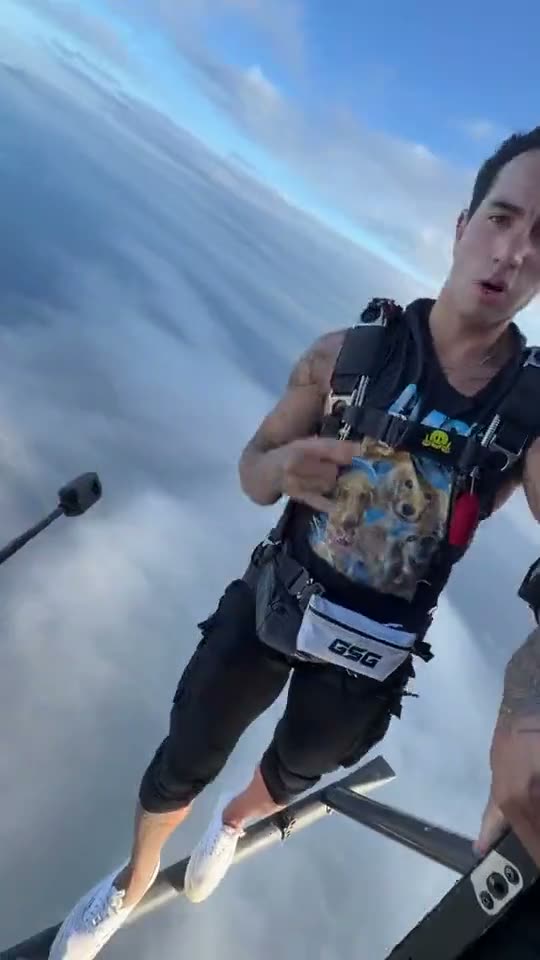
The Helicopter Skydive trend shows an adult on a helicopter skid above the clouds. The person hangs from a bar, pulls up and releases toward the open sky. The original vertical clip is about 15 seconds long, and the trend page uses it as an AI entertainment reference. It is not a guide to a real stunt.
The linked TikTok was posted by @keoni.anderson on Oct 20, 2026. On Nov 18, the post showed 29,700 views and 1,599 likes. Those numbers belong to that TikTok post. The table follows the sequence in the source clip.
| Time | Beat |
|---|---|
| Shot 1 | An adult balances on a helicopter skid above the clouds. |
| Shot 2 | The adult hangs from a bar with both hands. |
| Shot 3 | The adult pulls up as the camera looks toward the clouds. |
| Shot 4 | The adult releases toward the cloud-filled sky. |
02How to make the Helicopter Skydive AI video from one photo
The trend page uses the original helicopter clip as its reference and puts one adult photo in the lead role. You do not need to provide the source clip or write a prompt on AI Trend Club. The helicopter, cloud setting and camera sequence guide the edit.
Use a photo you have permission to edit. This page is for a fictional AI entertainment result. It does not explain how to skydive, operate a helicopter or perform a stunt. Keep that distinction clear when you use or share the video.
- Open the trend pageGo to the Helicopter Skydive page on AI Trend Club. Watch the linked TikTok to understand the scene before making an AI version.
- Start your versionPress Create your own. The site opens the trend in its video flow, so you do not need to upload a helicopter clip.
- Add one adult photoChoose one clear adult photo you have permission to use. Confirm permission in the flow. The photo supplies the identity for the adult on the skid.
- Choose the resolutionThe 480p version uses 692 credits. The 720p version uses 1,556 credits. Check the total on the button before you spend anything.
- Make and download the editTap Make my video. The page says the result is ready in a few minutes. The download is silent; add audio in TikTok or CapCut separately if you want it.
03The photo that works
This page asks for one adult photo. That photo takes the role of the person on the helicopter skid. Choose an image you have permission to edit, and keep the result clearly framed as an AI scene.
- Use one clear adult photo.
- Choose a person whose photo you have permission to use.
- Use one identity for the person on the skid.
- Keep the result in the AI entertainment context.
- Do not treat the video as instruction for a real skydive.
04The Helicopter Skydive AI prompt
AI Trend Club does not ask you to write a prompt. To try this idea in another video model that accepts a reference photo and clip, use the description below as a starting point.
Use the reference video as an AI entertainment scene. Replace only the adult on the helicopter skid with the adult in the reference photo. Preserve that person’s identity and keep the helicopter, skid, harness, cloud background, camera framing and source sequence. Show the person holding the bar, pulling up and releasing into the cloud-filled sky in the same order. Keep the result fictional and do not present it as a real stunt tutorial. Do not encourage anyone to imitate it. Add no captions, logos, dialogue or sound.05CapCut template or AI video?
A CapCut template can help arrange or trim footage you already recorded. It does not put your photo into the linked helicopter scene. The AI video uses one photo with the original clip as a reference, so the adult in your image plays the lead while the helicopter and clouds remain part of the scene.
Use this page for an AI entertainment edit, not for real skydiving advice. AI Trend Club runs in a browser and does not require a separate app. Your video stays private to your account. The download is silent. If you want background audio for a social post, add it separately in TikTok or CapCut.
06Is the Helicopter Skydive AI video free?
Watching the original TikTok and opening the trend page are free. A new account gets 25 welcome credits. That covers a few images, but not a trend video. The standard 480p version uses 692 credits. The 720p version uses 1,556 credits.
A Week pass is $6.99 and includes 800 credits, enough for one 480p version. A 1,000-credit pack costs $9.90; it also covers a 480p video but not 720p. Check the exact amount shown on the button before spending. If the video render fails, credits come back automatically.
| Option | Price | Credits |
|---|---|---|
| Week pass | $6.99 | 800 credits |
| 1,000 credits | $9.90 | 1,000 credits |
07Post your version
The download is silent, so add any audio separately in TikTok or CapCut. The trend page does not include the original soundtrack. Keep the description clear that this is an AI entertainment edit, not a real skydive or instructions for doing one.
Credit @keoni.anderson and link to the original TikTok so viewers can find the source. Keep your caption focused on the fictional cloud scene. These short ideas describe the dramatic change shown in the reference:
- One photo, a long way above the clouds.
- A fictional view from the helicopter skid.
- An AI scene made for the feed.
08Questions
- Is there a Helicopter Skydive AI template?
- The page offers an AI video edit using one adult photo and the linked reference clip. It is not a template that only arranges footage you recorded.
- Which AI makes the Helicopter Skydive video?
- It uses an AI video model guided by the original clip. Add one adult photo on AI Trend Club and start the video without writing a prompt.
- Is this a real skydiving tutorial?
- No. This page is for an AI entertainment edit. It does not teach or recommend attempting the stunt.
- Who made the original Helicopter Skydive video?
- @keoni.anderson posted the original TikTok on Oct 20, 2026. The source clip is linked above.
- Does the download include sound?
- No. Add audio separately in TikTok or CapCut if you want sound in your post.