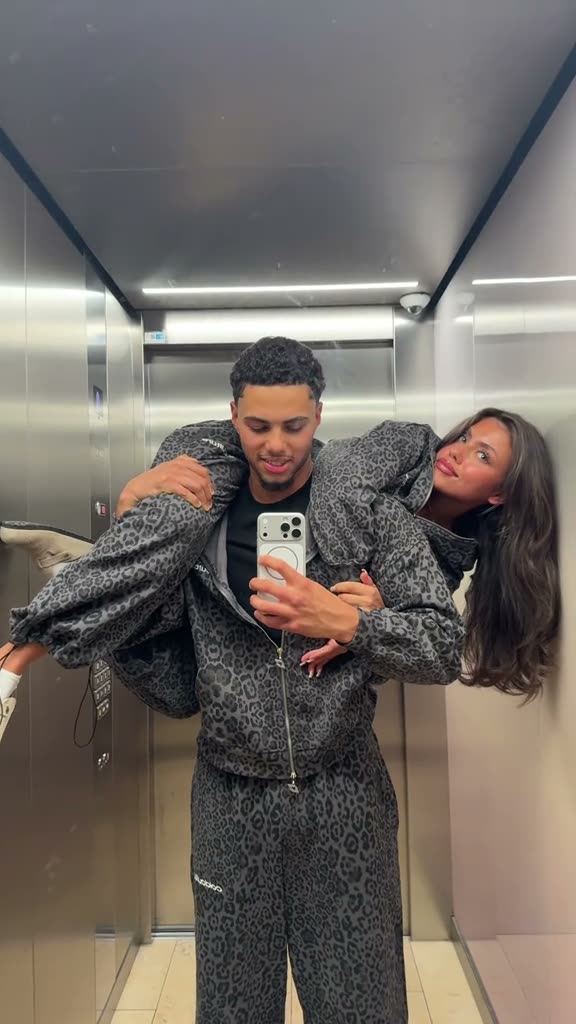
01What happens in the elevator selfie trend
Two adults take a close selfie in an elevator mirror. One holds the phone while the other leans across their shoulders, and the overlapping arms create a playful extra-arm illusion. The remake uses two separate photos to cast those roles. It follows the reference scene, but it does not promise an exact copy.
The linked TikTok example is by @juanandsueda. The post had 835,600 views and 93,300 likes when checked on Nov 17, 2026. That count describes the linked post at that check, not every version of the format.
| Time | Beat |
|---|---|
| Shot 1 | Two adults pose in an elevator mirror while one holds the phone. |
| Shot 2 | The partner leans across the phone-holder’s shoulders. |
| Shot 3 | Their arms overlap to create a playful extra-arm illusion. |
| Shot 4 | The close mirror selfie composition stays with the couple. |
02How to make the elevator mirror remake from two photos
The page has the original clip and a Create your own button. You do not need to type a prompt there. Keep the two photos in separate role slots so the phone-holder and partner stay distinct.
- Open the trend pageOpen the elevator mirror trend on AI Trend Club. Review the linked reference and the two role descriptions before you start.
- Add two separate photosChoose one photo for the phone-holder and another for the partner leaning across their shoulders. Confirm that you have permission to use both adults’ photos.
- Check the roles and qualityMake sure each photo is assigned to its intended role. The live creator currently offers 480p; the page also lists the 720p quote for reference, but that option is not available in the creation form right now.
- Make and downloadThe current create form uses 480p and shows 507 credits for this clip. The trend page lists 1,141 credits as the 720p quote for reference. When the render is ready, download it with the original sound or choose the silent version.
03The photos that work
This format uses two consenting adults, with one photo assigned to each person in the elevator mirror scene. Keep the pairing clear before you submit.
- Use two separate photos, one for each adult role.
- Use the phone-holder photo for the person holding the phone in the mirror.
- Use the second photo for the partner leaning across the phone-holder’s shoulders.
- Confirm that both people agreed to have their photos used.
- Check the role assignment before making the video.
04The Me and My Girlfriend AI prompt
AI Trend Club fills in the scene instructions, so there is no prompt to write on the page. If you are trying a different video model that accepts a reference clip and two identity photos, this prompt is a starting point.
Use the source clip as the scene guide. The person in the first reference photo takes the phone-holder role in the elevator mirror selfie. The person in the second reference photo leans across the phone-holder’s shoulders. Keep the elevator mirror, phone, patterned outfits, close framing, overlapping arms and timing. Preserve each adult’s own identity and keep the two roles distinct. Change who appears in the scene while following the original pose and sequence. Do not invent another location or turn the couple into different characters.05CapCut template or AI video?
A CapCut template can arrange footage you record yourself, but it does not put your face into the people and scene of the linked clip. An AI remake uses the reference clip to guide the elevator mirror scene and uses your two photos for its roles. The extra-arm effect comes from the pose and the way the arms overlap in the mirror.
The original sound is included with the reference-based download, and you can also choose a silent version. After downloading, you can add a caption or edit the timing in CapCut. The scene and identities may vary from the original, so check the finished video before sharing it.
06Is it free?
The reference and trend page are free to view. A new account receives 25 welcome credits, enough for a few image edits but not enough for this video. This clip uses 507 credits at 480p or 1,141 at 720p. Failed videos return their credits automatically.
The Week pass and 1,000 credits pack are the lowest listed purchase options. The price and credit amount are shown below; check the page button before spending because the page shows the current quote for the selected quality.
| Option | Price | Credits |
|---|---|---|
| Week pass | $6.99 | 800 |
| 1,000 credits | $9.90 | 1,000 |
07Post it
Choose the original sound if you want the remake to keep the same audio. Credit @juanandsueda in the caption and link back to the reference when the platform lets you. The creator is credited here as the source example; we have not confirmed who first made the format.
Keep the joke about the selfie and overlapping pose. These short captions describe the scene without saying that the remake is the original clip:
- One mirror selfie, with a little extra reach.
- Two of us, one elevator mirror.
- That arm overlap did the most.
08Questions
- How many photos do I need?
- Use two separate adult photos, one for the phone-holder and one for the partner leaning across their shoulders.
- Is there a template for this trend?
- The page offers the existing reference-based video flow, with two photos in separate roles. It does not include an untested generated sample.
- Which AI makes this remake?
- An AI video model guided by the original clip.
- Can I make it on my phone?
- AI Trend Club runs in a browser, so there is no app to install.
- Who made the original?
- The linked TikTok example is by @juanandsueda. We have not confirmed who first created the format.