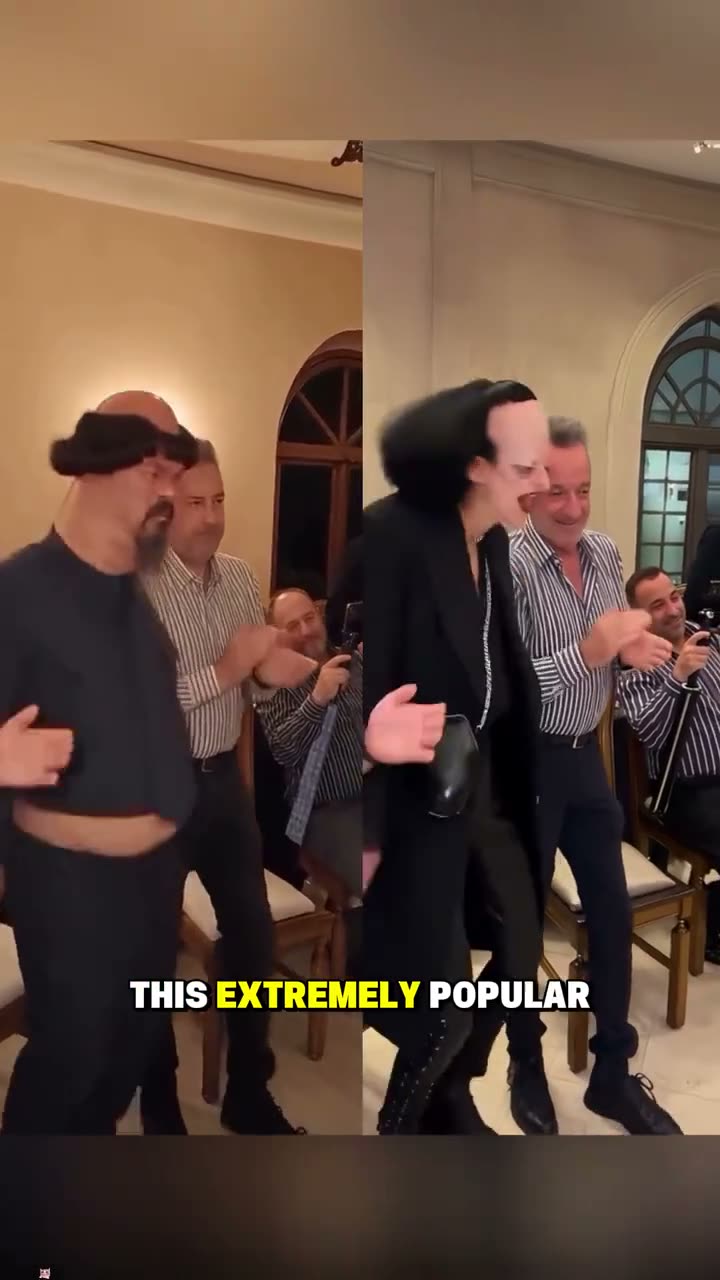
01What happens in the Party Viral Dance trend
The Party Viral Dance moves from a relaxed entrance into a louder dance-floor finish. The lead first sways beside a line of guests who clap along. They move past the group with a rolling walk, then jump, kick and spin once they reach the open floor. The room, crowd and lead all stay visible enough to make the change in energy easy to follow.
The linked post at the top of the trend page is a tutorial by @lsffncz. It shows the one-photo idea and explains how the effect is used. The video recipe follows a separate 12-second motion reference by @annaliseamira8. Keeping those sources separate matters: one is the recent tutorial, and the other guides the dance movement in a one-person remake.
| Time | Beat |
|---|---|
| Shot 1 | The dancer sways beside the row of clapping guests. |
| Shot 2 | They move past the guests with a loose, rolling walk. |
| Shot 3 | The dancer jumps and kicks on the open floor. |
| Shot 4 | They spin and continue dancing. |
02How to make the Party Viral Dance AI video from one photo
You do not need to write a prompt on AI Trend Club. The page opens the single-person video flow, and the original clip guides the scene. Use an adult portrait that you own or have permission to use. The maker shows the credit amount before you submit, so you can check the cost before you start a render.
- Open the trend pageOpen the Party Viral Dance page and press Create your own. The tutorial post and the recipe reference are credited separately on the page.
- Add one photoChoose one clear portrait of an adult and confirm you have permission to use it. This page is built for one lead, not a group of separate people.
- Check the settingsThe recipe is a silent, vertical clip. Keep the motion reference in mind: one lead moves past the guests, then dances on the open floor.
- Choose a qualityThis trend page currently offers a standard 480p render for 553 credits. Confirm the current amount on the button before you spend.
- Make and downloadTap Make my video and wait for the render. Download the silent MP4, then add a sound in TikTok or CapCut if you want one.
03The photo that works
Use one clear adult portrait. Choose a person whose face is easy to recognize, and use only a photo you have permission to edit. The video uses one photo for one lead, so a group image can make it unclear which person should take the dancer’s place. Review the whole result before you share it, especially the movement past the guests and the final turns.
- One adult portrait for the lead
- A face that is visible and easy to recognize
- A photo you own or have permission to use
- One person in the lead photo, not a group
04The Party Viral Dance AI prompt
AI Trend Club fills in the recipe for you. You do not type a prompt there. If you are trying the idea in another video tool that accepts a reference clip, use a short direction that names the lead and protects the background people.
Use the reference clip of a night party as the motion and scene guide. Keep the warmly lit hall with arched windows, a row of adult guests clapping, and the tall man in a long white robe in the background. Replace only the adult dancer in the shiny purple jacket with the person in the reference photo. Keep the same person recognizable through every shot. Have them sway past the guests, then jump, kick, spin and continue dancing on the open floor. Preserve the vertical camera, room and timing. Do not add text or logos. Keep the output silent.05CapCut template or AI video?
A template and an AI video remake do different jobs. A template arranges clips or photos that you provide. It does not, by itself, place your portrait into the original party scene and follow that scene’s movement. The AI video flow uses the reference clip as a guide and puts one photo into the lead role while the guests and hall remain part of the scene.
You can still use CapCut after the download. Add a caption, trim the start or place a sound over the silent clip. The trend page does not promise that the remake matches every hand movement or facial detail exactly, so watch it through before posting.
06Is the Party Viral Dance AI video free?
Watching the original post and reading the trend page do not use generation credits. Making a video uses credits. A new account includes 25 welcome credits, which can cover a few images but is not enough for this video.
The Week pass is listed at $6.99 for 800 credits. A 1,000-credit pack is listed at $9.90. This trend page currently offers a standard 480p render for 553 credits. The button shows the current price and credit amount before you submit. If a video fails, its credits come back automatically. The Week pass covers one standard render by credit amount; the credit pack also covers one standard render. Check the current amount shown in the maker before confirming.
| Option | Price | Credits |
|---|---|---|
| Week pass | $6.99 | 800 |
| 1,000 credits | $9.90 | 1,000 |
07Post it
The download is silent. If you want audio, add the trend sound in TikTok or CapCut after you download it. Credit the creator whose clip you use, and keep the page’s two sources clear: @lsffncz posted the linked tutorial, while @annaliseamira8 is credited for the dance motion reference.
Keep the caption short and describe the scene you made. These ideas stay close to the playful entrance and the dance-floor finish:
- From the guest line to the dance floor.
- One photo, one party entrance.
- A party walk with an unexpected finish.
08Questions
- Is there a Party Viral Dance AI template?
- The page uses an AI video recipe, not a prompt you have to write. It places one photo in the lead role and follows a separate motion reference.
- Which AI makes the Party Viral Dance video?
- An AI video model guided by the original clip. The exact credit amount appears on the button before you spend.
- Can I make it on my phone?
- The page runs in a browser, so there is no app to install.
- Who made the original?
- The linked tutorial is by @lsffncz. The separate motion reference is by @annaliseamira8. The page credits both sources for their roles.
- Does the download include the trend sound?
- No. The clip is silent. Add a sound in TikTok or CapCut after downloading if you want audio.