01What happens in the Chibi Office Figurine trend
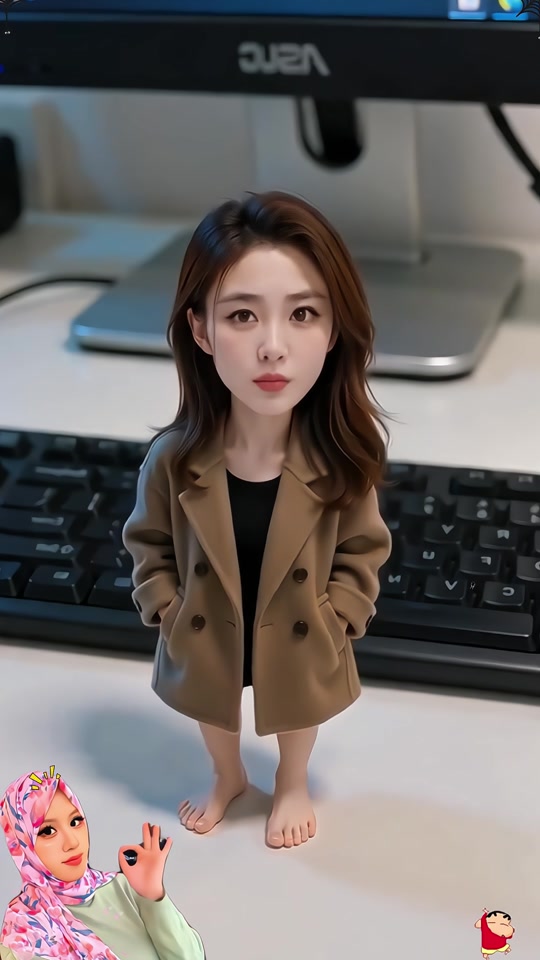
The Chibi Office Figurine format turns one portrait into a small, big-headed figure standing by a keyboard and monitor. The page adapts the desk-side look to a still image edit. It does not create a physical toy, an animation or a 3D file.
The linked TikTok post is one example of the format. Its creator posted it on Nov 18, 2026. The post had 1,716 views and 40 likes when checked on Nov 19, 2026. We have not confirmed who first made the wider idea.
| Shot | What you see |
|---|---|
| Shot 1 | A tiny chibi figure stands in front of a keyboard and monitor. |
| Shot 2 | The figure has an oversized head and a small, fully dressed body. |
| Shot 3 | The person’s visible face, hair and clothing guide the still image edit. |
02How to make the Chibi Office Figurine AI photo from one photo
The editor opens with the prompt already filled in. You can read it, adjust it, and decide whether the result matches what you want before saving.
The page’s purpose is narrow: one adult portrait becomes one desk-side chibi picture. The editor does not turn that picture into a video, build a digital mesh, or ship a physical figurine.
- Open the trend pageGo to the Chibi Office Figurine page and review the linked creator example. The page describes the result as a still image, not a video.
- Choose the image editorPress Make the figurine photo. The link opens the existing image editor with the trend prompt ready.
- Add one adult photoChoose one adult portrait that you have permission to edit. This format uses one uploaded photo as its identity reference.
- Review the prompt and priceKeep the instructions about the oversized head, small body, full outfit, hands in jacket pockets, keyboard and monitor. The editor shows the image edit price before you submit.
- Create and check the stillSubmit the edit and review the image. Look at the face, hair, clothes and desk details before saving or sharing it.
03The photo that works
The reference post shows a tiny character at an office desk. The page’s prompt uses that scene idea, but it asks the editor to create a new picture from your photo rather than copy the creator’s finished work.
- Choose one adult portrait for the single photo input.
- Use a photo you have permission to edit.
- Keep the face, hair and clothing visible if you want the edit to follow those details.
- Review the result for changed clothing or facial details before saving.
- Do not expect an exact copy of the person or a physical miniature.
04The Chibi Office Figurine AI prompt
On AI Trend Club, the prompt is already filled in. You can read or change it before you create. If you want to test another image model, start with this description and check that it accepts a reference photo.
Use the uploaded photo of one consenting adult as the identity reference. Create one still image of a small chibi miniature standing on a desk in front of a keyboard and monitor. Use a large head and small body, with the full outfit visible and both hands in the jacket pockets. Keep the person’s face, hair and clothing recognizable. Use a simple office desk scene. Do not add extra people, text, logos or watermarks. Make a flat image only, not a physical object, 3D mesh, or animation.05Still image or 3D figurine?
The page uses an image edit. It makes one still picture based on one adult portrait and a written prompt. The result can look like a tiny office figure, but it is still a digital image.
A physical figurine would be an object you could hold. A 3D model would be a mesh that could be viewed or edited in 3D software. This page promises neither. It does not animate the person or make a moving video. If you want to share the result, treat it as an AI-edited portrait and review it first.
The source post remains the creator’s work. The trend page links to that post so readers can see the example in context. The image you make starts with your own photo and can differ from the example.
06Does the Chibi Office Figurine AI photo cost credits?
The image editor shows the current cost before you submit. One image edit costs 5 credits. New accounts receive 25 welcome credits; if all of them are still available, that balance can cover five image edits. Check the button and your balance before creating.
The welcome balance is not a promise that every account has unused credits. If you have already spent some, the editor will show the amount available for your next image. The edit creates one still image, so you do not need to choose video resolution or a video package for this page.
| Item | Credits |
|---|---|
| One image edit | 5 |
| New account welcome balance | 25 |
07Share the office figurine photo
Check that the image still looks like the adult in your photo and that the desk scene reads clearly. The prompt aims for an oversized head, a small body, a full outfit and both hands in jacket pockets, but image details can change. Keep the original creator credited if you refer to the TikTok example.
The format works as a playful profile picture or personal keepsake because it turns a familiar portrait into a tiny office scene. Make it clear that the image is AI-edited if you post it.
- My tiny desk-side double.
- A small office version of me.
08Questions
- What is the Chibi Office Figurine AI photo?
- It is one still chibi-style portrait of a person beside an office keyboard and monitor.
- How many photos do I need?
- Use one adult portrait that you have permission to edit.
- Does it make a video or a 3D model?
- No. The existing image editor creates one still image, not an animation, physical figurine or 3D mesh.
- Who posted the linked example?
- The TikTok example is by @user7453115952617 and was posted on Nov 18, 2026. We have not confirmed who first made the wider format.