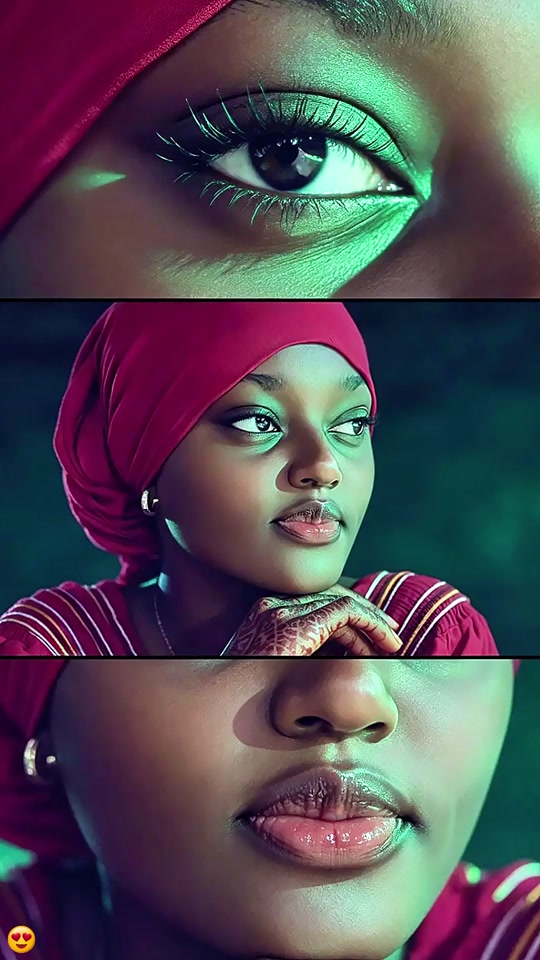
01What happens in the Three Close Up Portrait trend
The Three Close Up Portrait format arranges one person in three stacked panels. The top panel crops close around the eyes, the middle shows the face and shoulders, and the bottom frames the lips. The page recreates this as one still image, not three moving shots.
The linked TikTok post by @user4947097136093 was posted on Nov 18, 2026. It had 5,605 views and 324 likes when checked on Nov 19, 2026. We have not confirmed who first made the wider format.
| Panel | What it shows |
|---|---|
| Top | An extreme close crop around the eyes. |
| Middle | The same person’s face and shoulders. |
| Bottom | A close crop around the lips. |
02How to make the Three Close Up Portrait AI photo from one photo
The page opens the image editor with a prompt ready to use. Review the panel order and color direction before submitting. You can change the prompt if you want to describe the layout differently.
The final result is one vertical 9:16 still image. The three sections are parts of a single collage. This workflow does not create a separate video for each panel or animate the face.
- Open the trend pageReview the linked TikTok example and the description of the three-panel layout.
- Open the image editorPress Make the portrait collage. The editor opens with the trend prompt filled in.
- Add one adult photoChoose one adult portrait you have permission to edit. The prompt uses that same person for every panel.
- Review the prompt and priceCheck that the prompt asks for eyes, face and shoulders, then lips, with teal-green and magenta lighting. The editor shows the edit price before submission.
- Create one still collageSubmit the edit and review all three panels. Check that they appear to show the same person before saving or sharing.
03The photo that works
Use one adult portrait that you have permission to edit. The image editor uses that photo as the identity reference for all three crops.
The prompt specifies the order of the close crops and the teal-green and magenta lighting. It also asks the model to keep the same facial features and skin tone. These directions guide the edit; they do not guarantee a perfect match.
- Use one photo, not three separate inputs.
- Choose an adult portrait you have permission to edit.
- Check that the face is visible in the source photo.
- Look across the eye, face and lip panels to see whether the same person carries through.
- Review the result before sharing because image details can vary.
04The Three Close Up Portrait AI prompt
The prompt is included on AI Trend Club, so there is no prompt to write before using the editor. Read the text and change it if you want another image model to follow a similar still collage layout.
Use the uploaded photo of one consenting adult as the identity reference. Create one vertical 9:16 still collage with three horizontal panels, all showing the same person. In the top panel, make an extreme close crop of the eyes. In the middle panel, show the face and shoulders. In the bottom panel, make a close crop of the lips. Use teal-green and magenta lighting. Keep the same facial features and skin tone across all panels. Do not add text, logos, extra people or a watermark. Make one static image, not animation or separate video clips.05Three-panel photo or video effect?
This page creates a still collage. The eyes, face and lips appear in separate horizontal panels, but all three are part of one image. A viewer can see the full layout at once. The page does not make the panels move or turn them into a sequence of clips.
The linked post is a creator example, not an image made by AI Trend Club. The editor starts with the photo you add and the included prompt. Its output may differ in lighting, crop or facial details, so inspect the finished image before saving it.
If you want a moving portrait, this page is not that workflow. Its output is a static image that you can download and share as a picture.
06Does the Three Close Up Portrait AI photo cost credits?
One image edit costs 5 credits. The image editor shows the cost before you submit, so check the button and your balance before creating. New accounts receive 25 welcome credits; when that full balance is available, it can cover five image edits.
The editor uses credits for the still image. You do not need to choose video resolution or buy a video package for this trend page. If you have used some welcome credits already, the balance shown in the editor is the amount to follow.
| Item | Credits |
|---|---|
| One image edit | 5 |
| New account welcome balance | 25 |
07Share the three-panel portrait
Look at each panel separately before you post. Check whether the eye crop, the face-and-shoulders crop and the lip crop look like the same person. If a panel feels inconsistent, adjust the prompt or try a different permitted portrait. The image editor can change details, so use your judgment before sharing.
The format works as a stylized portrait because it gives one face three different crops in one vertical image. If you refer to the example, credit @user4947097136093 and link to the creator’s TikTok post.
- One face, three close views.
- A portrait, cropped into a collage.
08Questions
- What is the Three Close Up Portrait AI photo?
- It is one still collage with close crops of the eyes, face and lips from the same person.
- How many photos do I need?
- Use one adult portrait that you have permission to edit.
- Does it animate the three panels?
- No. The image editor makes one static collage, not a video.
- Who posted the example?
- The linked TikTok post is by @user4947097136093 and was published on Nov 18, 2026. We have not confirmed who first made the wider format.