01What happens in the Boxing Dog trend
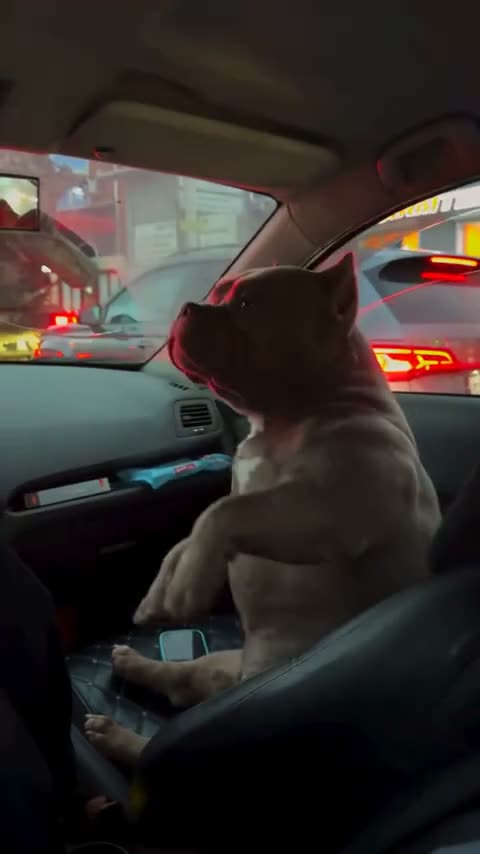
The Boxing Dog trend starts with a dog sitting upright in the front passenger seat of a car. Then the dog moves its front paws in quick, playful punches. The camera stays inside the car, so the traffic and lights outside remain part of the view.
The linked original is a 15-second vertical TikTok from @malysh_bully. Its paw movements give the clip a boxer-like rhythm, while the dog remains the main subject from the passenger seat. The sequence below follows the reference shown on the trend page.
| Time | Beat |
|---|---|
| Shot 1 | A dog sits upright in the front passenger seat as traffic lights glow outside. |
| Shot 2 | The view stays inside the car while the dog begins moving its front paws. |
| Shot 3 | The dog alternates its paws in quick, playful boxing motions. |
| Shot 4 | The dog stays in the seat as night traffic remains visible through the windows. |
02How to make the Boxing Dog AI video from one photo
The Boxing Dog page uses the original car clip as its reference and puts one dog photo in the passenger-seat role. You do not need to write an AI prompt on AI Trend Club. The photo decides which dog takes the lead. The car, night traffic and paw movements come from the reference scene.
- Open the trend pageGo to the Boxing Dog page on AI Trend Club. Review the linked TikTok from @malysh_bully to see the passenger-seat scene and the quick paw movements.
- Start your versionPress Create your own. The page opens the video flow for this specific trend, so you do not need to upload a reference clip yourself.
- Add one dog photoChoose one clear photo of your dog that you have permission to use. Confirm that permission in the flow. This page is set up for a dog photo, not a people-only portrait.
- Choose a resolutionThe standard 480p video uses 692 credits. The 720p HD video uses 1,556 credits. Check the amount on the button before you spend anything.
- Make and download the videoTap Make my video. When it is ready, download it with the original sound or as a silent vertical 9:16 clip.
03The photo that works
This version uses one dog photo for the front passenger-seat role. Pick the pet image you want to use before starting the video, and make sure you have permission to use it.
- Use one photo of your own dog.
- Choose a clear dog photo, as the page specifies.
- Keep one dog as the lead in this version.
- Do not use a people-only photo for the dog role.
- Use a photo you have permission to edit.
04The Boxing Dog AI prompt
AI Trend Club does not ask you to write a prompt. If you want to try the idea in another video model that accepts a reference photo and clip, start with the description below. It keeps the dog in the passenger seat and follows the original car scene.
Use the reference clip as the source. Replace only the dog in the front passenger seat with the dog in the reference photo. Preserve the dog's species, face, coat color and markings. Keep the car interior, passenger-seat position, night traffic outside the windows, fixed in-car camera and quick alternating front-paw punches. The dog stays in the passenger role throughout the vertical shot. Match the source timing and playful action. Keep the dog fully canine, with no contact or injury. Do not add another animal, text, a logo or a new scene.05CapCut template or AI video?
A CapCut template helps arrange or trim footage that you record or already have. It does not place your dog into the linked car scene. An AI video uses your dog photo with the reference clip, so your pet takes the passenger-seat role while the car view and quick paw movements remain part of the scene.
These are different ways to make a post. Use an AI video when you want your dog in the original setup. After downloading, you can edit the file in CapCut or another editor. The trend download can include the original sound or be silent, and the clip is vertical 9:16.
06Is the Boxing Dog AI video free?
Watching the original TikTok and opening the trend page are free. A new account gets 25 welcome credits. Those credits are enough for a few images, but not for a Boxing Dog video. The standard 480p version costs 692 credits, and the 720p version costs 1,556 credits. A Week pass costs $6.99 and includes 800 credits, enough for one standard video. A 1,000-credit pack costs $9.90. The exact credit amount appears on the button before you spend, and a failed render returns its credits automatically.
| Option | Price | Credits |
|---|---|---|
| Week pass | $6.99 | 800 credits |
| 1,000 credits | $9.90 | 1,000 credits |
07Post your version
The original sound is available with the video download. You can also choose a silent file and add audio when you post. Credit @malysh_bully in your caption and link to the original TikTok, so people can find the creator's clip. Keep your own caption focused on the dog, the car and the unexpected paw action.
These short caption ideas stay close to the joke in the reference:
- Passenger seat. Boxer paws.
- A quiet ride did not last long.
- My dog took the front seat seriously.
08Questions
- Is there a Boxing Dog AI template?
- The trend page offers an AI video version that uses one dog photo and the linked reference clip. It is not a template that only arranges footage you record.
- Which AI makes the Boxing Dog video?
- It uses an AI video model guided by the original clip. Add one dog photo on AI Trend Club and start the video without writing a prompt.
- Can I use a person photo?
- This version is configured for one dog photo in the passenger-seat role.
- Who made the original Boxing Dog video?
- @malysh_bully posted the original on TikTok on Nov 14, 2026. The source clip is linked above.
- Does the video include the original sound?
- Yes. The download can include the source sound or be silent, and the trend page links to the original post.