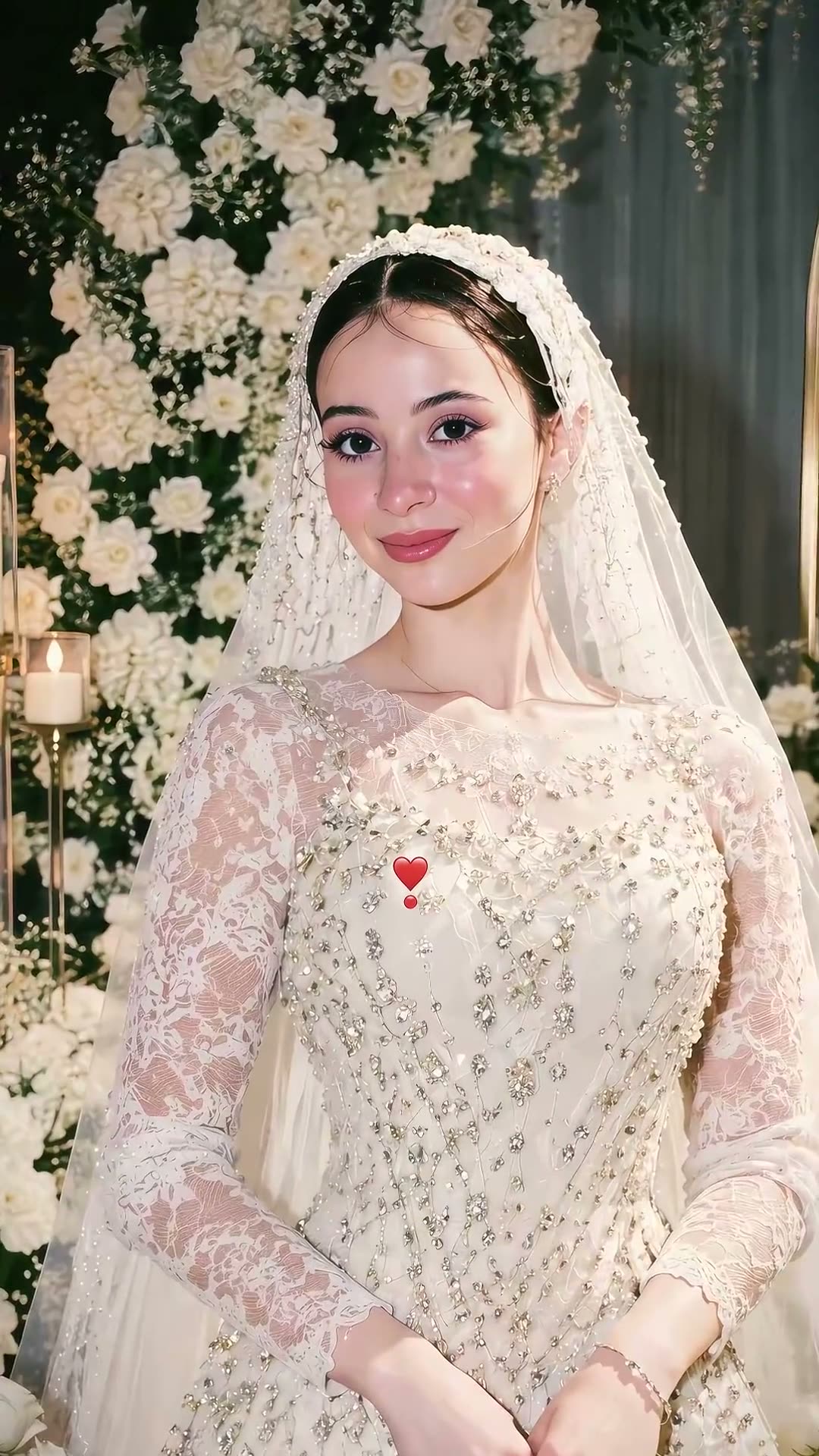
01What happens in the Wedding Dress Transformation
The Wedding Dress Transformation puts one adult portrait into a bridal look. The image prompt describes a pearl-edged veil, long sleeves, lace and an embroidered ivory dress, with white flowers and soft light. The result is one still image made from the portrait you choose.
The linked TikTok tutorial by @aheem94qw2 was posted on Nov 16, 2026. It shows AI bridal portrait examples and a phone editing walkthrough. The post had 816,900 views and 17,800 likes when checked on Nov 19, 2026. Those numbers describe the linked post at that time and can change.
| Part of the look | What the prompt asks for |
|---|---|
| Portrait | Keep the same adult recognizable |
| Clothing | An ivory embroidered dress with long sleeves and lace |
| Details | A pearl-edged veil, white flowers and soft light |
02How to make the Wedding Dress Transformation AI photo from one portrait
Start from this trend page so the image editor opens with the bridal prompt filled in. You can read it before sending a request. It asks for a general wedding look rather than a named designer dress, and it tells the editor to keep visible details such as age, skin tone and a head covering.
The image editor makes one still picture. It does not turn the portrait into a moving video or create a record of a real ceremony. Check the prompt and the credit amount shown in the editor before you submit. After the image is ready, inspect it before saving or sharing.
- Open the trend pageReview the linked TikTok example and the still-image description.
- Open the image editorPress Make the photo to carry the included bridal prompt into the editor.
- Add one portraitChoose one adult photo you have permission to edit. Keep any head covering you want to preserve.
- Review the prompt and priceCheck the veil, dress, flowers and identity instructions. The editor shows the current credit cost before submission.
- Create and inspectSubmit the edit, then check the face, clothing and details before sharing the image.
03Choose a portrait for the bridal edit
Use one adult portrait that you own or have permission to edit. The prompt uses the same person as the identity reference and asks the image editor to keep the face, skin tone and age recognizable. If the portrait includes a head covering, the instruction asks to preserve it.
The result can vary. Look at the face, veil and dress before you decide whether it works for you. The page describes a generic bridal portrait, not a particular designer's gown, physical dress or real wedding photograph.
- Use one adult portrait, not several photos.
- Choose an image where the person's face is visible.
- Use a photo you have permission to edit.
- Keep a head covering visible if you want the prompt to preserve it.
- Review the finished image before sharing it.
04The Wedding Dress Transformation AI photo prompt
The trend page carries the prompt into the existing image editor, so there is no prompt you need to write. Read it before submitting. You can adapt the wording for another image editor if you want to describe a similar still bridal portrait.
Edit the uploaded portrait of one consenting adult into one elegant bridal portrait. Keep the same person recognizable and preserve their face, skin tone, age, and hairstyle or head covering. Add a pearl-edged veil, long-sleeved lace and embroidered ivory wedding dress, white flowers, and soft natural-looking light. Keep the design generic and do not copy a named designer or a specific dress. Make one still image, not a video or real wedding photograph. Do not add text, logos, extra people, or a watermark.05A still bridal portrait to review and share
This workflow makes a single edited picture from one portrait. The veil, dress and flowers are visual details in the generated image. The editor does not create a moving outfit change, a physical dress or a photograph from an actual wedding.
After the edit, check whether the person still looks recognizable and whether the clothing and head covering match the prompt. If you wanted a video transformation, this photo workflow does not make one. The linked tutorial is a creator example, not an image created by AI Trend Club.
06Does the Wedding Dress Transformation AI photo cost credits?
One image edit uses 5 credits. New accounts receive 25 welcome credits, which can cover five image edits if the full balance is still available. The editor displays the current price before you submit, so check the button and your balance first.
Viewing the trend page and the linked tutorial does not create an image. Credits are used when you submit the image edit. If you have already used some welcome credits, follow the balance shown in your editor.
| Image edit | Credits |
|---|---|
| One still image | 5 |
| New account welcome balance | 25 |
07Share the bridal portrait with context
Look at the face, veil, dress and flowers before sharing. The result is an AI-edited bridal portrait, not evidence of a wedding or a real outfit. If you refer to the example, credit @aheem94qw2 and link to the creator's TikTok post.
The look combines a portrait with formal clothing, lace and flowers. Use a photo you have permission to edit, and give the creator credit when discussing the tutorial.
- A portrait in a bridal look.
- A veil, lace and flowers in one still image.
08Questions
- What is the Wedding Dress Transformation AI photo?
- It is a still bridal portrait made from one adult photo, with a veil, lace and an embroidered ivory dress.
- How do I make the photo?
- Open the trend page, press Make the photo, add one permitted adult portrait and review the included prompt and price before submitting.
- Does this make a video transformation?
- No. The image editor creates one still image.
- Who posted the example?
- The linked TikTok tutorial is by @aheem94qw2 and was posted on Nov 16, 2026. We link to it above.