01What happens in the AI Aging Filter Photo Timeline
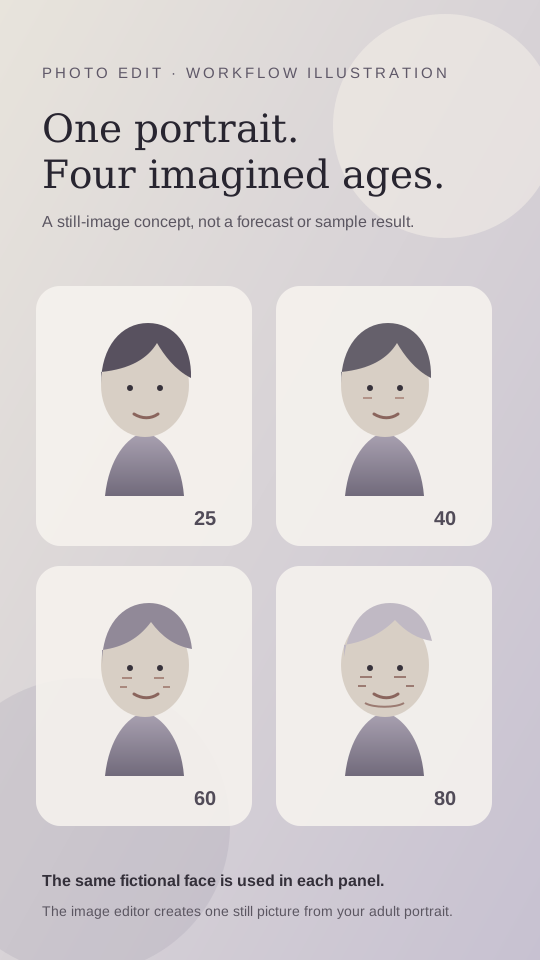
The AI Aging Filter Photo Timeline turns one adult portrait into one still image with four imagined age stages. The panels show the same person at 25, 40, 60 and 80. The camera angle, clothing and background stay consistent so the face remains the focus. This page adapts an age timeline shown in a TikTok post into a photo edit. The linked creator post is by @user3577540320181. We have not confirmed who first made the wider format.
The timeline is a creative interpretation. It is not a forecast of your appearance, a medical assessment or proof of what aging will look like for a particular person. An image model may change facial details between panels or place a label incorrectly. Review the final picture and describe it as an AI-created age edit when you share it.
| Stage | Visual direction |
|---|---|
| 25 | A young adult appearance |
| 40 | The same person with subtle adult age changes |
| 60 | More visible lines and greying hair |
| 80 | A later adult stage with deeper wrinkles and lighter hair |
02How to make an AI aging filter photo from one portrait
Start from the AI Aging Filter trend page. It opens the existing image editor with the age timeline prompt filled in. You can read the wording and adjust it before creating the image. The editor makes a still image, even though the linked trend reference is a video. It does not turn the photo into a moving clip.
Use a portrait you have permission to edit. Keep the requested stages in order and inspect the labels before sharing. The image model may interpret age details differently on each run, so treat the prompt as direction rather than a guarantee.
- Open the trend pageChoose the AI Aging Filter Photo Timeline page and use its image-edit button.
- Add one adult portraitSelect a clear adult portrait you have permission to edit.
- Review the promptCheck that the requested ages are 25, 40, 60 and 80 and that the same person should appear in each panel.
- Create and inspectReview the shown credit price, submit the edit if you choose, then check the face and each label before saving or sharing.
03Choose a portrait for the age timeline
The edit needs one adult portrait as its identity reference. The photo should show the person clearly enough for the image editor to carry recognizable features through the four panels. Use an image you own or have permission to edit. This page is designed for an adult subject and asks for adult ages throughout. Do not use a child’s portrait for this timeline.
The prompt asks for a consistent camera angle, head position, clothing, lighting and simple background. Those details help keep the panels connected as one imagined sequence. The model can still vary the face, hair and skin texture, so compare the result with the uploaded portrait and check the output rather than assuming every detail stayed the same.
- One clear portrait of an adult
- Permission to edit the person’s photo
- A visible face to use as the identity reference
- The same portrait used for all four stages
- No child’s image in the age progression
04Review the AI aging filter prompt
The prompt is already included on the AI Trend Club trend page, so you do not need to write one from scratch. Read it before you submit. It asks for one still image with the same adult at 25, 40, 60 and 80, with one stage in each panel and only those age labels. It also asks the editor to keep the framing and setting consistent.
If you use a different image editor, this wording can serve as a starting point. Results vary across tools, and the prompt cannot guarantee an exact likeness or accurate lettering.
Edit the uploaded photo of one consenting adult into one still four-panel age progression image. Show the same person at 25, 40, 60, and 80 years old, one stage per panel in that order. Keep the camera angle, head position, clothing, lighting, and simple background consistent. Preserve recognizable facial features while adding gradual adult age changes, including fine lines, greying hair, and deeper wrinkles. Separate the panels clearly and add only the labels 25, 40, 60, and 80 in the correct order. This is a creative simulation, not a prediction. Do not depict a child, add other people, logos, or a watermark.05Photo trend or aging video
The linked TikTok reference is a video. The edit on this page is a still image. It places four imagined adult stages of one person into a single composition; it does not animate the face, add motion or reproduce the creator’s clip. The distinction matters when you choose what to make and when you describe the result to other people.
The original post is useful as a reference for the age-timeline idea. The page uses the existing image editor to make a different output from a portrait you provide. It does not include the creator’s video as your result, and it does not claim that the photo edit reproduces the original template.
06What an AI aging filter photo costs
The current image editor uses 5 credits for one image edit. The editor shows the price before you submit, so read the displayed amount and decide whether to continue. This is a credit-based image edit, not a free video generation offer. The page does not promise a particular result or a fixed number of attempts.
After the image is ready, inspect all four panels. If the order is wrong, the face varies too much or an age label is missing, you can revise the prompt or choose a different adult portrait. Each new edit is another image job, so check the shown price again before submitting it.
| Item | Current editor price | Output |
|---|---|---|
| One image edit | 5 credits | One still four-panel timeline |
07Share the image with clear context
Before you post, check the face, panel order and labels. Make clear that the age timeline is an AI-created image, not a prediction of a real person’s future appearance. Use only an adult portrait you have permission to edit. If you discuss the linked example, credit @user3577540320181 and link to the original post.
The format works as a playful personal image because it carries one familiar face through several imagined stages. Keep the caption close to that idea. Do not imply that the edit is an untouched photograph or that it shows how a person will actually age.
- Four imagined ages, one AI-made timeline.
- A portrait reimagined across four adult stages.
- One face, four creative age edits.
08Questions
- Does the AI aging filter make a video?
- No. This page opens an image editor that makes one still image.
- How many photos do I need?
- Use one clear adult portrait that you have permission to edit.
- Which ages appear in the timeline?
- The prompt asks for 25, 40, 60 and 80 in that order.
- Does the edit predict how I will look later?
- No. It is a creative simulation, not a prediction or medical result.
- Who made the linked TikTok post?
- The linked post is by @user3577540320181. We have not confirmed who first made the wider format.