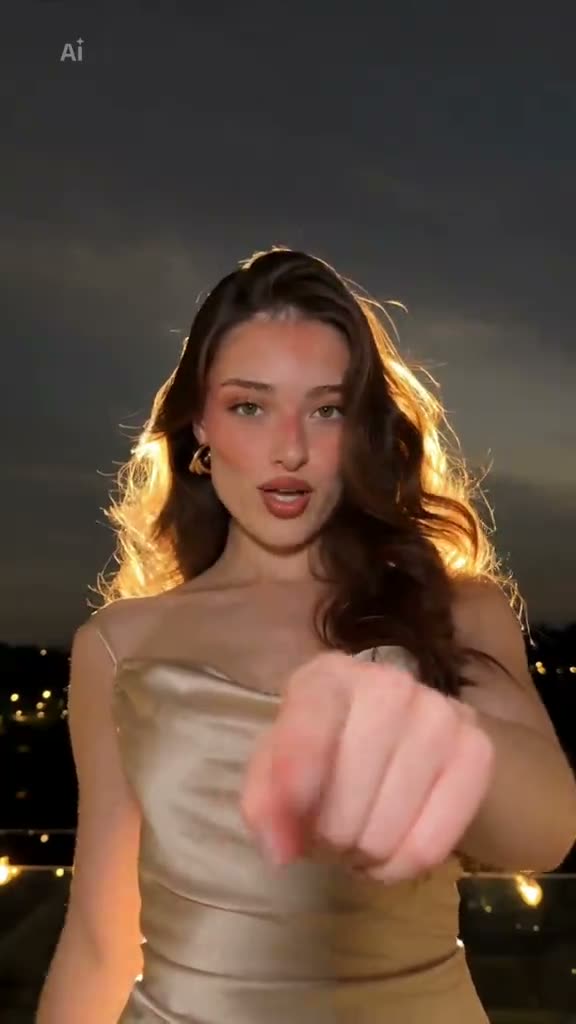
01What happens in the Boom Clap Confetti trend
The Boom Clap Confetti trend is a short night-scene performance. The performer points toward the camera, crosses both arms, and moves through two bursts of confetti. Metallic gold streamers form the second reveal, and a kiss gesture closes the clip. The selected source is the AI night-scene version posted by @plantillasxmaaari on TikTok.
The page shows that original clip at the top and links to the creator. The remake uses one adult photo for the lead performer. It keeps the night setting and follows the same sequence. The video output is silent, so plan to add a sound separately if you want music in a social post.
| Time | Beat |
|---|---|
| Shot 1 | The performer points at the camera and crosses both arms. |
| Shot 2 | The first confetti burst lands in the night scene. |
| Shot 3 | Gold streamers fall as the performer ends with a kiss gesture. |
02How to make the Boom Clap Confetti AI video from one photo
You do not have to film the dance or create a CapCut project first. The AI Trend Club page uses the linked video as the reference and lets your uploaded photo take the lead role. It runs in a browser, and you do not need to install an app.
Use these steps to start the edit:
- Step 1: Open the trend pageOpen the Boom Clap Confetti trend page in your browser. You can watch the linked TikTok source before choosing to create your own version.
- Step 2: Start your projectPress Create your own to open the setup screen for this trend.
- Step 3: Add one adult photoUpload one adult photo for the performer role. Confirm you have permission to use the image.
- Step 4: Choose the resolutionThe 480p version costs 646 credits. The 720p version costs 1,452 credits. The current amount appears on the button before you spend.
- Step 5: Make and downloadTap Make my video. When it is ready, download the silent clip. Add a sound in TikTok or CapCut if you want one.
03The photo that works
Your photo supplies the identity for the performer who points, crosses their arms and poses in the confetti. The remake is set up for one adult photo. Look at the free preview before paying for a full video, so you can check whether the person appears in the intended role.
- Use one adult photo for the lead performer.
- Choose a photo you have permission to upload.
- Review the free preview before submitting the full video.
- Keep the request focused on the original night setting and two confetti bursts.
- The video file is silent; add sound after downloading if you want it.
04The Boom Clap Confetti AI prompt
AI Trend Club does not ask you to write a prompt. If you want to try another video model that accepts a reference image, you can start with the description below. It is for that separate workflow; it is not required on the trend page.
The prompt follows the order of the original performance. It keeps the lead in the night scene and describes the two visual beats without adding another person or an unrelated ending.
Show the person in the reference photo in the same nighttime scene as the reference clip. Begin with the person facing the camera and pointing toward the lens. Have them cross both arms, then move into the first confetti burst. Continue the performance as metallic gold streamers fall around the lead. End with the same simple kiss gesture toward the camera. Keep the original framing, lighting, and order of actions. Replace only the performer. Do not add people, text, logos, music, or a new scene.05CapCut template or AI video?
A CapCut template is an editing layout. It can arrange footage that you record or select, such as clips of you doing a dance or posing in a room. It does not place your face into the source creator’s night scene or reproduce the two confetti bursts around your photo.
An AI video uses the original clip as a visual reference and puts your photo in the lead role. The result keeps the point, crossed-arm pose and confetti sequence as a guide. This page creates a silent video, while a template edit uses your own footage and whatever sound you add to that project.
You can still use CapCut after the AI video is ready. Add text or a sound there if you want to prepare a social version. The original TikTok link is useful for checking the action order before you write a caption or choose audio.
06Is the Boom Clap Confetti AI video free?
You can watch the original and read the trend page without paying. A new account receives 25 welcome credits. Those credits are enough for a few images, but not enough for this trend video. One 480p video costs 646 credits, and one 720p video costs 1,452 credits.
The Week pass is a subscription that costs $6.99 and includes 800 credits. That covers one standard 480p video in this format. A 1,000-credit pack costs $9.90 and is another option for a standard video. For 720p, check the credit balance and the exact number displayed before submitting. If a video fails, the credits come back automatically.
| Option | Price | Credits |
|---|---|---|
| Week pass | $6.99 | 800 |
| 1,000 credits | $9.90 | 1,000 |
07Post it
The downloaded clip is silent. If you want a sound, add it in TikTok or CapCut after you save the video. The linked post credits @plantillasxmaaari, so name that creator in your caption and link the original when you share a remake.
Keep a caption close to what the video shows. You could write “Two bursts, one gold finish,” “Point, cross, confetti,” or “The gold streamers got the final frame.” These ideas describe the sequence without claiming that the remake is the creator’s original video.
08Questions
- Is there a Boom Clap Confetti AI template?
- The AI Trend Club page follows the linked creator clip. A CapCut template is a separate edit made from your own footage.
- Which AI makes the Boom Clap Confetti video?
- AI Trend Club uses an AI video model guided by the original clip.
- Can I make it on my phone?
- Yes. The page works in a browser and does not require an app installation.
- Who made the original?
- The linked TikTok post is by @plantillasxmaaari.
- Does the download include music?
- No. The generated clip is silent. Add a sound in TikTok or CapCut if you want one.