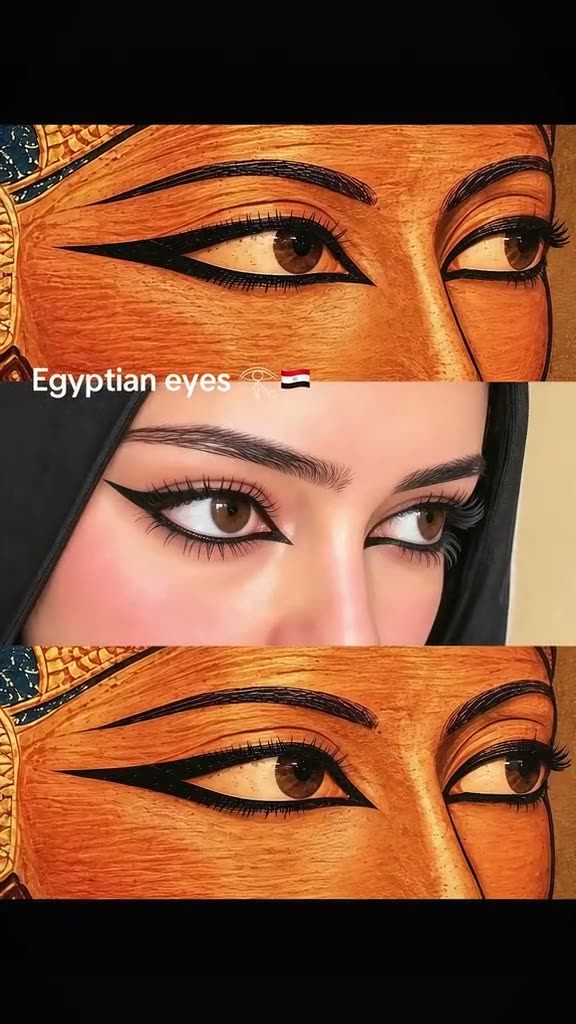
01What the Egyptian Eyes Eyeliner photo looks like
The idea uses a vertical stack of three panels. The center panel is a portrait wearing long black eyeliner. Close-up eye illustrations above and below frame the person and repeat the main visual detail. This page turns that arrangement into one editable still image from a portrait you have permission to use.
The linked TikTok post by @aheem94qw2 is the reference shown above. It presents eye art, a portrait with a related eyeliner shape, and the eye art again. The generated image is a new interpretation. It is not the original post, a historical artifact or a copy of a particular painting.
| Part | What to expect |
|---|---|
| Top and bottom | Original decorative eye illustrations |
| Center | One adult portrait with elongated eyeliner |
| Output | One AI-edited still image |
02How to make the three-panel portrait
The existing image editor fills in a prompt for the requested look. Open the trend page, review the description and follow the image editor steps. The prompt aims to keep the person recognizable and make the upper and lower eye motifs relate to the center portrait.
Read the complete prompt before submitting. If you want a different illustration style, adjust the wording while keeping the three-panel structure. The editor shows the current credit price before you submit, so you can decide after seeing the exact amount.
- Open the trendReview the Egyptian Eyes Eyeliner page and its linked creator post.
- Choose a portraitAdd one adult portrait you have permission to edit.
- Review the promptCheck that it asks for one center portrait and original eye illustrations above and below.
- Create the imageSubmit only after checking the price shown by the editor.
- Review the resultInspect the face, eyeliner and panel edges before saving or sharing.
03Choose a clear portrait
Start with a photo where the person faces the camera or turns only slightly. Both eyes should be visible, with enough detail to guide the eyeliner. A clean image makes it easier to tell whether the generated center panel still resembles the person. Avoid a crop that cuts through the brows or places a hand across the eyes.
Use one photo of an adult who has agreed to the edit. If the image belongs to someone else, get permission before uploading it. A head covering, hairstyle or skin tone can be part of the portrait and should remain recognizable. The prompt asks the editor to preserve those features, but the result can vary.
Before sending the image, check that the photo is sharp, reasonably lit and not filtered so heavily that the eyes disappear. A plain background is useful, though the output is an illustrated composition and the background may change. Do not add a second person or an unrelated picture, because this workflow is designed around one portrait.
- Keep the eyes in focus.
- Use a photo you have permission to edit.
- Choose a crop that includes the full face.
- Review head covering and hairstyle details in the output.
04What the filled-in prompt asks for
The prompt treats the uploaded portrait as the identity reference for the center panel. It asks for long black kohl-style eyeliner and a vertical arrangement with a related eye illustration above and below. The illustrations should be original decorative motifs inspired by ancient Egyptian visual forms, not a reproduction of a named artwork.
You can adjust style words such as painterly, graphic or softly lit, but keep the core layout clear. Ask for one complete image, not separate clips. Keep the prompt focused on the visible elements you want: one recognizable person, the eyeliner and two matching eye illustrations.
Use the uploaded adult portrait as the identity reference for the center panel. Create one vertical still image with three stacked panels. Keep the same face, skin tone, eye shape, hair and head covering. Add elongated black kohl-style eyeliner in the center portrait. Above and below it, create original decorative eye illustrations inspired by ancient Egyptian visual motifs, without copying a named artwork or depicting a historical person. Do not add text, logos, extra people or a watermark. Make one finished still image, not an animation.05Check the image before saving
Look at the image at full size, not only at the small preview. Confirm that the person remains recognizable in the center and that the eyes are not distorted. Check whether the upper and lower illustrations feel related without becoming unexpected extra portraits. The frame edges should be clean and the panels should read in the intended order.
The editor can interpret fine makeup details differently from the reference. If the eyeliner is too short, uneven or heavy, revise the prompt with a more specific description and make another image only if you choose to spend the displayed credits. Keep the edit about makeup and composition; do not ask it to alter the person’s identity.
06Understand the credit price and limits
This page uses the existing image editor, which displays a five-credit price before submission. The price shown by the live editor is the amount to use for your decision. A guide or preview does not submit an image request on your behalf. The editor creates one still image and does not make an animated sequence.
The result is a generated interpretation rather than a documentary photograph. The eyeliner shape, panel spacing and illustration style may differ from the prompt. Review the output before saving it. If the image does not look right, change the wording or choose another source portrait instead of assuming every detail will match on the first attempt.
| Question | Answer |
|---|---|
| Is this a video? | No, it creates one still image. |
| How many photos? | One adult portrait you have permission to edit. |
| What is charged? | The live editor shows five credits before submission. |
07Keep the edit personal and respectful
Use your own portrait or a photo whose subject has agreed to an AI edit. Do not upload a stranger’s face just because the image is public. If you share the result, make it clear that the portrait treatment was AI-edited. Do not present the generated scene as a real historical photograph or an original painting.
The page links to the creator post so visitors can see the reference format and credit the person who posted it. We have not confirmed who first made the wider format. The prompt uses newly described decorative shapes, and the original creator’s video remains their work.
When the result is ready, check the face, skin tone, makeup and panel layout one last time. Save only the version you are comfortable sharing. A clear portrait, a focused prompt and a careful review give you a practical way to make the style your own.
- Ask permission before editing another person’s photo.
- Treat the output as an AI-created image.
- Keep creator credit with the reference.
- Review the full image before sharing.
08Questions
- How many photos do I need?
- Use one adult portrait you have permission to edit.
- Does this edit create a video?
- No. The current image editor creates one still image.
- Does the prompt copy an ancient painting?
- No. It asks for original decorative eye illustrations inspired by ancient Egyptian visual motifs.
- Who posted the reference?
- The linked TikTok post is by @aheem94qw2. The wider trend origin has not been confirmed.