01What happens in the MeiMei Cat trend
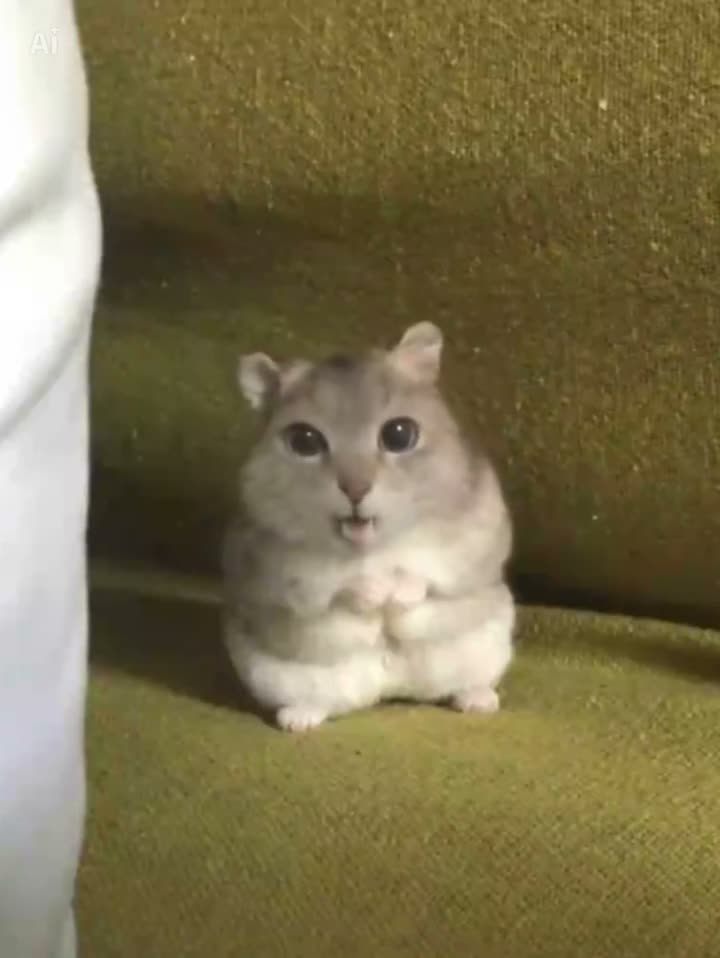
The MeiMei Cat trend keeps one cat centered on a green sofa. The cat moves its mouth, lowers its eyelids, and briefly changes expression while the camera stays fixed. It is a short cat video, not a still image or a generic cat GIF. The AI Trend Club page uses one photo of your cat as the lead in this scene.
The small face change carries the clip. The sofa and still framing make that moment easy to follow, while the cat stays in place until the video ends. The table follows the original sequence so you can see how the setup, mouth movement, and sleepy expression fit together.
| Time | Beat |
|---|---|
| Shot 1 | One cat sits centered on a green sofa. |
| Shot 2 | The cat moves its mouth while holding the same pose. |
| Shot 3 | Its eyelids lower, then its face briefly changes expression. |
| Shot 4 | The cat stays in place as the clip ends. |
02How to make the MeiMei Cat AI video from one photo
Open the You Are Nice, You Are Pretty Cat page and review the source clip. The edit uses one photo of your own cat to replace the cat in the scene. The green sofa, fixed camera, and one-cat setup remain part of the reference.
- Open the trend pageGo to the MeiMei Cat page and watch the original clip to understand the mouth movement and brief expression change.
- Add one cat photoChoose one clear photo of your cat and confirm that you have permission to use it.
- Use the page flowPress Create your own. You do not need to write a prompt on AI Trend Club. Keep the scene focused on one cat.
- Check the credit priceChoose 480p for 461 credits or 720p for 692 credits. The exact amount appears on the button before you spend anything.
- Make and downloadTap Make my video. It is ready in a few minutes. Download the vertical video with the trend sound or silent.
03The photo that works
The page is built around one cat on the green sofa. A clear photo that shows your cat’s markings gives the edit a useful reference, and placing the face near the center helps the sofa framing read. Use a photo you have permission to edit.
- One clear photo of your cat
- Visible markings on the cat
- The cat’s face near the center
- Permission to use the photo
- One cat as the lead in the scene
04The MeiMei Cat AI prompt
AI Trend Club has a built-in flow, so there is no prompt to write on the site. If you want to try the idea in another video model that accepts a reference clip and photo, you can start with this description. It keeps the scene focused on a natural cat and the short expression sequence.
Use the cat in the reference photo as the only pet in a short video. Place the cat seated on a green sofa in a fixed camera view. Keep the sofa, framing, and single-cat scene from the reference clip. Let the cat move its mouth while holding the same pose, then lower its eyelids and briefly change its expression before returning to a calm look. Keep the cat natural and preserve its species, face, fur color, markings, and body shape. Add no human face, extra pet, words, or watermark.05CapCut template or AI video?
A CapCut template can assemble footage that you record yourself. It cannot put your cat into the green sofa scene from the original clip. An AI video uses your cat photo in the reference scene, following the fixed framing, mouth movement, and brief expression change.
The trend page already provides the video flow and includes the original sound. If you download the clip and want to edit it afterward, CapCut can add captions or the trend sound. That editing step is separate from creating the AI video. The result uses the photo you provide and follows the reference; it is not the original creator’s video.
06Is the MeiMei Cat AI video free?
The trend page and reference clip are free to view. New accounts receive 25 welcome credits, which can cover a few images but not a trend video. This cat video costs 461 credits at 480p and 692 credits at 720p. The site shows the exact amount before you submit, and credits for a failed video come back automatically.
The Week pass costs $6.99 for 800 credits, which covers one video at 480p. The 1,000 credits pack costs $9.90, but it is below the listed 720p price of 692 credits. Check your balance and the displayed price before you submit. The video is private to your account, according to the site information on the trend page.
| Option | Price | Credits |
|---|---|---|
| Week pass | $6.99 | 800 credits |
| 1,000 credits | $9.90 | 1,000 credits |
07Post it
The original sound is included in the download. Credit @dlyncnwhl9l and link to the original post when you refer to the source. Keep the caption centered on the cat’s small expression change and identify your result as an edit made with your own cat photo.
- One cat, one sleepy expression change.
- A small face change carries the whole clip.
- My cat takes the lead on the green sofa.
08Questions
- What is the MeiMei Cat trend?
- It is a short cat clip with mouth movement and a brief sleepy expression change on a green sofa.
- How many photos do I need?
- Use one clear photo of your cat that shows its markings and face.
- Which AI makes the MeiMei Cat video?
- It uses an AI video model guided by the original clip.
- Does the download include the trend sound?
- Yes. The trend page includes the original sound, and you can download with sound or silent.
- Who made the original?
- The linked clip was posted by @dlyncnwhl9l. The trend page links to that post.