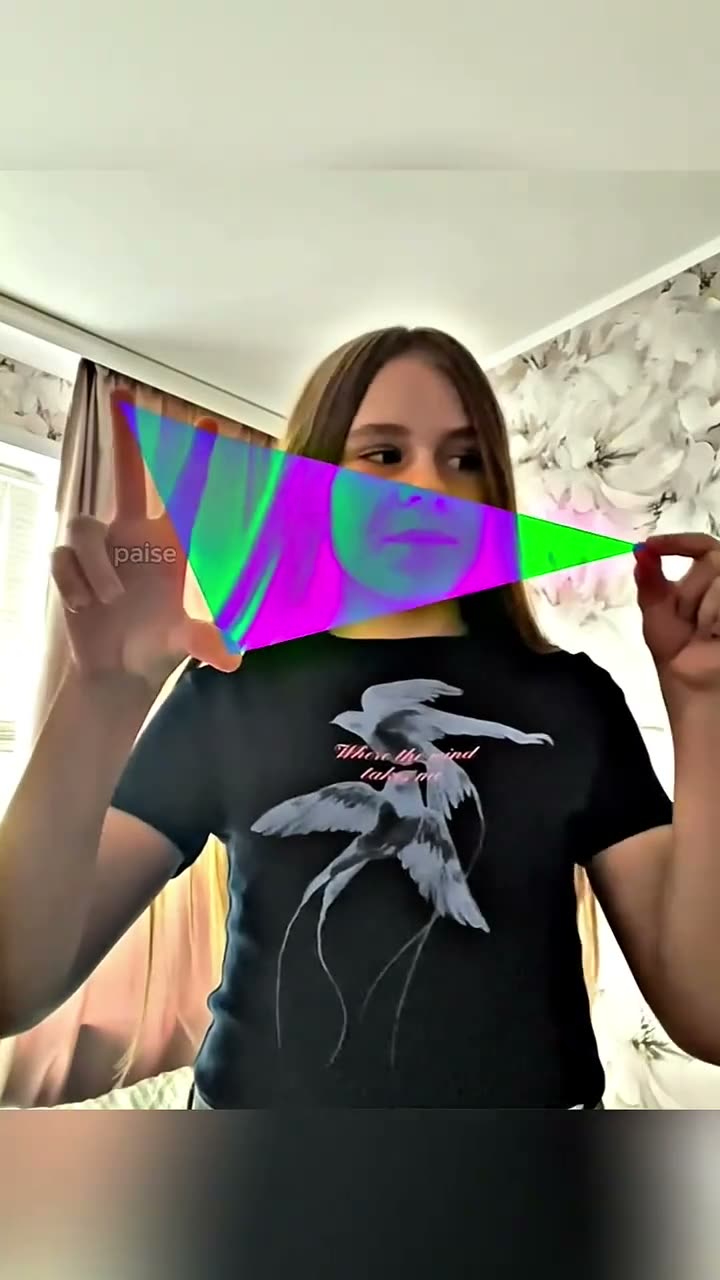
01What happens in the Inverted Hand Glitch trend
The Inverted Hand Glitch is a short portrait effect built around a square made by the hands. The demonstrator brings both hands in front of the face, colored strips stretch between them, and the face inside the square changes color while the area outside stays natural. Releasing the hands clears the effect.
The clip works as a compact visual sequence: the gesture makes a border, the effect stays inside it, and the release gives the scene an ending. The AI Trend Club page uses one portrait as the demonstrator and follows the source gesture and framing. The table below lays out the shots in order.
| Time | Beat |
|---|---|
| Shot 1 | The demonstrator brings both hands in front of the face. |
| Shot 2 | Colored strips stretch into a square between the hands. |
| Shot 3 | The face inside the square turns inverted while the outside stays natural. |
| Shot 4 | The hands release, and the colors return to normal. |
02How to make the Inverted Hand Glitch AI video from one photo
Start with the Inverted Hand Square Glitch page. Watch how the colored frame forms and how the effect clears when the hands release. The site flow puts your photo in the demonstrator's place; you do not need to write a prompt to use it.
- Open the trend pageOpen the Inverted Hand Square Glitch page and review the short reference clip.
- Add one portraitChoose one clear, centered portrait with the full face visible. Confirm that you have permission to use it.
- Start the built-in editPress Create your own. The trend page supplies the video flow, so there is no prompt to write on the site.
- Review the priceChoose 480p for 231 credits or 720p for 346 credits. Check the exact amount on the button before you spend anything.
- Create and downloadTap Make my video. It is ready in a few minutes. Download the vertical clip with the original sound or silent.
03The photo that works
The effect needs the face to sit inside the hand frame. A centered portrait with the full face visible gives the edit a clear reference. Review where the square falls and whether its edges stay around the face before you share the result.
- One centered portrait
- The full face visible in the photo
- Clear edges around the face
- Permission to use the photo
- The source hand gesture as a guide when reviewing the frame
04The Inverted Hand Glitch AI prompt
AI Trend Club does not ask you to write a prompt. If you want to try this effect in another video model that accepts a reference clip and photo, use the sample below as a starting point. It describes the color change as confined to the square and keeps the gesture in its original sequence.
Use the person in the reference photo as the demonstrator in a short hand-frame effect. Begin with both hands moving in front of the face. Stretch colored strips between the hands to form a square. Invert the colors of the face only inside that square while keeping the area outside it natural. Preserve the hand gesture, dark shirt, room, camera framing, and timing from the reference clip. When the hands release, return the colors to normal. Keep the hands natural and add no words, logo, or watermark.05CapCut template or AI video?
A CapCut template can combine footage you record yourself, but it cannot insert your face into the scene from the original clip. An AI video uses your photo as the demonstrator in the referenced scene. In this trend, that means following the hand gesture, the colored square, and the face-only inversion.
The trend page provides an AI video flow without a prompt-writing step. The original sound is available in the download. If you want to edit after downloading, you can use CapCut to add captions or the trend sound. Keep the distinction clear when you describe what you made: it is an AI edit guided by the source clip, not a CapCut arrangement of your own footage.
06Is the Inverted Hand Glitch AI video free?
You can view the reference and open the trend page for free. A new account gets 25 welcome credits, enough for a few images but not enough for a trend video. This video uses 231 credits at 480p or 346 credits at 720p. The page shows the exact credit amount before you submit, and credits come back automatically if a video fails.
The Week pass is $6.99 for 800 credits, enough for one standard video at either quality listed here. A 1,000 credits pack costs $9.90. Check the price shown on the button before submitting because it displays the amount for the quality you selected.
| Option | Price | Credits |
|---|---|---|
| Week pass | $6.99 | 800 credits |
| 1,000 credits | $9.90 | 1,000 credits |
07Post it
The downloaded version can include the original sound. Credit @webster.paisley and link to the original clip when you refer to the source. A concise caption can describe the frame and its quick color change without implying that the original creator made your edit.
- A hand frame, then a color flip.
- The square clears when the hands release.
- One portrait with one visual change.
08Questions
- What is the Inverted Hand Glitch trend?
- It is a short portrait effect where a colored square opens between the hands and inverts the face inside it.
- How many photos do I need?
- Use one clear, centered portrait with the full face visible and permission to use the photo.
- Which AI makes the Inverted Hand Glitch video?
- It uses an AI video model guided by the original clip.
- Does the effect stay on after the hands release?
- No. The colors return to normal when the hands release.
- Who made the original?
- The linked clip was posted by @webster.paisley. The trend page links to that post.