01What happens in the Perdón pet photo trend
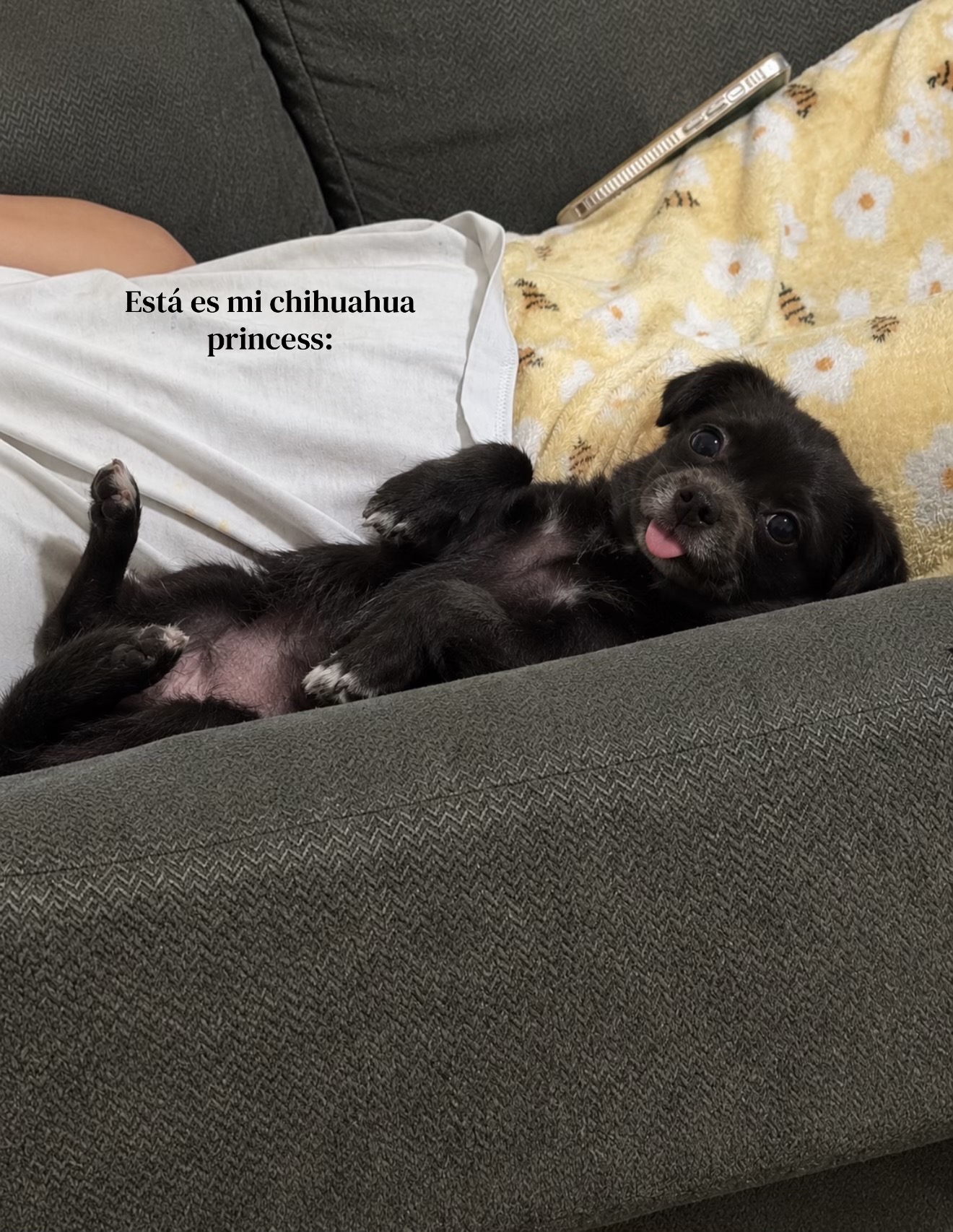
The Perdón Pet Photo Reveal is a still-image idea built around one pet on a couch. The original creator post shows a sequence where the same dog appears with a lighter coat and a younger look, then the original photo returns. The linked TikTok is a Photo Mode gallery, not an AI Trend Club result.
The post by @jimherrp031727 was published on October 18, 2026. Task evidence recorded 15.7M views and 3.7M likes on November 22, 2026. The page embeds the credited original; your edit is a separate still made from a pet photo you may use.
| Panel | Beat |
|---|---|
| Panel 1 | A Chihuahua rests on the couch in the opening photo. |
| Panel 2 | The same pet and couch framing continue as its coat looks lighter. |
| Panel 3 | The dog looks younger while keeping a familiar pose. |
| Panel 4 | The original post returns to the creator’s unedited photo. |
02How to make the Perdón AI photo from one pet picture
The image editor creates one static image from one uploaded pet photo. Its prompt is filled in for you, and you can review the wording before submitting. The result is a four-panel interpretation of the couch reveal, not an animated clip and not a ready-made carousel of separate files.
If you want the last card to be exactly the same as your source photo, save the original before you edit. Add that untouched file as a separate card when you assemble your carousel. The generated fourth panel can follow the same pose and scene, but it is an AI interpretation and may change small details.
The editor creates one still. It does not export separate carousel slides or guarantee a pixel-identical fourth panel. Keep the source file so you can add the exact original yourself.
- Open the trend pageVisit the Perdón Pet Photo Reveal page and check the embedded creator post for the couch framing and reveal order.
- Choose one pet photoUpload one image of your own pet that you have permission to edit. Use a picture where its face and markings can be seen.
- Review the edit promptThe image editor fills the prompt in for you. Check that it describes one pet, one couch scene, and a static four-panel image.
- Create one stillThe editor shows the current price before you submit. One image edit uses 5 credits.
- Save the original tooKeep the unedited source image if you want an exact final card. You can add it after the generated image when assembling a carousel.
03The pet photo that works
If the pet’s coat or face changes too much between panels, try a clearer single-pet photo and review the identity instruction before submitting again. If the couch moves or the pose shifts, shorten the prompt to focus on the same room, camera angle, and resting position. The model can vary small details, so check each result before sharing it.
- Use one pet in the input photo.
- Choose a picture that shows the pet’s face and markings.
- Keep the couch and pose in frame if you want to echo the reference.
- Use a photo you have permission to upload and edit.
- Keep extra pets, people, text, logos, and watermarks out of the prompt.
04The Perdón pet photo prompt
This prompt asks the image model to keep one pet and one setting while changing its appearance across the panels. It also says to make a still image and avoid adding lettering. The generated result may still vary, so use the untouched photo as its own final card if exact preservation matters.
Edit the uploaded pet photo into one static vertical four-panel image. Show the same dog resting on the same couch in every panel. Keep its face, coat markings, pose, camera angle, crop, room, and lighting consistent. Across the first three panels, make a gentle progression toward a lighter coat and younger appearance while keeping the dog natural. In the fourth panel, echo the original pose and scene, but do not claim it is an exact copy. Add no extra animals, people, text, logos, or watermark. Return a still image, not an animation.05Still image or carousel?
The existing image editor creates one composite still. That picture can show four stages together, but it is not four separate photos and it is not a video. Think of it as one designed card for a post. The original TikTok Photo Mode post remains linked above as a reference, with the creator credited.
A carousel needs separate images. Save the generated still, then add the untouched pet photo as the final card in your social app. That preserves the exact source while the edited image carries the reveal.
06Does the Perdón pet photo edit cost credits?
One image edit uses 5 credits. The editor shows its current credit price before you submit. A new account starts with 25 welcome credits, which can cover five image edits at that listed rate. There is no video generation step for this page, because the result is a still image.
Review the prompt and the image editor’s price before submitting. The linked post and this guide are references; the AI image is created only after you send the edit.
| Action | Credits | Result |
|---|---|---|
| One image edit | 5 credits | One static four-panel image |
| New account welcome balance | 25 credits | Enough for five image edits at the listed rate |
07Finish the carousel
Save the edited still and the original pet photo as separate files. Put the edited reveal first, then place the untouched original as the final card if you want the same ending as the creator’s sequence. That order lets viewers compare the generated interpretation with the real source photo.
When you share the post, identify the AI-edited image as an edit and credit @jimherrp031727 for the linked reference. Keep the original and your generated image distinct in the caption. The creator’s Photo Mode post is the source example; the image you make uses your own pet photo.
- One couch pose, four still panels.
- A lighter coat, then the original photo.
- A familiar pet, shown in a new way.
08Questions
- Is the Perdón Pet Photo Reveal a video?
- No. The current editor creates one static four-panel image. It does not animate the picture.
- How many photos do I need?
- Use one photo of your own pet. Add the untouched source separately as a last card if you want an exact original in the carousel.
- Can the last panel be exactly the original photo?
- The image model may change details. Keep the original file and add it as a separate last card for an exact copy.
- How much does one edit cost?
- One image edit uses 5 credits, and the editor shows the current price before you submit.
- Who posted the original?
- The linked TikTok Photo Mode post is by @jimherrp031727 and was posted on October 18, 2026. We have not confirmed who started the format.