01What happens in the Mecha Ride trend
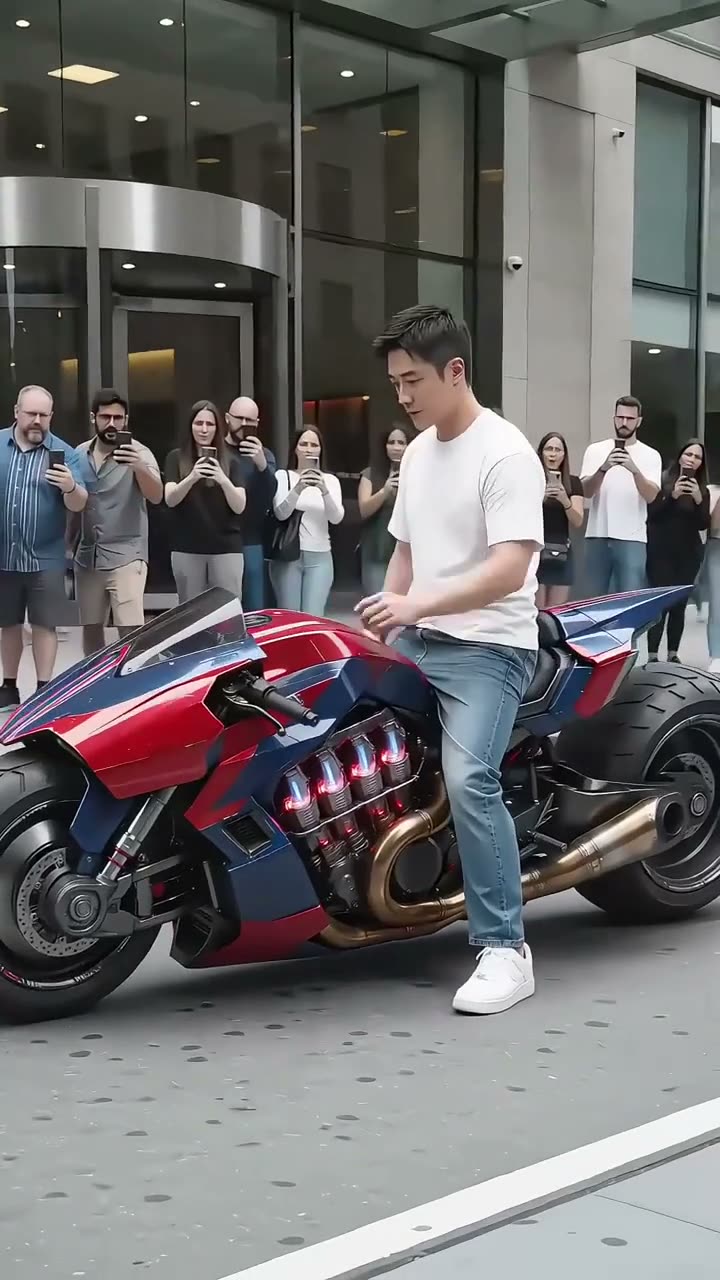
The Mecha Ride clip shows two separate motorcycle transformations in a 15-second vertical video. First, a rider in a white top sits on a red-and-blue bike and appears in matching mecha armor. A second example shows a pink bike and pink armor.
The riders are separate examples in one original clip. On this page, one adult photo plays the main lead in the red-and-blue scene. The street, motorcycles, and people watching stay in the reference scene.
| Time | Beat |
|---|---|
| Shot 1 | A rider in a white top sits on a red-and-blue motorcycle. |
| Shot 2 | The rider appears in red-and-blue mecha armor on the bike. |
| Shot 3 | A second rider appears beside a pink motorcycle. |
| Shot 4 | The second rider appears in pink mecha armor. |
02How to make the Mecha Ride AI video from one photo
The AI Trend Club trend page starts from the linked 15-second clip and the site's photo-edit flow. You do not need to install an app or write a prompt. Add one adult photo that you own or have permission to use, then choose the output quality before you spend credits.
The original clip is a visual reference for the scene and movement. The page is designed for one adult photo, which plays the lead rider. The background crowd remains part of the source scene.
- Open the trendVisit the Mecha Ride page on AI Trend Club and press Create your own.
- Add one photoChoose one adult photo and confirm that you have permission to use it. The role hint asks for your face and upper body to be visible.
- Check the settingsThe editor uses the original vertical clip as a reference. There is no prompt field to fill in.
- Choose a resolution480p uses 692 credits. 720p uses 990 credits. The button shows the exact credit amount before you spend.
- Make and downloadTap Make my video. When it finishes, download the vertical clip with the trend sound or choose a silent version.
03The photo that works
Use one clear adult portrait for the solo rider role. You should be able to see the person's face and upper body in the photo.
- Choose one adult photo, not a group photo.
- Keep the full face visible and easy to see.
- Include the upper body in the frame.
- Use a photo you own or have permission to edit.
- Avoid a child's photo for this adult role.
04The Mecha Ride AI prompt
AI Trend Club does not ask you to write a prompt. If you want to try a different video model that accepts a reference clip and an image, use this as a starting point.
Use the original vertical street clip as the visual reference. The person in the reference photo is the lead rider in the opening red-and-blue motorcycle scene. Begin with the rider in a plain white top beside the bike, then show a clear change into generic motorcycle-inspired mecha armor as the rider takes the bike's place. Keep the same face from the reference photo throughout the lead scene. Preserve the red-and-blue motorcycle, the city street, the watching crowd, the camera framing, and the original movement. Keep the separate pink motorcycle example unchanged. Add no logo, text, watermark, extra rider, or soundtrack.05CapCut template or AI video?
A CapCut template is made to arrange footage that you record yourself. It can add cuts, effects, or captions, but it does not place your photo into the original rider's street scene.
An AI video uses your photo with the linked clip as a reference, so your photo can play the lead while the motorcycle setting and action remain recognizable. On AI Trend Club, you do not write the prompt yourself. The output is a vertical clip, and the trend sound is included.
After downloading, you can use CapCut to add captions or adjust the sound for a social post. Keep the original creator credit with the clip when you share it.
06Is the Mecha Ride AI video free?
Watching the original clip and reading the trend page are free. Making a video uses credits. A new account gets 25 welcome credits, enough for a few images but not enough for this video.
A Week pass costs $6.99 for 800 credits and renews every week. The 480p video uses 692 credits, so that pass covers one standard video. The 720p option uses 990 credits, so it needs more credits than the Week pass provides.
A failed video returns its credits automatically. Check the exact amount shown on the button before you start. The charge is based on the resolution you select.
| Option | Price | Credits |
|---|---|---|
| Week pass | $6.99 per week | 800 |
| 1,000 credits | $9.90 | 1,000 |
07Post it
The downloaded version can include the trend sound. When you post, credit TikTok creator @po94275 and link to the original clip. The page keeps the creator credit next to the source video.
Keep the caption close to what the video shows: a motorcycle rider becoming a mecha rider, with the street and bike still in view. Here are a few short caption ideas based on the transformation theme.
- One photo, one mecha ride.
- From bike rider to robot armor.
- A motorcycle scene with a mecha reveal.
08Questions
- Is there a Mecha Ride AI video template?
- AI Trend Club uses the linked original clip as a visual reference. Add one adult photo to play the lead rider.
- Which AI makes the Mecha Ride video?
- The page uses an AI video model guided by the original clip.
- Can I make the Mecha Ride video on my phone?
- Yes. The site runs in your browser, so you do not need to install an app.
- How many credits does Mecha Ride use?
- The listed amounts are 692 credits for 480p and 990 credits for 720p. Check the button before you spend.
- Who made the original Mecha Ride clip?
- TikTok creator @po94275 posted the original. The trend page links to the post.