01What happens in the Bedtime Robot trend
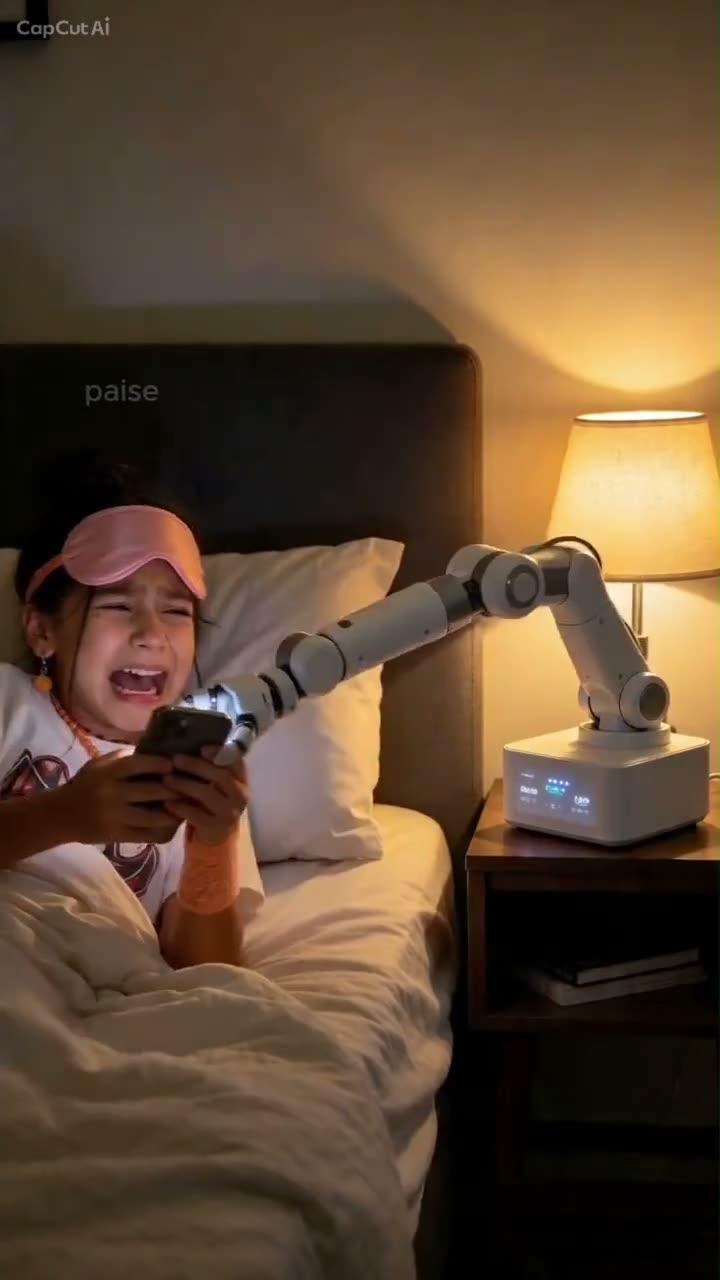
The Bedtime Robot is a six-second vertical clip built around a familiar bedtime phone moment. A person lies in bed holding a phone, a bedside robotic arm reaches over to take it, and the arm pulls back beside the bed. The AI Trend Club version uses one adult photo for the person in the opening segment while keeping the bed, lamp, arm, and camera view in place.
The phone grab is the central action. The selected remake covers the opening bedside sequence only, so the page does not promise later scenes from the full post. The TikTok post is credited to @webster.paisley.
| Time | Beat |
|---|---|
| Shot 1 | A person lies in bed holding a phone. |
| Shot 2 | The bedside robotic arm reaches over to take it. |
| Shot 3 | The arm pulls back beside the bed. |
02How to make the Bedtime Robot AI video from one photo
This Bedtime Robot AI video tutorial uses one adult photo for the person in bed. The source clip guides the short phone-grab scene, so there is no prompt to write on AI Trend Club. You can watch the selected opening segment and check the amount of credits before you decide to submit a photo.
- Open the trend pageGo to the Bedtime Robot page and watch the linked original. The version on the page focuses on the person in bed and the bedside arm taking the phone.
- Start the create flowPress Create your own to open the browser-based flow. There is no separate app to install, and the site does not ask you to write a prompt for this trend.
- Add one photoChoose one clear adult portrait for the person in bed. Confirm that you have permission to use the photo, and keep the upload focused on one person.
- Choose the resolutionSelect 480p for 277 credits or 720p for 415 credits. The exact cost appears on the button before you spend anything, so check the selected resolution and displayed amount.
- Make and downloadTap Make my video. It is ready in a few minutes. Download with the trend sound or silent, in vertical 9:16 framing for TikTok, Reels, or Shorts.
03The photo that works
Use one clear adult portrait photo for the person in bed. The recipe focuses on the opening action, so keep the photo and the requested edit centered on that one role.
- Use one clear adult portrait photo.
- Choose a photo for the person lying in bed.
- Keep the uploaded image focused on one person.
- If the person is hard to recognize, use a clearer photo.
- If the phone grab is hard to follow, keep the edit focused on the opening bedside action.
- If a render fails, credits come back automatically.
04The Bedtime Robot AI prompt
AI Trend Club uses the source video as a guide and does not ask you to enter a prompt. If you want to try the sequence in another video model that accepts a reference clip and a photo, use a concise description of the opening action.
Create the opening bedside sequence from the reference clip. The person in the reference photo lies in bed holding a phone. A bedside robotic arm reaches over, takes the phone, and pulls back beside the bed. Keep the person's identity from the reference photo consistent. Preserve the bed, lamp, phone, robotic arm, vertical framing, and timing of the short action. Keep the scene harmless and simple. Do not add another person, another room, captions, text, a logo, or a watermark.05CapCut template or AI video?
A CapCut template can arrange footage that you record yourself. It cannot place your face into the linked source scene of a person in bed as a robotic arm takes a phone. An AI video uses your photo for the person in that scene and follows the source clip's opening action. The generated result is a separate AI edit guided by the original, not the original TikTok presented as your own recording.
The trend page works in a browser and has no prompt box for this flow. The download can include the trend sound or be silent. You may add captions or choose a sound in CapCut after downloading if you want to make a social version. The source TikTok is credited to @webster.paisley. Keep the source details distinct from your own caption and account.
06Is the Bedtime Robot AI video free?
Watching the original and opening the trend page are free. Generating the Bedtime Robot video is not free. A new account receives 25 welcome credits, enough for a few images but not enough for this video. The six-second video uses 277 credits at 480p or 415 credits at 720p. If a render fails, credits come back automatically. The create button shows the exact amount before you submit.
The lowest priced option that covers either resolution is the $6.99 Week pass with 800 credits. A $9.90 pack provides 1,000 credits. You do not need to purchase a pass or credits to read this guide or view the source clip. Before starting, check the resolution and credit amount shown on the button so you know what the selected version will use.
| Option | Price | Credits |
|---|---|---|
| Week pass | $6.99 | 800 credits |
| 1,000 credits | $9.90 | 1,000 credits |
07Post it
Download with the trend sound or choose the silent version. Credit @webster.paisley for the original TikTok and link to that post. Say that your result is an AI edit. Keep the caption focused on the short phone-grab gag and do not imply that the original source footage is yours.
- A bedside arm calls time on scrolling.
- One more phone check, then lights out.
- A robot takes the phone at bedtime.
08Questions
- What is the Bedtime Robot trend?
- It is a six-second vertical clip of a person in bed as a robotic arm takes their phone.
- How do I make the Bedtime Robot video?
- Press Create your own, add one adult photo, and tap Make my video. There is no prompt to write.
- How many photos do I need?
- Add one clear adult photo for the person in bed.
- Which AI makes the Bedtime Robot video?
- It uses an AI video model guided by the original clip.
- Who made the original?
- TikTok creator @webster.paisley posted the selected original on Nov 20, 2026.