01What happens in the Office Dance trend
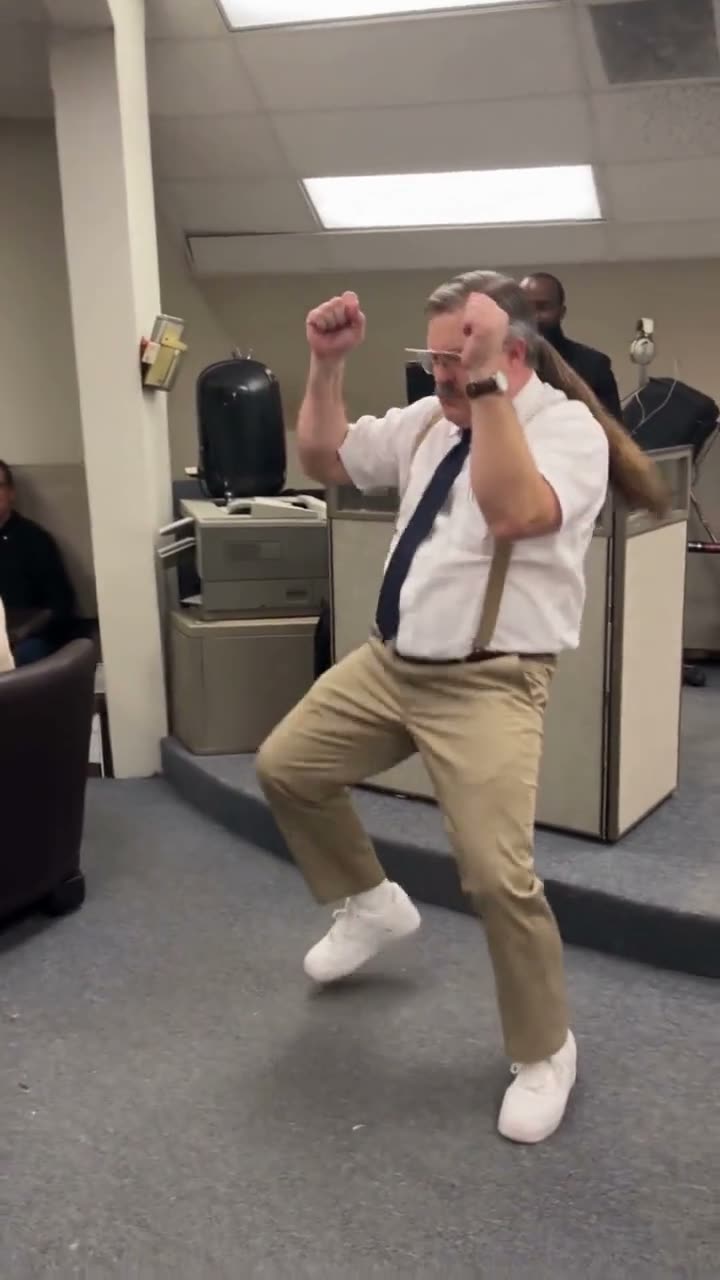
The Office Dance trend shows a worker dancing across an office while coworkers watch from behind the counters. The lead starts with both fists raised, lifts each knee, moves into low side lunges, then throws both arms wide. The office scene stays around the dancer, which makes the coworkers part of the joke.
The selected clip is 14 seconds long and uses a wide view that keeps the dancer’s full body visible. It works as an office-humor post or a quick dance break. The table follows the action in order, from the first raised fists to the wide-arm finish, so you can check the beats against the source clip.
| Time | Beat |
|---|---|
| Opening shot | The office worker starts with both fists raised near the head. |
| Next shot | The dancer lifts each knee and steps into a wide stance. |
| Dance beat | The lead leans into low side lunges across the office carpet. |
| Final frame | The dancer throws both arms wide while coworkers watch. |
02How to make the Office Dance AI video from one photo
AI Trend Club uses one photo to place your image in the lead dancer’s role while the office, camera view, and move sequence stay recognizable. Start by watching the original clip and checking the steps on the trend page. There is no prompt to write on the site, and the flow works in your browser without an app.
Pick a full-body photo of an adult who agreed to be pictured. Confirm that you have permission before uploading it. The video stays private to your account. The button shows the credit amount before spending, and credits from a failed video come back automatically.
- Open the trend pageWatch the original Office Dance clip and note how the lead moves through the office.
- Press Create your ownThis opens the AI video flow for the trend. You do not need to write a prompt.
- Add one photoUse a head-to-feet adult photo and confirm you have permission to use it.
- Choose a resolutionSelect 480p for 646 credits or 720p for 968 credits. Confirm the amount on the button.
- Make and downloadTap Make my video. When it is ready, download the silent vertical clip and add the trend sound if you want it.
03The photo that works
The dance moves across the frame, so use a full-body adult photo that leaves the lead easy to distinguish.
- Choose a head-to-feet photo so the routine has room.
- Use one clear photo for the central dancer.
- Make sure the person agreed to be pictured.
- A full-body image helps avoid cropping the dance.
- If the render fails, credits return automatically; try again with a clearer photo.
04The Office Dance AI prompt
AI Trend Club does not ask you to enter a prompt. To try this in another video model that accepts a reference image, start with the prompt below. It follows the source action in sequence and keeps the person in the photo as the lead.
Create a vertical office dance video with the person in the reference photo as the central dancer. Begin with both fists raised near the head. Have the dancer lift each knee, step into a wide stance, and move through low side lunges across the office floor. Finish with both arms open wide. Keep the office counters and watching coworkers in the background, and use a wide camera view that keeps the dancer’s full body visible. Follow the moves in this order and keep the scene readable.05CapCut template or AI video?
A CapCut template can put together clips you filmed yourself, but it cannot place your face into the original office scene. An AI video uses your photo as the lead in the source clip’s setting and movement sequence. That difference matters here because the coworkers, office counters, and wide camera view help make the dance recognizable.
The clip on the trend page is silent, so the original sound is not included in the download. You can add the trend sound or captions in CapCut after downloading. If you post it on TikTok, credit @dalefromaccounting23 so people can find the original office dance.
06Is the Office Dance AI video free?
Watching the source and reading the trend page are free. New accounts receive 25 welcome credits, which can make a few images but will not cover this video. This trend costs 646 credits at 480p or 968 credits at 720p. The button shows the exact amount before you spend, and a failed video returns its credits automatically.
The Week pass is the lowest listed purchase and includes 800 credits. That is enough for the 480p option, but not the 720p option, which uses 968 credits. The 1,000-credit pack covers the listed amount for 720p. Check the live button before you pay so you know the cost for your selected resolution.
| Option | Price | Credits |
|---|---|---|
| Week pass | $6.99 | 800 |
| 1,000 credits | $9.90 | 1,000 |
07Post it
This clip is silent. Add the trend sound in TikTok or CapCut if you want the post to use the matching audio. Credit @dalefromaccounting23 in the caption and keep the office setting visible as part of the joke.
The format puts one dancer in front of coworkers, like a quick break from work. A short caption can call attention to the contrast between the office scene and the moves.
- Clocked out for one dance break.
- The office has an unexpected lead dancer.
- One wide shot, coworkers watching.
08Questions
- What is the Office Dance AI trend?
- It is an office dance clip with a worker moving in front of coworkers. The selected video is 14 seconds long.
- How do I make the Office Dance video?
- Open the trend page, press Create your own, add one permitted full-body adult photo, choose a resolution, and tap Make my video.
- Which AI makes the Office Dance video?
- It uses an AI video model guided by the original clip. AI Trend Club provides the trend flow without a prompt field.
- Can I make it on my phone?
- The video flow runs in your browser and does not require an app. The vertical clip is intended for TikTok, Reels, or Shorts.
- Who made the original Office Dance?
- The selected original was posted by @dalefromaccounting23. The page links to the TikTok source.