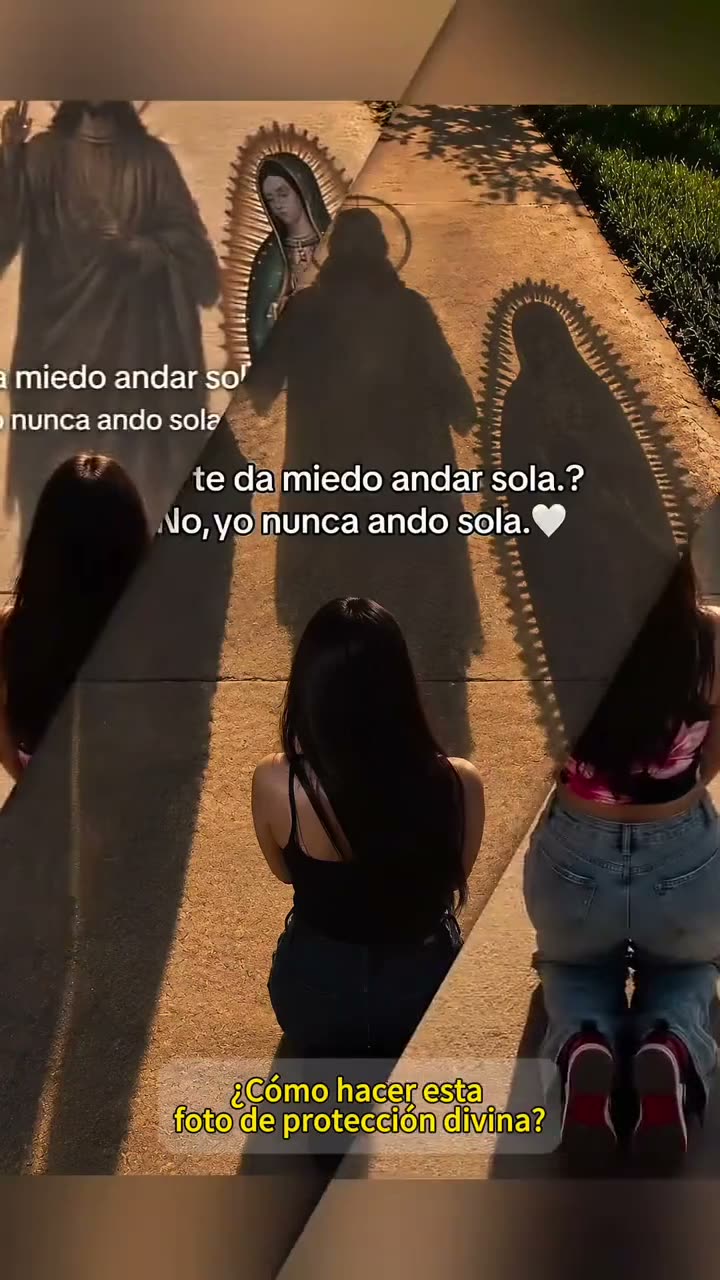
01What happens in the Nunca Ando Sola photo trend
The linked example opens with a person kneeling with their back to the camera on a golden path. Three haloed devotional shadows stretch along the ground ahead. The TikTok then moves into a phone walkthrough, but the AI Trend Club page creates one still portrait from a photo you provide.
The title means “I am never alone.” The portrait page keeps the visual idea calm and simple: one adult from behind or at a three-quarter angle, the golden path and long shadows. The finished result is an AI-edited still image. It is not an animated video, and this guide does not claim the image was made by the creator of the source post.
| Shot | What the reference shows |
|---|---|
| Shot 1 | A person kneels with their back to the camera on a golden path. |
| Shot 2 | Three haloed devotional shadows stretch along the ground in front of them. |
| Shot 3 | A phone walkthrough follows the opening portrait scene. |
02How to make the AI photo from one portrait
Open the trend page and choose the image-making button. Add one adult portrait that you have permission to edit, review the prompt carried into the editor, and check the credit amount before submitting. The browser editor makes one still image. There is no video resolution or soundtrack step for this page.
The editor shows the price before you submit. The current image-edit amount is 5 credits for one image. The source clip can be viewed without creating anything. A new account receives 25 welcome credits, which can cover several image edits at the listed price. Wait for the still image to finish, then review it before you save or share it.
- Open the trend pageReview the linked TikTok and the still-image description.
- Open the image editorChoose the page’s image-making button to carry in the prompt.
- Add one portraitUse one adult photo that you have permission to edit.
- Review the prompt and priceCheck the golden path, back-facing pose and three shadows. The editor shows the 5-credit amount before you submit.
- Create and inspectSubmit one image edit, then check the person, path and shadows before sharing the still image.
03Choose a portrait for the golden path
Use one adult portrait with a clear outline. The page suggests a back-facing or three-quarter view, with clothing and hair visible. A group photo is not needed. The person in the result should remain guided by the adult portrait you provide, while the path and shadow arrangement supply the scene.
If the background is busy, the page’s photo notes suggest avoiding it. The page also says not to add extra text or logos. Use a portrait you have permission to edit. Because the editor creates an image, not a video, check the still image itself for the visible person and shadow details before deciding to share it.
- Use one adult portrait with a clear outline.
- Try a back-facing or three-quarter view.
- Keep clothing and hair visible.
- Avoid a group photo or busy background.
- Do not add extra text or logos.
- Use a portrait you have permission to edit.
04Review the included portrait prompt
The trend page carries an image prompt into the existing editor. You do not need to write one before starting. Read the wording before submitting; it asks for a single respectful devotional portrait and tells the editor to keep the adult recognizable and preserve visible personal details.
If you use another image editor, the prompt below describes a similar generic composition. It asks for a still image, not a sequence of frames, and avoids naming a real person. The result can vary, so treat the wording as direction rather than a guarantee that every shadow or facial detail will appear exactly as requested.
Edit one uploaded adult photo into a single realistic, respectful devotional portrait. Keep the same adult recognizable and preserve their hair, clothing, and natural body shape. Show them from behind, kneeling on a golden path. Place three long, soft-edged haloed devotional shadows on the ground ahead of them. Keep the path and shadow arrangement simple and calm. Make one still portrait, not a video or collage. Do not depict recognizable public or historical figures. Do not add words, logos, extra people, or a watermark.05A photo edit or a CapCut template?
A CapCut template arranges photos or clips you select, but it does not create this new still portrait from the image prompt. The workflow on this page uses one adult photo as the identity reference and an AI image edit to create a new scene with the path and devotional shadows.
There is no soundtrack to add to a still picture. The page is for people who want an image, not a moving video. If your goal is to make a video instead, this particular page will not do that. Check the prompt and the visible credit amount in the editor before deciding whether to proceed.
06Does the portrait edit cost anything?
Viewing the reference and reading the page are free. Submitting an image edit uses credits. The current price is 5 credits for one image, shown in the editor before you submit. A new account receives 25 welcome credits. At the listed five-credit price, that amount can cover five image edits, though each one is a separate request.
No image request starts just because you opened the guide. Review the image prompt and displayed price before submission. This page does not generate a paid video and does not include a video sample. If you only want to understand the visual format, you can read the instructions and view the source post without making an image.
| Action | Credits |
|---|---|
| Open the page and view the source | 0 generation credits |
| Submit one image edit | 5 credits |
| New account welcome balance | 25 credits |
07Share the still with a source credit
If you share a result, make clear that it is an AI-edited portrait and credit the linked original by @kimberlihayes1. The creator’s post shows the reference format; it is not the image you generated. A short caption can describe the golden path and the feeling of having company without claiming the creator’s work as yours.
The image is quiet and reflective. Keep the caption simple and point viewers to the original post if you refer to its layout.
- A quiet portrait on the golden path.
- Three shadows and a feeling of company.
- A still image inspired by the linked photo format.
08Questions
- Does this page make an AI video?
- No. The page uses one adult portrait to create a single AI-edited still image.
- How many photos do I need?
- Use one adult portrait that you have permission to edit.
- What does Nunca Ando Sola mean?
- The page translates it as “I am never alone.”
- How many credits does one image use?
- The current image editor shows 5 credits for one image edit.
- Who posted the original?
- @kimberlihayes1 posted the linked TikTok on Oct 18, 2026. The trend page links to it.