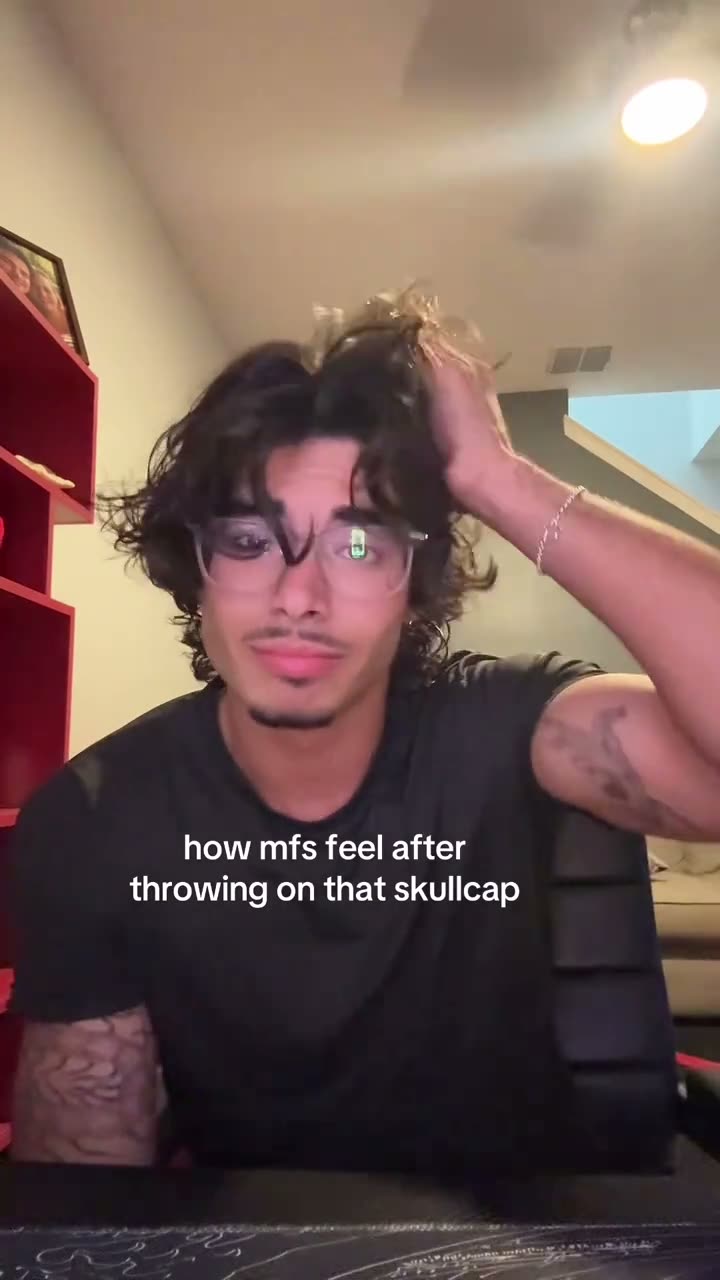
01What happens in the Skull Cap trend
The Skull Cap trend is a short before-and-after video. It opens on a creator with uncovered hair, then shifts to a fitted black skull cap and hood in a darker room. The close, vertical framing makes the change easy to read, while the opening caption sets up a joke about how the finished look feels.
The linked TikTok is by @d_cortez31 and was posted on October 16, 2026. The clip was about eleven seconds long when checked. Here is the sequence shown in the source.
| Time | Beat |
|---|---|
| Shot 1 | The creator faces the camera with uncovered hair as a meme caption introduces the cap joke. |
| Shot 2 | They move a hand near their hair while the scene shifts darker. |
| Shot 3 | The creator appears in a fitted black skull cap with the hood up. |
| Shot 4 | They touch the cap near the side of the head and hold the close pose. |
02How to make the Skull Cap AI video from one photo
The page follows the original clip as a visual reference. You do not need to write instructions for the site, and you can make the video in a browser without installing an app. Use a photo of an adult who agreed to be included, then review the credit amount before you start.
Follow these steps from the trend page:
- Open the trend pageGo to the Skull Cap AI Trend page and check the linked original so you know which transition the remake follows.
- Start your videoPress Create your own to open the maker for this trend.
- Add one photoChoose one clear adult photo and confirm that you have permission to use it.
- Choose a qualityThe 480p video costs 507 credits. The 720p video costs 761 credits. The exact amount appears on the button before you spend.
- Make and downloadTap Make my video. It is ready in a few minutes. Download the silent vertical result, then add a sound in TikTok or CapCut if you want one.
03The photo that works
This trend uses one adult as the lead, so choose a clear photo of a person who agreed to be in the edit. The page does not list a pet role or ask for a second image.
- Use one clear photo of an adult.
- Make sure the person has agreed to the edit.
- Keep to one photo for this trend.
- Use a person as the lead; this setup is not for a pet photo.
04The Skull Cap AI prompt
There is no prompt to write on AI Trend Club. If you are trying the idea in another video model that accepts a reference clip, you can start with this description and adjust it to that model's controls.
Create an eleven-second vertical video that follows the reference sequence. Start with the person in the reference photo facing the camera with uncovered hair in a close view. Move one hand toward the hair as the room shifts darker. Transition to the same person wearing a fitted black skull cap with the hood up, in the darker room. Keep the close vertical framing and simple before-and-after timing. Let the person touch the cap near the side of the head and hold the pose. Use natural movement. Keep the video silent, with no added text, music, dialogue, or watermark.05CapCut template or AI video?
A CapCut template can arrange footage that you record yourself. It does not place the person from a photo into the linked clip's room and action. An AI video uses the original as a visual reference, then puts the person from your one photo into the lead role while keeping the cap transition and setting.
This Skull Cap page does not include the original sound in a generated result. After downloading, you can add the trend sound or captions in TikTok or CapCut. The page itself does not require a prompt or a separate editing app.
06Is the Skull Cap AI video free?
Watching the original and opening the trend page are free. A new account receives 25 welcome credits, which can cover a few still images but not this video. The 480p option uses 507 credits, and 720p uses 761 credits. A failed video returns its credits automatically.
The lowest entry options that cover one video are the Week pass or a 1,000-credit pack. Check the live button before starting, because it shows the exact credit amount for the option you choose.
| Option | Price | Credits |
|---|---|---|
| Week pass | $6.99 | 800 |
| 1,000 credits | $9.90 | 1,000 |
07Post it
The generated video is silent, so add the trend sound in TikTok or CapCut if you want audio. Credit @d_cortez31 in your caption and link to the original post above. The joke is a small change of look that reads like a change in mood, so keep your caption short.
Caption ideas:
- One cap, a whole new mood.
- Before the cap. After the confidence.
- Small change, different energy.
08Questions
- Is there a Skull Cap AI template?
- This page uses an AI video workflow guided by the original clip, not a prebuilt editing template. Add one adult photo to put that person in the lead role.
- Which AI makes the Skull Cap video?
- It uses an AI video model guided by the original clip, with your photo taking the lead's place.
- Can I make it on my phone?
- The site runs in a browser and does not require an app installation. Open the trend page, add one photo, and follow the maker steps.
- Does the generated video include the original sound?
- No. The generated result is silent. You can add the trend sound in TikTok or CapCut after downloading it.
- Who made the original?
- The linked TikTok was posted by @d_cortez31 on October 16, 2026. We link to it above.