01What happens in the Waiting on My Fries trend
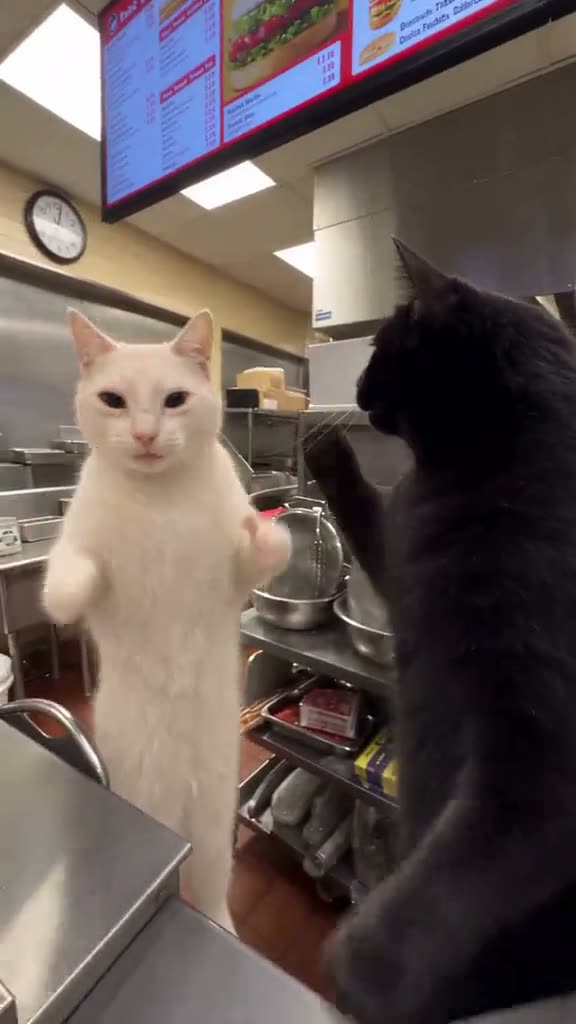
Two cats stand at a restaurant counter. The black cat turns toward the camera as the view moves closer, then raises a paw and sways beside the counter. The pale cat comes back into view beside the dancing cat. The contrast between the moving lead and the nearby second cat is the central visual joke.
The recipe uses one photo of your pet for the black cat’s lead role. The pale cat and restaurant setting remain in the scene. The result is a vertical 14-second clip, with the counter and both-cat arrangement following the linked original. Upload only the pet meant to take the lead so the second cat remains the other subject.
Watch the linked original before you start. The trend page pairs the source clip with its remake recipe. Browsing is free; video creation begins when you submit. Your photo takes the lead while the listed scene and shot sequence stay in place.
| Time | Beat |
|---|---|
| Shot 1 | Two cats stand at the restaurant counter. |
| Shot 2 | The black cat turns toward the camera as the view moves closer. |
| Shot 3 | The black cat raises a paw and sways beside the counter. |
| Shot 4 | The pale cat comes back into view beside the dancing cat. |
02How to make the Waiting on My Fries AI video from one photo
Use the built-in recipe. Review the credit total before submitting; no prompt is required.
- Open the trend pageFind the Waiting on My Fries page on AI Trend Club and watch the linked original. The original shows the shot order and movement that the remake follows. You can review the reference clip and page without paying.
- Start your remakePress Create your own on the trend page. The page opens the existing recipe, so there is no prompt field to fill in for this workflow. Keep the linked clip nearby if you want to compare the beats while setting up your version.
- Add one photoUpload one clear photo of your pet. Confirm that you have permission to use the image. The photo supplies the lead subject; the recipe keeps the listed scene and shot sequence in place. Check the on-page guidance before you continue, especially if the uploaded subject should match a specific role.
- Choose the outputSelect 480p for 646 credits or 720p for 968 credits. The exact credit amount appears on the button before you spend. Check the selected quality and amount there before submitting, since the two output options use different credit totals.
- Make and downloadTap Make my video and wait a few minutes for the result. Download it as a vertical 9:16 clip, with the trend sound or silent. The downloaded video can then be posted as a short-form clip; the original sound is included in this recipe’s download options.
03The photo that works
This recipe uses one clear photo of your pet. Use the list to match the stated photo requirement and listed fixes for unclear or cropped results.
- Add one photo of your pet for the lead cat.
- Use one clear pet photo.
- Choose a photo where your pet’s face is visible.
- Upload only the pet who should take the lead so the second cat stays distinct.
04The Waiting on My Fries AI prompt
This recipe needs no prompt on AI Trend Club. To try it in another video model that accepts a reference image, use a prompt like this to follow the source action and setting.
Create a vertical restaurant-counter dance based on the reference clip. Two cats are beside the counter, with the black cat as the lead and the pale cat nearby. Start with both cats visible, then let the black cat turn toward the camera as the view moves closer. Have the black cat raise a paw and sway beside the counter. Bring the pale cat back into view beside the dancing cat. Keep the restaurant setting and the two-cat arrangement consistent with the reference. Use the pet in the reference photo as the lead black cat. Keep the action playful and easy to follow.05CapCut template or AI video?
A CapCut template and an AI video remake do different jobs. A CapCut template can arrange footage that you recorded yourself, but it does not place your face into the original clip’s scene. This page’s AI workflow uses your photo to take the lead’s place in the linked shot sequence. It keeps the scene elements that the page describes, which is why the result follows the original format rather than simply cutting together new phone footage.
After you download the result, you can add captions or the trend sound in CapCut. The recipe already offers a download with the original sound or a silent version, so choose the version that fits your edit. The trend page credits the original creator. Keep that credit with your remake.
06Is the Waiting on My Fries AI video free?
Watching the original and browsing the trend page are free. A new account receives 25 welcome credits, which is enough for a few images but not enough for this trend video. The lowest-cost listed entry is the $6.99 Week pass with 800 credits. Check the Make my video button first. Failed video renders return their credits automatically.
| Option | Price | Credits |
|---|---|---|
| Week pass | $6.99 | 800 |
| 1,000 credits | $9.90 | 1,000 |
07Post it
When you share your remake, add the trend’s original sound or choose the sound version provided by the recipe, then credit @merkurianin in your caption. The source belongs to that creator, while the remake uses your photo. Keep the caption focused on the scene or its visual idea.
- A counter dance with my pet in the lead.
- One cat dances while the other stays nearby.
- Waiting at the counter with a playful twist.
08Questions
- What happens in the Waiting on My Fries trend?
- A black cat dances at a restaurant counter while a pale cat stays nearby.
- How do I make the Waiting on My Fries AI video?
- Open the page, press Create your own, add one clear photo of your pet, choose a quality, then tap Make my video. No prompt is required.
- Which AI makes the Waiting on My Fries video?
- An AI video model guided by the original clip follows the page’s photo-based workflow and shot sequence.
- How much does it cost?
- The Week pass is $6.99 for 800 credits. This recipe costs 646 credits at 480p or 968 at 720p. The button shows the amount before you spend, and failed video renders return their credits.
- Can I use a person instead of a pet?
- The recipe is for a cat or dog photo as the lead. Add one photo of your pet to take the black cat’s place.
- Who made the original?
- @merkurianin posted the linked original on TikTok; the page links to and credits that source.