01What happens in the Plug Walk car-window trend
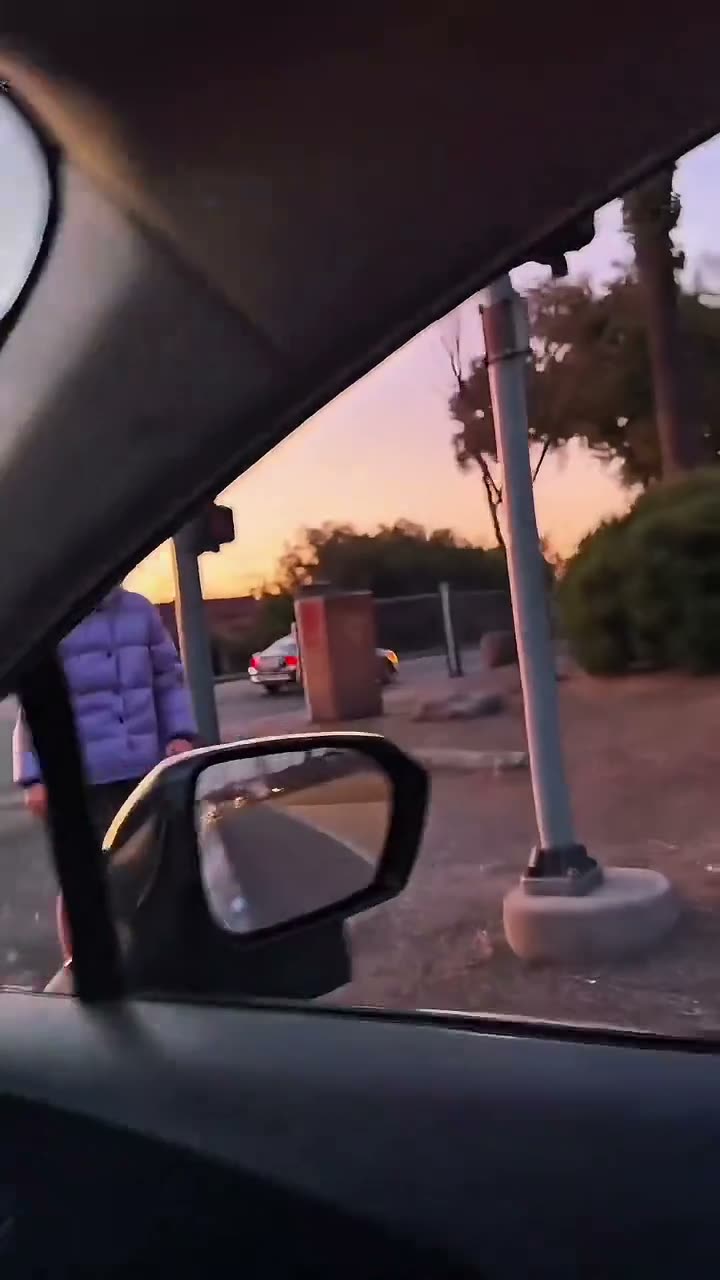
The Plug Walk car-window cash trend is a short scene filmed from inside a car. A hand passes a bill through the open window, the adult outside takes it, steps back, and starts dancing. The selected reference segment is 9.2 seconds long, taken from the 0.60–9.80-second part of the original post.
The linked TikTok post by @user2312450393252 was posted on October 18, 2026. The task evidence recorded 15.4K views and 205 likes on November 22, 2026. The page embeds and credits the full original post, while the AI recreation uses only the selected handoff and dance scene.
| Time | Beat |
|---|---|
| Shot 1 | The camera looks out from inside the car toward the open window. |
| Shot 2 | A hand reaches through and offers a bill to the adult outside. |
| Shot 3 | The adult takes the bill and steps away from the window. |
| Shot 4 | The dancer moves into the short routine beside the car. |
02How to make the Plug Walk AI video from one photo
AI Trend Club turns the selected scene into a video with one adult photo. The source car, window, handoff, and movement guide the edit. Your photo takes the outside dancer’s place. The creator’s later screen-recorded tutorial remains in the linked original post and is not part of the reference clip used for your video.
The site does not ask you to write a prompt. It sends the approved scene and your photo to an AI video model. You can check the current credit amount on the button before you submit, so the resolution and total are clear before any credits are used.
The page keeps the original’s credited creator post separate from your generated result. Your file is a new silent recreation based on the reference scene, not a copy of the creator’s clip. After the render completes, the video stays private to your account until you choose to share it.
- Open the trend pageVisit the Plug Walk Car-Window Cash page and watch the embedded original for the handoff and dance. The source post is credited above the guide.
- Start your videoPress Create your own. The flow opens in your browser, so there is no app to install.
- Add one adult photoChoose a full-body photo of an adult who agreed to be included. Confirm the photo permission step before continuing.
- Choose a resolutionAt 480p, the video uses 461 credits. At 720p, it uses 692 credits. The button repeats the exact amount for your selection.
- Make and downloadTap Make my video and wait for the render. It is ready in a few minutes. Download it silent, then add the trend sound separately if you want it.
03The photo that works
If the person looks too small or the face is hard to see, choose a clearer full-body image before you submit. The page can preserve the car and the handoff only when those stay in the source video; the uploaded photo supplies the dancer’s identity.
- Choose one adult who has agreed to appear in the video.
- Use a full-body photo so the dancer role is clear.
- Make sure the face and outfit can be seen in the photo.
- Use one person in the photo, not a group, for this single-person role.
- Do not add a tutorial screen, subtitle, logo, or watermark to your reference photo.
04The Plug Walk AI prompt
This prompt describes the scene and the role change without naming the original creator. The instructions keep the bill pass and dance in order, which gives the video model clear reference points. Different tools may interpret the timing in their own way, so compare the result with the source and review it before sharing.
Edit the source video. The person in the reference photo replaces the adult outside the car who takes the bill through the open window. Keep the car interior, the driver’s hand, the single bill, the open window, the outdoor background, and the vertical camera view. Follow the reference in order: the hand reaches out with the bill; the adult takes it; they step back and begin the short dance beside the car. Preserve the scene framing and movement. Keep the video silent. Add no subtitles, logos, or watermark.05CapCut template or AI video?
A CapCut template can arrange clips that you record yourself, but it cannot put your face into the original car-window scene. The AI video on this page uses the creator’s reference clip and your photo so the car, bill handoff, and dance guide the result while your photo takes the dancer’s role.
The AI video comes out silent. If you want the trend sound, add it after downloading in TikTok or CapCut. You can also add your own captions there. Keep the original creator credit in your post caption when you share a remake, and do not describe the creator’s video as your generated result.
06Is the Plug Walk AI video free?
You do not pay for a video by posting or watching the reference. The credit charge happens when you submit a generation. Review the resolution, credit total, and checkout details first. If the render fails, the credits return automatically.
| Option | Price | Credits |
|---|---|---|
| Week pass | $6.99 | 800 credits |
| 1,000-credit pack | $9.90 | 1,000 credits |
07Post it
The original post is silent in the AI recreation, so add the trend sound in TikTok or CapCut after you download it if that is part of your post. Credit @user2312450393252 in the caption and link to the original where the platform allows it. The original is the reference; your output is a separate remake using your own photo.
Keep the post playful and clear about what happened. These short captions fit the handoff and reaction without claiming that the scene is a real cash exchange:
- Window service, then a dance break.
- The handoff was quick. The footwork stayed.
- A little cash, a little choreography.
08Questions
- Is there a Plug Walk AI template?
- AI Trend Club has a dedicated page that uses one adult photo with the reference scene. It is an AI recreation, not a premade editing template.
- Which AI makes the Plug Walk video?
- It uses an AI video model guided by the original clip. The page handles the prompt and scene setup for you.
- Can I make it on my phone?
- Yes. The flow runs in your browser, and there is no app to install.
- Does my video include the original sound?
- No. It renders silent. Add the trend sound separately in TikTok or CapCut if you want it.
- Who made the original?
- The linked TikTok post is by @user2312450393252 and is dated October 18, 2026. We have not confirmed who first made the dance.