01What happens in the WYW My Sweetie Dance trend
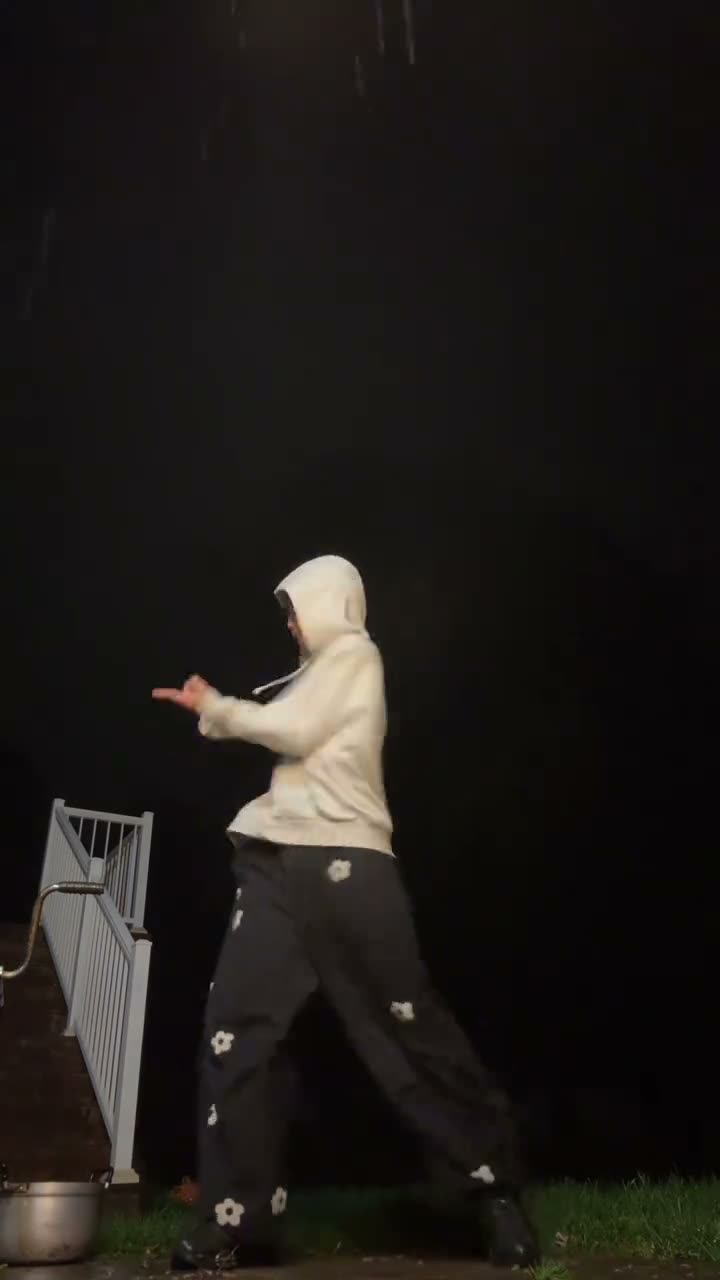
The WYW My Sweetie Dance is a short solo routine filmed at night with a fixed camera. The dancer stays in a full-body view while lifting and crossing their hands, bending their knees, and shifting their weight. The linked version runs for 14.5 seconds and finishes with a final pose.
The AI Trend Club page uses one adult photo for the dancer's role. The original scene supplies the night setting, clothing, camera view, and movement sequence. The post caption credits @William for the choreography. Your result is a separate AI edit, not the creator's original dance video.
| Time | Beat |
|---|---|
| Shot 1 | The solo dancer faces a fixed camera in a dark outdoor setting. |
| Shot 2 | They raise and cross their hands near the face and chest. |
| Shot 3 | They bend their knees and shift weight in the full-body frame. |
| Shot 4 | The routine ends with another hand pose and a brief pause. |
02How to make the WYW My Sweetie Dance AI video from one photo
The WYW My Sweetie Dance AI video tutorial uses one standing, full-body photo. The source clip guides the dance, so there is no prompt to write on AI Trend Club. You can review the original and the credit price before choosing whether to start.
- Open the trend pageGo to the WYW My Sweetie Dance page and watch the linked clip. Notice the hand movements, knee bends, weight shifts, and ending pose.
- Choose a full-body photoAdd one standing photo that shows your head to your feet. Confirm that you have permission to use the image.
- Use the built-in flowPress Create your own and check the photo preview. There is no prompt to write; the linked source video guides the scene and movement.
- Check the credit priceChoose 480p for 692 credits or 720p for 990 credits. The exact amount appears on the button before you spend anything.
- Make and downloadTap Make my video. The result is ready in a few minutes. The generated download is silent, so select a sound in your posting app if you want music.
03The photo that works
This dance uses the whole body, not only a close face. Pick a standing photo with your hands and feet in the frame so the short routine can stay readable. Use a clear image and confirm that you may use the person's likeness.
- One standing, full-body photo
- Hands and feet inside the frame
- A clear photo of one person
- Even light so the person is easy to see
- Permission to use the photo
04The WYW My Sweetie Dance AI prompt
AI Trend Club uses the reference clip and needs no written prompt. If you want to try the idea in another video model that accepts a reference clip and photo, this description follows the visible sequence without adding a new scene.
Use the person in the reference photo as the solo dancer in the light hooded top and dark patterned trousers. Keep the fixed vertical camera and dark outdoor setting. Show the dancer raising and crossing their hands near the face and chest, then bending their knees and shifting their weight through the routine. Keep the full-body framing, clothing, short pauses and final hand pose from the reference clip. Preserve the original timing. Make the video silent, with no text, logo or watermark.05CapCut template or AI video?
A CapCut template can arrange a dance that you record yourself. It cannot put your photo into the night scene and movement from the linked clip. An AI video uses the reference sequence and your photo as the dancer. Choose a template if you want to edit your own footage; choose the AI video flow if you want a version guided by this source scene.
The trend page works in a browser and does not require another app or a prompt. The generated video is silent. If you want the same or a different sound in a social post, choose it from the posting app's music library. The linked page credits the original TikTok creator and notes the choreography credit from the post.
06Is the WYW My Sweetie Dance AI video free?
Watching the source clip and opening the trend page are free. A new account receives 25 welcome credits, enough for a few images but not a video from this trend. The WYW My Sweetie Dance costs 692 credits at 480p or 990 credits at 720p. The exact amount appears on the button before you submit, and credits for a failed video come back automatically.
A Week pass costs $6.99 and includes 800 credits, enough for one 480p video. A 1,000-credit pack costs $9.90. Check the selected resolution and the displayed balance before starting, especially if you choose 720p. You do not need to buy anything to read the tutorial or watch the linked original.
| Option | Price | Credits |
|---|---|---|
| Week pass | $6.99 | 800 credits |
| 1,000 credits | $9.90 | 1,000 credits |
07Post it
The generated download is silent. If you want music, choose a sound from your posting app's own library. Credit @txuci_1 for the linked source and mention the @William choreography credit shown in that post. Keep your caption focused on the solo routine and make clear that your video is an AI edit.
- One full-body photo, one night routine.
- The WYW hand-and-knee sequence.
- My Sweetie dance, with my own photo.
08Questions
- What is the WYW My Sweetie Dance AI video?
- It is a solo dance edit that follows the hand gestures, knee bends, and weight shifts in the linked night clip.
- What photo do I need?
- Use one standing, full-body photo with your hands and feet in the frame.
- Which AI makes the WYW My Sweetie Dance video?
- It uses an AI video model guided by the original clip.
- Does the generated video include the song?
- No. The generated download is silent. Choose a sound in your posting app if you want music.
- Who made the original?
- TikTok creator @txuci_1 posted the linked clip on Oct 27, 2026, and the caption credits @William for the choreography.